
Dearest readers out there in the digital void!
I am sure you actually don’t have the time to read this, as you are probably already hasting through toy stores, lingerie boutiques, and Martha Stewart shops to get your Christmas shopping done (what? on Stansted Airport the Christmas decoration has been up since late September), because only the early bird catches the expensive super hero toy.
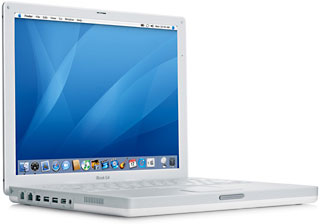 Free of those constraints, I recently ordered a G3 iBook as a combined Christmas/birthday present for me, that Apple was nice enough to miraculously swap into an 14″ 933 MHz G4, as my old 500 MHz dual USB iBook was (a) starting to look a bit dodgy after 2-1/2 years of constant travelling, numerous dowsings with various beers, coffee, orange juice, and curry paste, (b) not showing DVDs (lacking a Combo drive), and (c) just getting a tad too slow for my various needs.
After three weeks of nail biting, nightmares, thousands of reloads on Apple’s tracking page, and finally eight excruciating hours when I found out that the thing was finally out for delivery on the streets of London, it arrived yesterday night. My friend Ivor, who was nice enough to drop it off at my place (it was of course delivered at the office on the one day I was off sick) hung around to witness the unpacking and fill the room with envious grunts.
First impression: Packaging, as usual with Apple, is a delight. No wonder that they’re actually advertising the G5 in its cover. After opening the case, I was presented with the usual collection of CDs (Software Restore, OS X), a modem cable, and a rather fancy new AC adaptor, resembling that of my iPod, with a reassuringly long cable. The battery was already fully loaded (which caused more surprised grunts from Ivor), and the cute orange/green status light on the power plug was enough reason to get out the Hoegaarden.
After picking it up for the first time, the first surprise: It’s heavy. I didn’t put it on the scales, but it certainly feels heavier than my old 12″, but that’s something I happily accept, as the new 14″ screen is just gorgeous – it’s not only enormous compared to the old 12″, but also crisper and brighter, and the colours are positively sparkling. So far no white blemishes either (knock on wood).
The external white plastic shell is the same sturdy material as on the old models, but the elegant white surface on the inside of the iBook seems to be some sort of enamel (but don’t quote me on that), which feels quite nice.
Next was loading up the machine with two of the CDs. The new iBooks have rather sturdy sounding slot loading drives, which for my purposes is a real lifesaver, as my old optical drive finally gave up after the tenth drop on its caddy from 1 meter 50.
Next was breezing through the usual setup assistant, and then, Panther! Man, this is a gorgeous new OS. The Exposé feature alone was worth getting the iBook all the way from Taiwan.
I had never seen Quartz Extreme at work, but this was impressive: I opened up six applications, pointed at the prearranged corner, and Whoosh! Seven windows just organised themselves, waiting for me to click on one. Very impressive.
First point of critique though – the new layout of the directory windows. After double-clicking on the HD icon you get a rather XP-ish looking split window with a list of devices, directories, and folders on the left and the files on the right. I have to admit that I preferred the aesthetique of 10.2, but I’m sure that there will be a little utility to change this soon.
Speed is in a different league as well. Compared with the 500 MHz G3 running 10.2, there was no more waiting for the opening of menus, no more lag, and no more coloured beach balls.
The keyboard is a step in the right direction from the old iBooks, but I am still reminded of my old Sinclair QL, and it certainly doesn’t have the feel of my girlfriend’s IBM ThinkPad. On the other hand, with the 2″ extra space on each side, it does feel less cramped than the 12″ iBook, and it just oozes class.
The usual software bundle is included: AppleWorks for productivity, Tony Hawks Pro Skater 4 and Deimos Rising for gamers, and World Book 2003 for everybody else.
This particular iBook came with 640 MB and AirPort Extreme (which I unfortunately haven’t had the time to try out yet, but as I will be in numerous airports over the next five weeks I’ll give you the lowdown later), and the aforementioned Combo drive.
The next test was DVD viewing, and here for the first time the quality of experience took my breath away – flights will never be the same! I tried three different DVDs (“Babylon 5” Season 1, “George of the Jungle,” and “Father Ted” Season 1 for those of you taking notes), and the reproduction was more than I expected. Running full screen there were no obvious problems with the reproduction and certainly time lapses or jitters. The Apple DVD player is not the most intuitive, but I am sure that there’s a freeware alternative.
My next worry was the transfer of my software, adress book, and inbox from my old iBook. Unfortunately I didn’t have an ethernet cable in my house in London (the technical bits are all in my flat in Cologne), but I had my iPod’s FireWire cable in some corner. Remembering an obscure little note on MacSlash, I downloaded and installed “IP over FireWire” on the old 12″ iBook (it now comes as a feature with Panther), and after a couple of minutes of rather embarrassing fiddling, I had a rather quick connection between the two iBooks, and in a couple of minutes the software and music archives were transferred.
The speakers are no improvement to the old iBook; they’re still better than most laptops, but still sound pretty tinny, especially obvious during DVD Playback when one really should plug in external speakers or a headphone.
Battery life is quite impressive: During DVD playback the estimated battery time was 2:30, which is enough for the average European flight, and for long haul flights there are in-seat mains. So far I haven’t tried battery life during a normal work session, but I’ll be adding that as soon as I can.
So what’s the verdict? Well, I probably would have been happy with an updated G3, but this mixture of speed, screen size, and quality just completely blows me away. Apple has managed to produce a machine that combines everything I want from a portable computer with appropriate processor performance for a competitive price.
If this will not be a monster seller for them, my name shall be Ape Primate.
Keywords: #14inchibookg4 #ibookfirstimpressions #dirkpilat
Short link: http://goo.gl/AqOgQu
searchword: ibookfirstimpressions
