
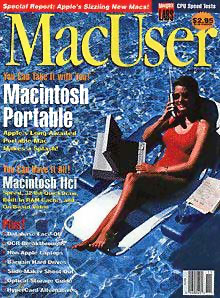
You might not believe the cover from the November 1989 MacUser. They considered the Mac Portable so sexy it was photographed with a swimsuit model for the front cover! (Or maybe so unsexy it needed this treatment.)

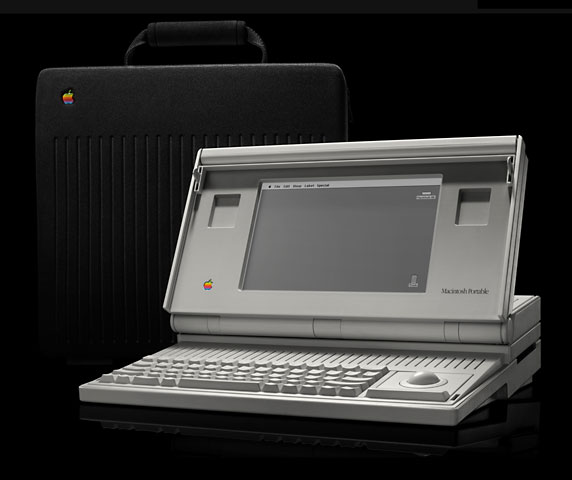
 When the Mac Portable was introduced, it had roughly the same clock speed as the fastest prior Mac, the IIcx, at 15.7 MHz, (although the portable was introduced at the same time as the 25 MHz Mac IIci). At that time, many Mac users who needed a field computer were buying Compaq 286-based laptops with DOS 4.01 (and sometimes Windows 2.1).
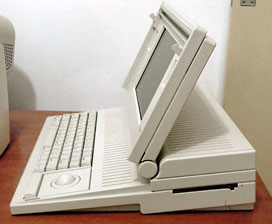
It was portable, but it was no lightweight. The 15.75 pound Mac (13.75 lbs without HDD) Portable never set the world on fire. It had a crystal clear 9.76″ 1-bit 640 x 400 pixel active matrix screen at 77 dpi, a 15.7 MHz 68HC000 CPU, and a front-mounted handle (which doubled as a lock to keep the lid down). The best thing about the Portable was probably the up-to-10-hour lead-acid battery. (No memory effect!) Options included an internal modem and a numeric keypad or a trackball.
 Color display? Aura Systems made ScuzzyGraph II, a SCSI peripheral that provided 8-color video for people who didn’t want to buy (or couldn’t afford) a Mac II. In 1989, ScuzzyGraph sold for $995 to $2,495 depending on resolution.
The Portable draws the same amount of power whether shut down or asleep, so it is generally best to put it to sleep unless it won’t be used again for several days.
Energy saving tricks include turning off the speaker, trying to open all your files at once to minimize disk access, using a RAM Disk, and putting the hard drive to sleep manually. Rumors to the contrary, it makes no difference at all in terms of energy use what desktop pattern you use.
The huge size and massive weight of the otherwise-impressive Portable make us call it a Limited Mac.
The Portable was the first Mac to ship with a preformatted hard drive (and the only portable Mac with a 3.5″ hard drive) and a preinstalled operating system. Along with the Mac IIci, it was one of the first Macs to user surface mount technology.
MacUser commented that this was “by far the most complex piece of machinery devised for sale by Apple computer” (Nov. 1989). Benchmarks showed it significantly faster than the 8 MHz Mac SE, and nearly as fast as the 16 MHz 68020-based Mac II on some tests.
The Portable was upgraded with a backlit screen; more, less-expensive RAM (2-4 MB standard); and a lower price in February 1991.
When buying a used Portable, be sure to get all the memory you need, since it’s difficult to come by nowadays, and don’t expect it to include a working battery. Bear in mind that the Portable only supports up to 9 MB of RAM and only functions in 24-bit mode. To get the most out of that memory, consider using RAM Charger 8.1, which offers better memory management than the Mac OS.
- Got a Portable or PowerBook? Consider joining the PowerBooks email list.
- Our System 6 List is for those using Mac System 6.
Details
- introduced: 1989.09.20 at $5,799
- ($6,400 with 40 MB hard drive)
- Price reductions: $4,799 (or $5,499 with 40 MB hard drive), 1990.04.01
- Discontinued 1991.10.21
- Backlit model 1991.02.01
- Gestalt ID: 10
- model number: M5120
- Code Names: Laguna, Malibu, Espirit
Mac OS
- requires System 6.0.4 to 7.5.5
- addressing: 24-bit only
Core System
- CPU: 16 MHz 68HC000
- ROM: 256 KB
- RAM: 1 MB, expandable to 9 MB using a special 30ns SRAM card (only one slot)
Performance
- 2.0, relative to SE
- 1.3 MIPS
- 2.15, Speedometer 3
- see Benchmarks: Portable for more details
Graphics and Display
- Size: 9.8 Inches, 640 by 400 resolution, 77 pixels per inch
- Manufacturer: Hosiden HLR1010-10-1101
- Bit Depth: 1-bit Monochrome
- Backlight upgrade: (Dealer-installed, $1,095) Card p/n: 820-0318-B
Drives
- Hard drive: 40 MB 3.5″ hard drive standard, uses special low power Connor drive with special connector (can only use standard SCSI drives with a special, costly adapter)
- Floppy drive: 1.4 MB double-sided
Expansion
- ADB ports: 1 for keyboard and mouse
- Headphone jack: 1/8″ (3.5mm)
- Serial ports: 2 DIN-8 RS-422 ports on back of computer
- SCSI ports: DB-25 connector on back of computer
- Batteries: 9V “transistor” battery for PRAM,
- M5137: SLA 6V 5.5Ah, 2.7lbs sealed lead-acid for power
- Battery Life: 6-12 hours (no HDD), 6-8 hrs w/HDD
- Power port: Barrel plug
- AC adapter: M5136: 7.5V 1.5A
- Charger Kit: M0275: M5136 adapt. + M0715 cradle
- Proprietary modem slot
Physical
- Keyboard: Full-sized “no compromises”, 63 keys, ALPS Orange or Salmon switches
- Optional: 18 key, optional
- Trackball: Single button, 33mm ball
- Weight: 15.75 lbs with battery and hard disk drive
- 13.75 lbs without hard disk drive
- Size (HxWxD): 4.05″ x 15.25″ x 14.83″
Tips
- One user has reported success replacing a dead Conner CP-3045 hard drive with a standard Conner CP-3044 that had been formatted under System 6.0.8.
. - You can use a PowerBook 100-series AC adapter to run the Portable without the internal lead-acid battery. However, you will lose PRAM settings if you unplug the power (date, time, cache size, etc.)
. - Godwin <godwin@unixg.ubc.ca> says, “If the acid battery dies, one can bypass it and convert the Portable into a luggable. One needs tw AC adapters – the original one and a 9V DC adapter. Take out the 9V DC battery and replace it with a 9V 1A power adapter. Then remove the battery and cover (there is a switch at the battery cover which we need to disable). Plug the two adapters in and viola! one of the sleekest Macs on anyone’s desktop!”
Online Resources
Online Profiles
Battery/Power Links
- Replacing the battery in a Mac Portable, JAG’s site
- Review: Power-Sonic PSG-650 battery
Cautions
- The Mac Portable does not provide SCSI termination power, depending on external SCSI devices to provide it. For more details, see SCSI Termination Power.
. - Macs with black-and-white only displays (1-bit, no grays) may find Netscape Navigator 3 makes it impossible to view some pages and sites. The workaround is to use Navigator 2.
. - Battery becomes unusable if discharged below 5.4V; keep it charged!
. - Hard drive will not spin up without a charged battery installed.
. - Modem port limited to 57.6 kbps (printer port may be faster); use of a 56k modem on the modem port may limit throughput. See 56k modem page.
. - Apple has discontinued support and parts orders for this model. You may be able to find dealers with parts inventory either locally or on our parts and service list.
.
Short link: http://goo.gl/q9sGII
searchword: macportable




