
Apple took the “underwhelming” Mac Portable, replaced the non-backlit 9.8″ 1-bit 640 x 400 pixel active matrix screen with a backlit display, increased base RAM to 2 MB or 4 MB, lowered the memory ceiling to 8 MB, and replaced expensive the SRAM (static RAM) chips with less-expensive pseudo-SRAM.
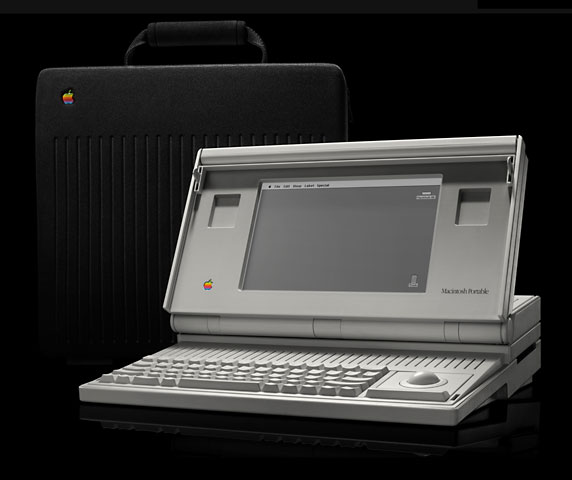
One negative side effect: pseudo-SRAM and backlighting draw more power, reducing battery life.
The huge size and massive weight of the otherwise-impressive Portable make us call it a Limited Mac. Bear in mind that the Portable was never intended as a laptop computer, but as a portable version of the desktop Mac. With a 16 MHz CPU, it was a very nice performer under System 6 and System 7.
The Portable was replaced by the first PowerBook models (100, 140, 170) in October 1991.
- Got a Mac Portable or PowerBook? Consider joining the PowerBooks email list.
- Our System 6 List is for those using Mac System 6.
Details
- introduced 1991.02.11, discontinued 1991.10
- Gestalt ID: 10
- model number: M5126
Mac OS
- requires System 6.0.4 to 7.5.5 (see caution on wake up crash caused by newer drivers)
- addressing: 24-bit only
Core System
- CPU: 16 MHz 68HC000
- ROM: 256 KB
- RAM: 2 MB, expandable to 8 MB using a special pseudo-SRAM card (only one slot)
Performance
- 2.0, relative to SE
- 2.15, Speedometer 3
- 1.3 MIPS
- see Benchmarks: Portable for more details
Graphics
- display: 9.8″ 1-bit 640 x 400 77 ppi
Drives
- hard drive: 40 MB 3.5″ hard drive standard, uses special low power Connor drive with special connector (can only use standard SCSI drives with a special, costly adapter)
- floppy drive: 1.4 MB double-sided
Expansion
- ADB ports: 1 for keyboard and mouse
- serial ports: 2 DIN-8 RS-422 ports on back of computer
- SCSI ports: DB-25 connector on back of computer
- proprietary modem slot
Physical
- size (HxWxD): 4.05″ x 15.25″ x 14.83″
- weight: 15.8 lb.
- power supply: 5W, 13 amps
- batteries: 9V “transistor” battery for PRAM, 6V 5Ah sealed lead-acid for power (over 2 lb.)
Tips
- One user has reported success replacing a dead Conner CP-3045 hard drive with a standard Conner CP-3044 that had been formatted under System 6.0.8.
- You can use a PowerBook 100-series AC adapter to run the Portable without its internal lead-acid battery. However, you will lose PRAM settings if you unplug the power (date, time, cache size, etc.)
- Godwin <godwin@unixg.ubc.ca> says, “If the acid battery dies, one can bypass it and convert the Portable into a luggable. One needs 2 AC adapters – the original one and a 9V DC adapter. Take out the 9V DC battery and replace it with a 9V 1A power adapter. Then remove the battery and cover (there is a switch at the battery cover which we need to disable). Plug the two adapters in and viola! one of the sleekest Macs on anyone’s desktop!”
Online Resources
- Low End Mac’s best classic Mac OS deals. Best online prices for System 6, 7.1, 7.5.x, Mac OS 7.6, 8.0, 8.1, 8.5, 9.0, 9.2.2, and other versions.
- The misunderstood Macintosh Portable, Dan Knight, Mac Musings, 2009.01.19. Often ridiculed for its nearly 16 lb. weight, people forget that the Mac Portable wasn’t designed to be a laptop computer.
- Creating Classic Mac boot floppies in OS X, Paul Brierley, The ‘Book Beat, 2008.08.07. Yes, it is possible to create a boot floppy for the Classic Mac OS using an OS X Mac that doesn’t have Classic. Here’s how.
- The compressed air keyboard repair, Charles W Moore, Miscellaneous Ramblings, 2008.07.24. If your keyboard isn’t working as well as it once did, blasting under the keys with compressed air may be the cure.
- Vintage Mac networking and file exchange, Adam Rosen, Adam’s Apple, 2007.12.19. How to network vintage Macs with modern Macs and tips on exchanging files using floppies, Zip disks, and other media.
- Solving Mac startup problems, Adam Rosen, Adam’s Apple, 2007.12.12. When your old Mac won’t boot, the most likely culprits are a dead PRAM battery or a failed (or failing) hard drive.
- Simple Macs for simple tasks, Tommy Thomas, Welcome to Macintosh, 2007.10.19. Long live 680×0 Macs and the classic Mac OS. For simple tasks such as writing, they can provide a great, low distraction environment.
- Mac System 7.5.5 can do anything Mac OS 7.6.1 can, Tyler Sable, Classic Restorations, 2007.06.04. Yes, it is possible to run Internet Explorer 5.1.7 and SoundJam with System 7.5.5. You just need to have all the updates – and make one modification for SoundJam.
- Format any drive for older Macs with patched Apple tools, Tyler Sable, Classic Restorations, 2007.04.25. Apple HD SC Setup and Drive Setup only work with Apple branded hard drives – until you apply the patches linked to this article.
- Making floppies and CDs for older Macs using modern Macs, Windows, and Linux PCs, Tyler Sable, Classic Restorations, 2007.03.15. Older Macs use HFS floppies and CDs. Here are the free resources you’ll need to write floppies or CDs for vintage Macs using your modern computer.
- Jag’s House, where older Macs still rock, Tommy Thomas, Welcome to Macintosh, 2006.09.25. Over a decade old, Jag’s House is the oldest Mac website supporting classic Macs and remains a great resource for vintage Mac users.
- 30 days of old school computing: Increasing battery life with a RAM disk, Ted Hodges, Vintage Mac Living, 2006.09.14. When using the hard drive, the old battery ran out of juice within 30 minutes, but running from a RAM disk it still has a 50% charge after half an hour.
- Edu-iMac too compromised, Mac Portables return to mothership, SheepShaver unstable, and more, Dan Knight, Low End Mac Mailbag, 2006.07.12. Thoughts on the education iMac, the Mac Portable, and the value of a Mac Plus in 2006. Also SheepShaver feedback, OS X ligature problems, and MP3 software for OS 8.
- Vintage Macs with System 6 run circles around 3 GHz Windows 2000 PC, Tyler Sable, Classic Restorations, 2006.07.06. Which grows faster, hardware speed or software bloat? These benchmarks show vintage Macs let you be productive much more quickly than modern Windows PCs.
- Compact Flash with SCSI Macs, PB 1400 CD-RW upgrade problems, and Web incompatibilities, Dan Knight, Low End Mac Mailbag, 2006.06.16. Suggested ways to use Compact Flash with vintage Macs and PowerBooks, problems getting CD-RW to work with a PowerBook 1400, and more thoughts on website incompatibilities.
- Moving files from your new Mac to your vintage Mac, Paul Brierley, The ‘Book Beat, 2006.06.13. Old Macs use floppies; new ones don’t. Old Macs use AppleTalk; Tiger doesn’t support it. New Macs can burn CDs, but old CD drives can’t always read CD-R. So how do you move the files?
- System 7.5 and Mac OS 7.6: The beginning and end of an era, Tyler Sable, Classic Restorations, 2006.02.15. System 7.5 and Mac OS 7.6 introduced many new features and greater modernity while staying within reach of most early Macintosh models.
- System 7: Bigger, better, more expandable, and a bit slower than System 6, Tyler Sable, Classic Restorations, 2006.01.04. The early versions of System 7 provide broader capability for modern tasks than System 6 while still being practical for even the lowliest Macs.
- Web browser tips for the classic Mac OS, Nathan Thompson, Embracing Obsolescence, 2006.01.03. Tips on getting the most out of WaMCom, Mozilla, Internet Explorer, iCab, Opera, and WannaBe using the classic Mac OS.
- The Joy of Six: Apple’s fast, svelte, reliable, and still usable System 6, Tyler Sable, Classic Restorations, 2005.12.06. System 6 was small enough to run quickly from an 800K floppy yet powerful enough to support 2 GB partitions, 24-bit video, and the Internet.
- Which system software is best for my vintage Mac?, Tyler Sable, Classic Restorations, 2005.11.22. Which system software works best depends to a great extent on just which Mac you have and how much RAM is installed.
- Macintosh Portable: Apple’s first portable Mac, Roger Sinasohn
- PowerBook history, Adam Robert Guha, Apple Archive, 2000.05.12. A history of portable Macs from 1989 through 1996.
- Networking a Mac Plus to an iMac, Jag’s House. Key component is a SCSI-ethernet adapter.
- Faster browsing on older Macs, Mac Online Tech Journal
- Old Macs on the internet, The Web Toolbox
- Email lists: PowerBooks, Classic Macs Digest
- Links to System 6.0.8 and 7.0.1
- Software Compatible with 68000 CPU
- Apple introduces two new Macs, MacTech, 1989.11. A first look at the Mac IIci and Portable.
- SCSI pinout (Mac Portable has a unique SCSI configuration)
- Portable parts for sale, Houlton’s Portable Options Page
Online Profiles
Battery/Power Links
- Replacing the battery in a Mac Portable, JAG’s site
- Review: Power-Sonic PSG-650 battery
Cautions
- Never use a version of Apple HD SC Setup newer than 7.3.1 (which comes with System 7.0.1) or your Portable will crash while waking from sleep mode.
- The Mac Portable does not provide SCSI termination power, depending on external SCSI devices to provide it. For more details, see SCSI Termination Power.
- Macs with black-and-white only displays (1-bit, no grays) may find Netscape Navigator 3 makes it impossible to view some pages and sites. The workaround is to use Navigator 2.
- Battery becomes unusable if discharged below 5.4V – keep it charged!
- Hard drive will not spin up without a charged battery installed.
- Modem port limited to 57.6 kbps (printer port may be faster); use of a 56k modem on the modem port may limit throughput. See 56k modem page.
- Apple has discontinued support and parts orders for this model. You may be able to find dealers with parts inventory either locally or on our parts and service list.
Keywords: #macportable #backlitmacportable
Short link: http://goo.gl/99Kj2z
