
Mac News Review
Mac Hits 6.8% Share on Net, Intel iMac Screen Problems, Classic on Leopard, and More
This Week's Apple and Desktop Mac News
Compiled by Charles Moore and edited by Dan Knight - 2007.12.07
PowerBook, iBook, MacBook, and other portable computing is covered in The 'Book Review. iPod, iPhone, and Apple TV news is covered in The iNews Review.
All prices are in US dollars unless otherwise noted.
News & Opinion
- Mac Hits Record 6.81% Share on Net
- iMac LCD Problems Continue to Grow
- 3 Ways to Run Classic on Leopard
- 3 Ways to Put Hierarchical Menus in the Leopard Dock
- Leopard Slow on Your Older Mac? Speed It Up with Fewer Colors
Software
- HierarchicalDock 1.1 Puts Hierarchical Menus in the Leopard Dock
- Correo 0.3, a New Email Client for OS X
- Parallels Premium Edition for Mac
Desktop Mac Deals
News & Opinion
Mac Hits Record 6.81% Share on Net
Fortune's Philip Elmer-DeWitt reports:
"After taking a brief October dip in advance of Leopard's release, Apple's share of the operating system market grew 3.34% in November to hit a record 6.81%,* according to the results of a Net Applications survey issued today.
"Microsoft's Windows in its various flavors continues to dominate with a 92.42% share, as measured by the Web metrics firm. Among the operating systems gathered in the 'other' category are Linux (.57%), Apple's iPhone (.09%), Sony's PlayStation (.02%), SunOS (.01%) and Nintendo's Wii (.01%)."
* The breakdown is 3.59% on Intel-based Macs and 3.22% on pre-Intel Macs. dk
Link: Apple Mac Hits Record 6.81% Market Share in Net Applications Survey
iMac LCD Problems Continue to Grow
AppleGazette's Michael says:
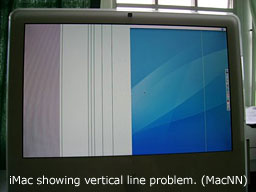 "MacNN reports that there are a
growing number of iMac users that are having some pretty serious LCD
screen trouble. The trouble seems to be that the iMacs are 'showing a
number of artifacts that include single-pixel lines spanning the length
of the screen.'
"MacNN reports that there are a
growing number of iMac users that are having some pretty serious LCD
screen trouble. The trouble seems to be that the iMacs are 'showing a
number of artifacts that include single-pixel lines spanning the length
of the screen.'
"This discussion thread features over 80 posts about the issue, and since most of these iMacs are over a year old and have just come out of warranty, users are being quoted prices of $700 or more...."
Editor's note: These problems have been reported on Apple's forums since late May. It appears to impact only white Intel-based iMacs, and at least one user reports having the problem out of the box. Here's a good reason to consider buying AppleCare for iMacs! dk
Link: iMac LCD Problems Continue to Grow
3 Ways to Run Classic on Leopard
MacCompanion's Jonathan Hoyle says:
"Longtime Mac users have been familiar with Classic, as Mac OS 9 and earlier helped paved the way to where we are today. The Classic environment allowed Mac users to continue to use older applications even within Mac OS X. Surprisingly, even some original applications from 1984 continue to run just fine on Mac OS X 10.4 Tiger, over two decades later. However, with Apple's transition to Intel-based Macintosh computers, Classic appeared to be on borrowed time. With Leopard, it's official: no Macintosh computer running Mac OS X 10.5, either PowerPC or Intel, will run Classic applications.
"Well . . . not exactly.
"Just because Apple ceased to support its Classic Environment implementation does not mean you have to delete your old apps just yet. As it happens, there are still a number of options available to the Leopard user who wishes to run these older applications. We will examine three of these: SheepShaver, Basilisk and Mini vMac. The good news is that all three are open source products, so they are absolutely free for you to download and try....
"This month's article will describe some of the pro's and con's to each of these three emulators, including running comparative performance tests and step-by-step installation instructions...."
"None of the options we have discussed is a truly suitable replacement for the Classic environment. If you use Classic applications continually and interactively, then your best bet is to stay with Mac OS X 10.4 Tiger...."
Link: Shaving Sheep and Running Classic on Leopard
3 Ways to Put Hierarchical Menus in the Leopard Dock
TUAW's Dave Caolo reports:
"Stacks is one of the selling points of Leopard, and many users love it. Many, but not all. If you'd like to use hierarchical menus in Leopard, try one of these three solutions.
"Quay 1.0 was released last week as shareware , Quay provides custom-sorted hierarchical menus, re-sizable icons and a customizable dock icon....
"Also available is freeware HierarchicalDock by Eternal Storms Software....
"Finally, check out OldFolder. It's free and open source...."
Link: Hierarchical Menus in the Leopard Dock: 3 Ways
Leopard Slow on Your Older Mac? Speed It Up with Fewer Colors
Blogger Charles Arthur says:
"To cut to the chase: Leopard, besides switching off your firewall in the upgrade, also switches your display preferences for colours displayed from 'thousands' - if that's how you had it set - to 'millions'.
"Since that's a difference which can suck up huge amounts of RAM, swap memory and CPU/GPU ('huge' being relative to the amount you have available), it's a hidden change which isn't very welcome.
"So, to speed up your machine: go to System Preferences, choose Displays -> Colours, and change the setting from 'Millions' of colours to 'Thousands'. Voilá! Faster machine."
Editor's note: This is very subjective. If anyone knows of benchmarks that demonstrate this, please let me know. dk
Link: Leopard Running Slow on Your Ageing Mac? Here's How to Speed It Up: Fewer Colours
Software
HierarchicalDock 1.1 Puts Hierarchical Menus in the Leopard Dock
PR: HierarchicalDock is a simple application for creating folders in your Dock that have hierarchical menus.
Feature List:
- Very lightweight, very fast
- Can show you invisible files
- Option: Show QuickLook Previews instead of file icons
- You can copy entire paths to files by holding down the control button and clicking on an item
- Sort: Alphabetically, by last used date, by creation date
- Quickly open folders by holding down shift and clicking on the folder in the Dock
Release Notes for v1.1:
- Optional: Show QuickLook Previews instead of file icons
- Two new sorting methods: Last Used Date, Creation Date (additional to alphabetical sorting)
- Resolves aliases
- Fixed issues with multiple monitors
- Fixed color profile issues
- Fixed issues when clicking on items
- Fixed a bug that caused extensions to show in Dock
- Fixed some issues with the different localizations
- Fixed positioning of menus
- Performance improvements
- Added Preferences window
- Added Update mechanism
HierarchicalDock is Freeware, but donations are greatly appreciated.
System requirements: Mac OS X 10.5 or later.
System support: PPC/Intel
Free
Link: HierarchicalDock
Correo 0.3, a New Email Client for OS X
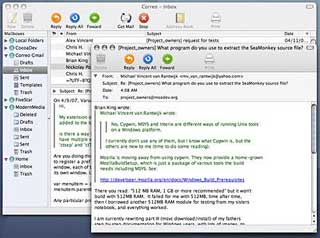 PR: Introducing
Correo, a new open-source mail client for Mac OS X. Correo blends
technology from two popular Mozilla projects, Camino and Thunderbird,
to create a polished native Macintosh application.
PR: Introducing
Correo, a new open-source mail client for Mac OS X. Correo blends
technology from two popular Mozilla projects, Camino and Thunderbird,
to create a polished native Macintosh application.
There are many planned features for the mail client, including plugin capability (to allow development of extensions such as PDA synchronization), tabbed window interface, address book support, keychain access, and various other to-be-determined features.
The latest release, 0.3 introduces many fixes to the internals of Correo, as listed below:
- Leopard Support
- Enhanced IMAP support - subfolders now load properly!
- Improved Character Encoding Support
Correo is currently in the early stages of development, and the latest release for the application is the 0.3 release.
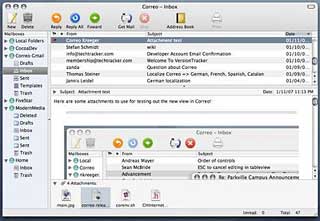 Features of Correo
0.2:
Features of Correo
0.2:
- Keychain support, passwords are stored in the Mac OS X Keychain
- Mac OS X Address Book integration.
- Single window mode, open messages in a separate window.
- Attachment support, adds the ability to save and add attachments to messages.
- Enhanced message list support for IMAP accounts.
- Collapsible message header and attachment view.
Features of Correo 0.1:
- Create multiple mail accounts (POP and IMAP)
- Reply, Forward, and write new messages (via SMTP)
- Ability to setup interface for 2 column split view or 3 column view
System requirements: Mac OS X 10.4 or later.
System support: PPC/Intel
Free
Link: Correo
Parallels Premium Edition for Mac
PR: Premium Edition includes award-winning virtualization, security, disk management and backup solutions in a single, affordable package
SWsoft, maker of Parallels Desktop for Mac, the #1 selling Mac system utility that allows users to run Windows side-by-side with Mac OS X on any Intel-powered Mac, today announced the release of Parallels Desktop 3.0 for Mac Premium Edition - a complete virtualization solution for Intel Mac users that includes Parallels Desktop 3.0 for Mac, plus easy-to-use utilities from leading third-party software companies that help keep Windows virtual computers safe, secure and running smoothly.
Award Winning Utilities Coupled With Parallels' Award Winning Virtualization
As part of its commitment to providing Mac users with the easiest, most complete virtual computing experience possible, Parallels Desktop 3.0 Premium Edition supports the latest Leopard-compatible build of Parallels Desktop 3.0 - which is available as a free update for all Parallels Desktop 3.0 users as of today - with three award-winning utilities that help users secure, back up and customize their Windows virtual machines. Bought separately and new, these three utilities cost more than $175.
Complete Malware Protection from Kaspersky Internet Security 7.0
To protect against the viruses, spyware, spam and malware that can harm any Windows machine, even virtual ones, Kaspersky Internet Security 7.0 is included with Parallels Desktop 3.0 Premium Edition. Kaspersky offers "Triple Threat" protection, including automated hourly anti-malware updates, intelligent active heuristics that provide proactive protection to investigate all unknown files and real time behavior analysis for consistent monitoring of a system's activities for any malicious behavior.
Fast, Easy Backup with Acronis True Image 11 Home
Acronis True Image 11 Home is the latest version of Acronis' award-winning backup and disaster recovery software. With Acronis True Image Home, users can easily back up individual files on their Windows virtual machine or take an entire image of their Windows virtual computer. Backups can be scheduled to run automatically at any interval and can be stored on external drives, DVDs and off-site computers via FTP.
Simplified Disk Management with Acronis Disk Director Suite
Acronis Disk Director Suite provides the ability to resize, move, copy, split and merge virtual disk partitions without losing data. It includes a boot manager that allows users to boot other operating systems, such as Linux, inside their Windows virtual machine.
"Maintaining and securing a Windows virtual computer is every bit as important as it is for a physical computer," said Serguei Beloussov, CEO, SWsoft. "We are pleased to work with Acronis and Kaspersky to make it easy and affordable for our Mac customers to protect, backup and customize their Windows virtual machines."
Now available from the Parallels website, as well as in Apple Stores and select retailers nationwide and via Authorized Parallels Partners, Parallels Desktop 3.0 for Mac Premium Edition costs $99.99.
Current Parallels Desktop 3.0 customers will receive the Leopard-compatible build as a free automatic update starting today.
Link: Parallels Desktop for
Mac Premium Edition
Desktop Mac Deals
Low End Mac updates the following price trackers monthly:
- Mac mini deals
- Intel iMac deals
- Mac Pro deals
- Power Mac G5 deals
- iMac G5 deals
- Power Mac G4 deals
- iMac G4 deals
- eMac deals
- Power Mac G3 deals
- iMac G3 deals
For deals on current and discontinued 'Books, see our 13" MacBook and MacBook Pro, MacBook Air, 13" MacBook Pro, 15" MacBook Pro, 17" MacBook Pro, 12" PowerBook G4, 15" PowerBook G4, 17" PowerBook G4, titanium PowerBook G4, iBook G4, PowerBook G3, and iBook G3 deals.
We also track iPad, iPhone, iPod touch, iPod classic, iPod nano, and iPod shuffle deals.
Join us on Facebook, follow us on Twitter or Google+, or subscribe to our RSS news feed
Links for the Day
- Mac of the Day: Power Mac 7500, introduced 1995.08.08. This workhorse introduced a new desktop case and CPU daughter cards for easy upgrade.
- Support Low End Mac
Recent Content
Go to the Mac News Review index.
About LEM Support Usage Privacy Contact
Follow Low End Mac on Twitter
Join Low End Mac on Facebook
Favorite Sites
MacSurfer
Cult of Mac
Shrine of Apple
MacInTouch
MyAppleMenu
InfoMac
The Mac Observer
Accelerate Your Mac
RetroMacCast
The Vintage Mac Museum
Deal Brothers
DealMac
Mac2Sell
Mac Driver Museum
JAG's House
System 6 Heaven
System 7 Today
the pickle's Low-End Mac FAQ
Affiliates
Amazon.com
The iTunes Store
PC Connection Express
Macgo Blu-ray Player
Parallels Desktop for Mac
eBay

