
Mac News Review
Macs and Special Hard Drive Connectors, New Opera 11 Release Candidate, Good-bye VGA, and More
This Week's Apple and Desktop Mac News
Compiled by Charles Moore and edited by Dan Knight - 2010.12.17
MacBook, PowerBook, iBook, and other portable computing is covered in The 'Book Review. iPad, iPod, iPhone, and Apple TV news is covered in The iNews Review.
All prices are in US dollars unless otherwise noted.
News & Opinion
- Macs and the Headache of Special Hard Drive Connectors
- Intel Light Peak: Good-bye Copper, Hello Speed
- Good-bye VGA
- Leading PC Makers Moving to All Digital Display Technology
- Component Suppliers to Benefit from Surging Demand for All-in-one PCs
Products & Services
Software
Desktop Mac Deals
News & Opinion
Macs and the Headache of Special Hard Drive Connectors
Hardmac's Lionel says:
"On many occasions we have spoken about the famous connectors that Apple uses in the iMac to supervise the temperature of its hard drives.
 "So to avoid playing with these connectors, we decided to
replace the original hard drive, Seagate spinning at 7200 rpm by
another slower Seagate in our article on the 21,5" 2010 iMac. We had
thus thought of regulating the problem and to have a disc supervised as
Apple wants it. Alas, it turned out the use of this sensor did not
function as we hoped."
"So to avoid playing with these connectors, we decided to
replace the original hard drive, Seagate spinning at 7200 rpm by
another slower Seagate in our article on the 21,5" 2010 iMac. We had
thus thought of regulating the problem and to have a disc supervised as
Apple wants it. Alas, it turned out the use of this sensor did not
function as we hoped."
Editor's note: Rather than use a normal SATA cable and the temperature support built into the S.M.A.R.T. standard, Apple choses to use special cables to connect to proprietary temperature sensor connections in Seagate, Western Digital, and Hitachi hard drives on the iMac and Mac mini. This means that you cannot change hard drive brands without replacing the drive cable. Hardmac explains how to modify an existing cable to work properly with an SSD. dk
Link: iMac, the Headache of Special Connectors for Hard Disks
Intel Light Peak: Good-bye Copper, Hello Speed
ZDNet UK's Mary Branscombe has posted a detailed tech guide to Intel's 10 Gbps Light Peak optical data transfer protocol, which is projected to eventually deliver up to 100 Gbps throughput. Initially, Light Peak will plug into familiar ports to deliver faster transfers over longer cables.
Ms. Branscombe cites Jason Ziller, director of Intel's optical I/O program, explaining that electrical speeds and capabilities are hitting their limits, with there being a general acknowledgment that the next speed bump needs to be optical, and that Light Peak cables can be very thin and flexible - and longer than copper.
Light Peak will initially use familiar connections like HDMI or USB, and even at 10 Gbps, you'll be able to copy a Blu-ray disc in less than 30 seconds (editor's note: assuming you have a drive that can read a Blu-ray disk that quickly).
Link: Intel Light Peak: A Tech Guide
Good-bye VGA
Hardmac's Lionel notes that the VGA format, launched in 1987, has been updated several times in order to bring support to ever larger displays, although it's been largely supplanted by DVI and DisplayPort. The major players in the field, including Intel, have decided to set a termination date of 2015 for VGA, giving current users time to adapt or switch. He reports that Intel will soon drop VGA support from its integrated graphic chipset, making an adapter necessary of you still want to keep using a VGA display.
Editor's note: VGA (for Video Graphics Array) was introduced with the IBM PS/2 line in 1987. The 15-pin analog connection initially supported up to 256 colors (from a 262,144 color palette) and a maximum resolution of 640 x 480, although it left room for 800 x 600. Over time, VGA evolved into Super VGA, and resolutions up to 2048 x 1536 and millions of colors. VGA connectors remain popular on TVs and video projectors.
The first Mac with DVI output was the Sawtooth Power Mac G4, introduced in August 1999. However, Apple abandoned DVI in favor of its proprietary ADC port with the July 2000 Mystic Power Mac G4. In addition to video, ADC provides USB and power to the display. Apple went back to DVI with the April 2002 PowerBook G4, and the August 2002 Mirror Drive Doors Power Mac G4 was the first with DVI (in addition to ADC) and without built-in VGA. DVI remained Apple's standard video connector until it was displaced by Mini DisplayPort in late 2008. Apple hasn't had a model with built-in VGA since the 2006 transition to Intel CPUs. dk
Link: Bye Bye VGA
Leading PC Makers Moving to All Digital Display Technology
PR: Intel's Nick Knupffer reports that AMD, Dell, Intel Corporation, Lenovo, Samsung Electronics LCD Business, and LG Display have announced intentions to accelerate adoption of scalable and lower power digital interfaces such as DisplayPort and High-Definition Multimedia Interface (HDMI) into the PC.
Intel and AMD expect that analog display outputs such as Video Graphics Array (VGA) and the low voltage differential signaling technology (LVDS) panel interface would no longer be supported in their product lines by 2015. HDMI has increasingly been included in new PCs for easy connection to consumer electronics devices. DisplayPort is expected to become the single PC digital display output for embedded flat panels, PC monitors and projectors.
DisplayPort and HDMI allow for slimmer laptop designs, and support higher resolutions with deeper color than VGA - a technology more than 20 years old. Additionally, as laptops get smaller and their embedded flat panel resolutions increase for more immersive experiences, the power advantages, bi-directional communications and design efficiency benefits of DisplayPort make it a superior choice over LVDS, the previous standard for LCD panel inputs.
Intel plans to end support of LVDS in 2013 and VGA in 2015 in its PC client processors and chipsets.
"Modern digital display interfaces like DisplayPort and HDMI enhance the consumer visual PC experience by immersing them with higher resolutions and deeper colors - all at lower power - to enhance battery life for laptops," says Eric Mentzer, Intel's vice president of Strategy, Planning and Operations for the Visual and Parallel Computing Group. "By moving to these new interfaces, Intel is able to focus investment on new innovations to enhance the PC experience rather than having to solve challenges of supporting legacy analog interfaces on our latest silicon process technology and products."
AMD plans to begin phasing out legacy interfaces, starting with the removal of native LVDS output from most products in 2013. The company also plans to remove native VGA output starting in 2013, with expansion to all AMD products by 2015. This would mean DVI-I support will be eliminated in the same timeframe.
"Displays and display standards are rapidly evolving, with new features such as multi-display support, stereoscopic 3-D, higher resolutions and increased color depth quickly moving from early adopter and niche usage to mainstream application," says Eric Demers, AMD's chief technology officer, Graphics Division. "Legacy interfaces such as VGA, DVI and LVDS have not kept pace, and newer standards such as DisplayPort and HDMI clearly provide the best connectivity options moving forward. In our opinion, DisplayPort 1.2 is the future interface for PC monitors, along with HDMI 1.4a for TV connectivity."
While the large installed base of existing VGA monitors and projectors will likely keep VGA on PC back panels beyond 2015, leading PC makers are in strong support of this transition. The DisplayPort connector interface provides backwards and forwards compatibility by supporting VGA and DVI output via certified adapters, while also providing new capabilities such as single connector multi-monitor support.
Moving to the latest digital standards like DisplayPort enables customers to preserve backwards compatibility with installed equipment while taking full advantage of the latest advances in display capabilities, configuration options, and features," says Liam Quinn, chief technology officer, Dell Business Client.
"We live in a digital-rich world and display technology must keep up with the explosion of digital content," comments George He, chief technology officer, Lenovo. "By transitioning to digital display technologies like Display Port and HDMI customers can not only enjoy a better computing experience, they get more of what's important to them in a laptop: more mobility, simplified design with fewer connectors, and longer battery life."
Leading display panel manufacturers such as Samsung Electronics LCD Business and LG Display also are in strong support of this transition.
Samsung Electronics LCD Business is already supporting this transition with embedded DisplayPort notebook panels, which we have been shipping since March of this year," says Seung-Hwan Moon, vice president of engineering, LCD Business, Samsung Electronics.
"LG Display is fully prepared for this future transition. We already have different sizes of LCD panels with eDP out in the market to fulfill various needs of customers." said Michael Kim, vice president of IT Product Planning Department at LG Display.
The strong value proposition of scalable and low power digital display interfaces for PC users coupled with industry innovation around these interfaces should accelerate overall adoption of the newer display technologies for PCs.
Editor's note: As noted above, Apple began using digital display ports in 1999 and has been 100% digital since the transition to Intel CPUs in 2006. So if you're wondering why Apple isn't part of this group, it's because the company ditched built-in VGA a long time ago. dk
Link: Leading PC Makers Moving to All Digital Display Technology, Phasing Out Analog
Component Suppliers to Benefit from Surging Demand for All-in-one PCs
DigiTimes' Max Wang and Yvonne Yu report that all-in-one PC makers have recently started to increase component orders, with suppliers for optical touch and panels expected to benefit from the surging demand for all-in-one PCs, according to the suppliers.
The reporters also note that Apple is the leading vendor of all-in-one PCs, accounting for almost 40% of the total market in 2010, and longtime Apple subcontractor Quanta Computer is the leading maker of all-in-one PCs in 2010, accounting for 60% of the OEM market.
Link: Component Suppliers to Benefit from Surging Demand for All-in-one PCs (subscription required)
Products & Services
I Don't Do Windows!
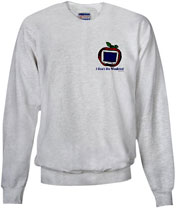
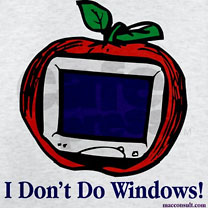 PR:
Macintosh users, say it loud and say it proud! Your favorite computer -
iMac, G4, G5, iBook, PowerBook, MacBook, Intel or mini - blows a
Windows PC out of the water, so proclaim it to the world with this
sweatshirt from Designs By Mike.
PR:
Macintosh users, say it loud and say it proud! Your favorite computer -
iMac, G4, G5, iBook, PowerBook, MacBook, Intel or mini - blows a
Windows PC out of the water, so proclaim it to the world with this
sweatshirt from Designs By Mike.
Warm up in a stylin' Hanes Heavyweight 90/10 cotton/polyester sweatshirt. Thick (but not bulky), for maximum comfort and durability whether you're working out or hanging out.
Features:
- 10.1 oz. patented PrintPro fabric in a 90/10 cotton/polyester blend
- Standard fit
- Spandex trim in cuffs and waistband
Colors:
- White
- Ash Grey
Price: $40 (Canadian)
Sizes S through 2XL ($3 extra)
Link: I Don't Do Windows!
Jesus Would Use a Macintosh
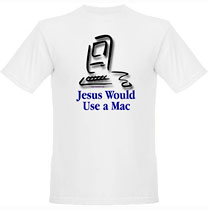
 PR: Designs By Mike says Jesus would use a Macintosh, if
he used a personal computer at all.
PR: Designs By Mike says Jesus would use a Macintosh, if
he used a personal computer at all.
Designs by Mike offers a whopping 96 products featuring their Jesus and Macintosh design, including many styles of T-shirts in standard women's, men's, children's, and toddlers' sizes:
Plus sweatshirts, tank tops, spaghetti strap tops, a messenger bag, tote-bags baseball caps, cups, steins, glasses, pins, refrigerator magnets, teddy bears, aprons, baby bibs, and more.
Link: Jesus Would Use a Macintosh
Jesus Would Use a Macintosh Messenger Bag
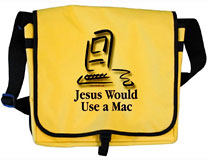 PR: WWJD - What would Jesus
do? Designs By Mike says Jesus would use a Macintosh, if he used a
personal computer at all.
PR: WWJD - What would Jesus
do? Designs By Mike says Jesus would use a Macintosh, if he used a
personal computer at all.
From school, to carrying your laptop, to a hip alternative diaper bag, this versatile, spacious messenger bag featuring the Jesus and Macintosh design is practically all you need to get you through every stage of your life - and look hip doing it.
Features:
- One front adjustable clasp closure.
- Main compartment has inside slip pocket.
- Front panel has zipper compartment.
- Adjustable 2" shoulder strap.
- 600 Denier Polyester
Size: 14 1/2" x 12" x 5"
Price:$36.50 (Canadian)
Link: Jesus Would Use a Macintosh Messenger Bag
Software
Opera Version 11.00.1149 Release Candidate
PR: Another update of Opera's fast and innovative "alternative" Web browser Version 11 - tagged a release candidate, is out.
Eleven New Reasons to Love Opera 11
- Tab stacking
Opera pioneered browser tabs. In Opera 11, tab stacking lets you drag one tab over another to create a group. Now, you can keep dozens of web pages open, organized and under control. - A safer address field
Opera's new address field hides the complexity of long web addresses and gives you better control of your security when browsing. Click on the badge for the website to see information about the site you are visiting. You can even get information about Opera's Turbo feature for slow networks data savings. - Extensions support
You can now browse Opera's extensions catalog to add new functionality easily and customize Opera just how you want it. - Visual mouse gestures
Mouse gestures are another Opera innovation that has been made easier-to-use with the addition of an interface that guides you. This allows new users to discover the speed and power that mouse gestures offer. - Better performance
Opera developers have been hard at work fine-tuning the Presto browser engine to put Opera even further ahead in a number of benchmarks. In Opera 11, pages load faster and complex applications run more smoothly. - Enhanced HTML5 support
Support for new standards and HTML5 technologies means that rich, dynamic web applications and multiplayer games can be supported by Opera 11. - Extended auto-update
A new auto-update system ensures that your extensions and Opera Unite apps are always up to date with the latest enhancements. - Search predictions from Google
Search suggestions predict queries as you type, making searching quicker and easier. Google search predictions are now built into Opera. When using the search field or searching from the address field with the 'g' search keyword, Google search predictions will appear. - Plugins only on demand
An option has now been added to have plugins such as Flash content load only when clicked. This is especially helpful to speed up browsing on computers that have difficulty handling lots of plugin content. - Enhanced email in your browser
A new mail panel for Opera's built-in email client module gives you control over the order in which your accounts and mail items show up. You can just drag items where you want them. The mail panel can also show your mail panel when you are using it and hide when you leave a mail tab. - Faster installation
Notwithstanding its many new features, Opera 11 is 30% smaller than Opera 10.60. That means that Opera downloads more quickly and installs in fewer steps. Getting Opera on your computer is easier than ever.
Link: Opera 11 Release Candidate
iStat Menus Advanced OS X System Monitor
PR: Bjango's iStat Menus 3.11 is a system monitor utility with readouts in the menu bar and in pull down menus that monitor CPU use, memory use, network traffic, disk use and activity, hardware sensor readouts, fan speed control, date and time, and a calendar.
CPU
Realtime CPU graphs and a list of the top 5 CPU resource hogs. CPU usage can be tracked by individual cores or with all cores combined, to save menu bar space.
Network
A realtime graph to keep on top of what's being sent and received for all network connections.
Date & Time
A highly configurable date, time and calendar for your menu bar, including fuzzy clock and moon phase. A world clock with sunrise, sunset, moonrise and moonset times for over 20,000 cities. It's one of the most powerful replacements for Apple's date and time menu available.
Disk Usage
See used or free space for multiple disks in your menu bar. More detail for all your disks is only a click away.
Disk Activity
Detailed disk I/O in your menu bar, displayed as a graph, a variety of different read and write indicators, or both.
Sensors
Realtime listings of the sensors in your Mac, including temperatures, hard drive temperatures (where supported), fans, voltages, current and power. Fan speeds can be controlled, with different rules when on battery power, if you'd like.
Battery
Detailed info on your battery's current state and a highly configurable menu item that can change if you're draining, charging, or completely charged.
Memory
Memory stats for your menu bar, shown as a pie chart, graph, percentage, bar or any combination of those things. The memory dropdown menu shows a list of the top 5 memory hogs, as well as other useful info.
Complete Control
Each menu extra comes with many different display modes, customizable colours, font sizes, and widths.
New in version 3.11:
- Adds sensor support for late 2010 MacBook Airs
- Sensor support for Intel-based Xserves
- Improved performance
- Bug fixes.
Languages: English. Partial localization for French, German, Italian, Japanese, Spanish, and Dutch.
System Requirements: Mac OS X 10.5, 10.6 or newer required (Universal Binary)
iStat Menus 3 is $16 demoware
Link: iStat Menus
Desktop Mac Deals
For deals on current and discontinued 'Books, see our 13" MacBook and MacBook Pro, MacBook Air, 13" MacBook Pro, 15" MacBook Pro, 17" MacBook Pro, 12" PowerBook G4, 15" PowerBook G4, 17" PowerBook G4, titanium PowerBook G4, iBook G4, PowerBook G3, and iBook G3 deals.
We also track iPad, iPhone, iPod touch, iPod classic, iPod nano, and iPod shuffle deals.
Join us on Facebook, follow us on Twitter or Google+, or subscribe to our RSS news feed
Links for the Day
- Mac of the Day: PowerBook 2300, introduced 1995.08.28. The only Duo equipped with a PowerPC processsor run at 100 MHz.
- Support Low End Mac
Recent Content
About LEM Support Usage Privacy Contact
Follow Low End Mac on Twitter
Join Low End Mac on Facebook
Favorite Sites
MacSurfer
Cult of Mac
Shrine of Apple
MacInTouch
MyAppleMenu
InfoMac
The Mac Observer
Accelerate Your Mac
RetroMacCast
The Vintage Mac Museum
Deal Brothers
DealMac
Mac2Sell
Mac Driver Museum
JAG's House
System 6 Heaven
System 7 Today
the pickle's Low-End Mac FAQ
Affiliates
Amazon.com
The iTunes Store
PC Connection Express
Macgo Blu-ray Player
Parallels Desktop for Mac
eBay

