
Mac News Review
10 Truisms of the Apple Universe, Adobe Ditching PowerPC, Apple Still Tops in Satisfation, and More
This Week's Apple and Desktop Mac News
Compiled by Charles Moore and edited by Dan Knight - 2009.08.21
MacBook, PowerBook, iBook, and other portable computing is covered in The 'Book Review. iPod, iPhone, and Apple TV news is covered in The iNews Review.
All prices are in US dollars unless otherwise noted.
News & Opinion
- 10 Truisms of the Apple Universe
- Microsoft Finally Bringing Outlook to Mac Users
- Apple Slips Slightly, Still Leads Customer Satisfaction Survey
- Apple Still Satisfaction King, Budget PC Makers Improving
- Mac or PC: Which Comes Out Tops for Business and Home Use?
- Adobe to Cut PowerPC Users Adrift
Reviews
Products & Services
- Verbatim 500 GB InSight USB Portable Hard Drive with LCD Display
- SanDisk Enhances Cruzer Enterprise Secure USB Drives to Meet the Needs of Federal Government Employees
Desktop Mac Deals
News & Opinion
10 Truisms of the Apple Universe
The New Zealand Herald's Mark Webster says:
"Ruminating on what makes Apple different to other PC companies, a few truisms spring to mind....
- There's no such thing as a cheap Mac:
- If your Mac develops a fault, you'll take it much more personally than if it was a PC.
- If your Mac fails, no PC user will hear you scream.
- Macs are deceptively simple. (But Apple CEO Steve Jobs is deceptively complex.)
- You new Mac probably won't feel that much faster than your old Mac. But if you go back to your old Mac, you will be shocked at just how slow it is.
- There are at least two other ways to do things than the way you do them.
- There are applications in your Applications folder and utilities in your Utilities folder you have never used.
- Windows runs great on Macs. Or so I hear.
- You don't know what Apple's bringing out next, and nor do I. It's possible Apple fosters off-beat rumours to create smoke and mirrors to conceal real plans.
- Some people just don't get it."
Link: Ten Truisms of the Apple Universe
Microsoft Finally Bringing Outlook to Mac Users
ZD Net's Sam Diaz says:
"I should have been excited to hear that Microsoft is finally replacing its stale excuse for an e-mail program for the Mac - Entourage - with a shiny new Mac version of Outlook, due out late next year.
"But I wasn't - excited about it, that is. You see, I'm already looking forward to my update to Snow Leopard, the new version of Mac OS X, next month. One of the upgrades to that OS is support for Microsoft Exchange in Apple Mail."
Link: Microsoft to Replace Entourage with Outlook. Nice Idea but Kind of Too Late
Apple Slips Slightly, Still Leads Customer Satisfaction Survey
Macworld's Peter Cohen reports:
"The American Customer Satisfaction Index (ACSI) has released customer satisfaction scores for a number of consumer product sectors including personal computers. While Apple still ranks well above its competitors, its rating slipped a point compared to a year ago."
Link: Apple Leads in Customer Satisfaction Survey, Despite Slip
Apple Still Satisfaction King, Budget PC Makers Improving
Silicon.com's Erica Ogg reports that despite gains by Compaq and Gateway, the 2009 ACSI consumer satisfaction scores show that Apple continues to lead the pack by a mile, with a score of 84 (a slight decrease from 85 last year). Its next closest competitor, Dell scored a distant 75 - the average score for all PC makers - while HP moved from 73 to 74.
Link: Apple Still Satisfaction King Despite Budget PC Makers' Gains
Mac or PC: Which Comes Out Tops for Business and Home Use?
Canada's Canoe portal site says:
"There will never be a clear winner in the age-old debate of whether a Mac beats the PC, or the PC trumps the Mac, but it is infinitely clear that each enjoys a staunch following of devoted fans.
"The confusion between which is the better of the two, really comes to light if you are a unbiased consumer looking for the machine that best suits your needs, or a business owner fielding requests from individual employees, arguing the necessity for their preferred platform.
"In this article, we will take a look at the following:
- What's the difference?
- Frequently asked questions about Macs and PCs
- Choosing the right platform for your home/schooling requirements
- Choosing the right platform for your office environment"
Editor's note: This is a very fair and balanced treatment of the topic. cm
Link: Mac or PC: Which Comes Out Tops for Business and Home Use?
Adobe to Cut PowerPC Users Adrift
An updated FAQ posted by Adobe this week serves notice to PowerPC Mac users that future versions of its Creative Suite software will support only Intel-based Macs.
Adobe explains:
"With Apple's future development focused on Intel Macs, Adobe is aligning its resources accordingly. Customers are being notified to provide fair notice of any changes regarding the operating systems and hardware supported by Adobe solutions. By announcing these changes now, Adobe customers will have time to plan their migration strategy accordingly.
"Adobe intends for future versions of the Creative Suite range of products to run on Intel based Macs with no support for their installation on PowerPC systems."
Creative Suite 3 and Creative Suite 4 products are currently Universal Binary applications, meaning they can be installed on either a PowerPC Mac or an Intel Mac that meets the minimum system requirements of the Creative Suite application being installed.
Adobe also says it will discontinue releasing patches for PowerPC systems running Creative Suite, based on the rational evaluation that the majority of erstwhile Mac PowerPC platform users have transitioned to more current configurations, prompting Adobe to suspend support for the PowerPC platform. However, Adobe also says it recognizes the investment customers have in its software and believes in giving fair notice of any changes regarding the operating systems and hardware that their solutions support, and hopes that by announcing its roadmap intentions early, customers will have time to plan their migration strategies accordingly.
There is no mention of how this will affect related consumer applications such as Adobe Photoshop Elements, but my deduction would be that PPC Elements is likely to be discontinued as well when the current (and getting a bit long in the tooth) PSE 6 is superseded.
Link: Adobe Creative Suite FAQ
Reviews
MacSpeech Dictate: Voice Recognition for OS X
AppStorm's David Appleyard says:
"MacSpeech Dictate is undoubtedly the leading speech recognition application for the Mac, designed for the platform from the ground up. At $200 it certainly doesn't come cheap, but offers an incredibly powerful feature set and arrives bundled with a high-quality, noise canceling microphone headset.
"This review will assess the quality of speech recognition in MacSpeech Dictate, take a look at the features on offer, and outline how it is capable of controlling your Mac."
Link: MacSpeech Dictate: Voice Recognition for OS X
Products & Services
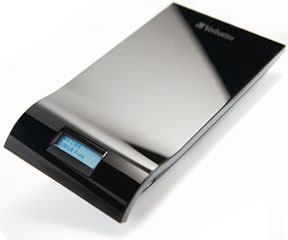
Verbatim 500 GB InSight USB Portable Hard Drive with LCD Display
PR: For a portable hard drive that continuously displays available free space, take a peek at the Verbatim InSight hard drive with an Always On LCD that shows the drives available free space and personalized name.
The Always On LCD display automatically updates when the drive is connected and/or safely dismounted and is easily renamed right from your PC or Mac.
Compatible with all USB connections, the InSight drive includes a USB 2.0 cable, a Quick Start guide and Nero BackItUp software that offer full system backup/restore functions and optional password security. Compact but big on storage capacity, the InSight drive is available in a sleek piano-black finish with capacities of 320 GB and 500 GB and carries a 5-year limited warranty.
With an Always On display, the Verbatim InSight hard drive is a plug-and-play external drive that keeps you in the know even when its disconnected.
 Features & Benefits
- Features an Always On LCD that displays a personalized drive name and available free space.
- View the Always On LCD display without power
- Identify drive and free space without connecting to a PC
- Windows and Mac compatible
- 5-year limited warranty
Package Includes: InSight Hard Drive, USB 2.0 cable, Quick Start Guide
System Requirements:
- USB 1.1 or 2.0 Port
- Windows 2000, XP, Vista or
- Mac OS X 10.1 or higher
Specifications
- Rotational Speed - 5400 RPM
- Display - 32 x 128 pixels always on cholesteric display
- External Power - USB bus-powered
- Interface - One USB mini-B port
- Data Transfer Rate - USB 2.0 High-Speed: 480 Mb/s (max), USB 1.1 Full Speed: 12 Mb/s (max)
- Unit Dimensions - 5.99 in. X 3.37 in. X 0.63 in. (151.12 mm x 85.51 mm x 16.0 mm)
- Unit Weight - 0.36 lb. (161.59 g)
- Capacity/Speed: 500 GB/5400 RPM
Verbatim InSight drives are currently available from Amazon.com at $126.99 for 320 GB, $138.58 for 500 GB. These prices include free ground shipping.
Link: 500 GB InSight USB Portable Hard Drive with Display
SanDisk Enhances Cruzer Enterprise Secure USB Drives to Meet the Needs of Federal Government Employees
PR: SanDisk Corporation, a global leader in flash memory cards, has announced that its SanDisk Cruzer Enterprise secure USB flash drives are now enhanced to meet the unique requirements of government employees.
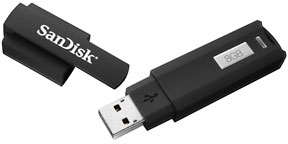 The Cruzer Enterprise design was independently
tested and certified under Military Standard 810-F environmental
standards in addition to being suitable for use by the
visually-impaired under Section 508 requirements. Cruzer Enterprise
drives feature industry-leading cryptographic modules and encryption
algorithms, durable waterproof design, and are fully compliant with
Trade Agreements Act (TAA) requirements for purposes of US Government
procurements. In addition, the Cruzer Enterprise line of flash drives
is listed for Common Criteria certification, which it is expected to
receive next month.
The Cruzer Enterprise design was independently
tested and certified under Military Standard 810-F environmental
standards in addition to being suitable for use by the
visually-impaired under Section 508 requirements. Cruzer Enterprise
drives feature industry-leading cryptographic modules and encryption
algorithms, durable waterproof design, and are fully compliant with
Trade Agreements Act (TAA) requirements for purposes of US Government
procurements. In addition, the Cruzer Enterprise line of flash drives
is listed for Common Criteria certification, which it is expected to
receive next month.
Military Standard 810-F Design and Waterproof:
The federal government requires that IT devices meet certain design standards in order to prevent the loss of critical information if the host drive is ever exposed to liquid. This feature is particularly important for military and health care settings, which often involve sensitive information as well as an increased risk of exposure for the storage drive. SanDisk's line of Cruzer Enterprise flash drives passed an environmental test conducted by an independent laboratory, and was certified as meeting Military Standard 810-F 506.4 and 512.4 when submitted to immersion and rainy conditions using fresh water.
Section 508 Compliance:
Section 508 of the Rehabilitation Act of 1973 requires federal agencies to make their electronic and information technology accessible to people with disabilities. The law was enacted to eliminate barriers in information technology, to provide new opportunities for people with disabilities as well as to encourage the development of technologies that will help achieve these goals.
SanDisk reconfigured the Cruzer Enterprises graphical user interface (GUI) to increase accessibility for visually-impaired users. The encrypted USB drives are now compatible with certain assistive technologies such as screen reader software that recreates the Cruzer Enterprises GUI through text-to-speech representation or via a Braille output device.
SanDisk has upgraded the Cruzer Enterprise product line to meet the needs of a much broader range of users, said Yariv Fishman, director of product marketing, enterprise solutions, SanDisk. By reconfiguring the USB drives GUI, we increased the accessibility of important information technology to the visually-impaired. Additionally, the drives waterproof design is a perfect fit for health care professionals, soldiers and anyone else who needs to safeguard their critical data from harmful contact with liquid.
To further meet the federal governments need for secure storage, SanDisk intends to implement Common Access Card (CAC) and Personal Identity Verification (PIV) functionality on its Cruzer Enterprise flash drives in accordance with Department of Defense and FIPS 201 standards. Smart cards are issued as a standard form of identification for active-duty military personnel, National Guard members, government employees and contractors.
SanDisk Cruzer Enterprise secure USB drives feature FIPS (Federal Information Processing Standard) 140-2 Level 2 certification for encryption, a standard set by the National Institute of Standards and Technology (NIST). FIPS certification confirms that a drive has met NIST standards for design of the cryptographic module, for the strength of encryption algorithms and resistance to physical intrusion. Cruzer Enterprise drives are also listed for Common Criteria certification, an internationally recognized ISO standard (ISO/IEC 15408) used by governments and other organizations to assess the security and assurance of technology products. Common Criteria is an important worldwide evaluation standard for security products as its certifications are recognized in 26 countries around the world.
SanDisk Cruzer Enterprise can be centrally managed by SanDisk's Central Management and Control software (CMC), which has been used by government agencies, healthcare organizations and enterprises for years. The CMC device agent resides on a company-issued Cruzer Enterprise drive, giving corporate IT departments and government agencies greater control and flexibility over the lifecycle management of the device including deployment throughout the organization, password recovery and renewal through the network, central back-up and restore of data, central usage tracking with detailed audit reports, and remote termination of lost drives.
* Based on internal testing, complies with MIL-STD 506.4 (Blowing rain) and 512.4 (Immersion). This equates to compliance with IEC 60529 IPX7. IEC 60529 is a European system of test specification standards for classifying the degrees of protection provided by the enclosures of electrical equipment. An IPX7 designation mean a product can withstand accidental immersion in one meter of water for up to 30 minutes. An IPX8 designation is for continuous underwater use. Product must be clean and dry before use.
Link: SanDisk Enterprise
Desktop Mac Deals
Low End Mac updates the following price trackers monthly:
- Mac mini deals
- Intel iMac deals
- Mac Pro deals
- Power Mac G5 deals
- iMac G5 deals
- Power Mac G4 deals
- iMac G4 deals
- eMac deals
- Power Mac G3 deals
- iMac G3 deals
For deals on current and discontinued 'Books, see our 13" MacBook and MacBook Pro, MacBook Air, 13" MacBook Pro, 15" MacBook Pro, 17" MacBook Pro, 12" PowerBook G4, 15" PowerBook G4, 17" PowerBook G4, titanium PowerBook G4, iBook G4, PowerBook G3, and iBook G3 deals.
We also track iPad, iPhone, iPod touch, iPod classic, iPod nano, and iPod shuffle deals.
Join us on Facebook, follow us on Twitter or Google+, or subscribe to our RSS news feed
Links for the Day
- Mac of the Day: 17" MacBook Pro Core Duo, (2006.04.24. The top-end MacBook Pro has a 1680 x 1050, 2.16 GHz Core Duo CPU, and supports Apple's 30" Cinema Display.)
- Support Low End Mac
Recent Content
About LEM Support Usage Privacy Contact
Follow Low End Mac on Twitter
Join Low End Mac on Facebook
Favorite Sites
MacSurfer
Cult of Mac
Shrine of Apple
MacInTouch
MyAppleMenu
InfoMac
The Mac Observer
Accelerate Your Mac
RetroMacCast
The Vintage Mac Museum
Deal Brothers
DealMac
Mac2Sell
Mac Driver Museum
JAG's House
System 6 Heaven
System 7 Today
the pickle's Low-End Mac FAQ
Affiliates
Amazon.com
The iTunes Store
PC Connection Express
Macgo Blu-ray Player
Parallels Desktop for Mac
eBay

