
Mac News Review
iMac Update in June?, OS 9/X File Sharing Fixed, Apple Offers Free Recycling to Schools, and More
This Week's Apple and Desktop Mac News
Compiled by Charles Moore and edited by Dan Knight - 2007.05.25
PowerBook, iBook, MacBook, and other portable computing is covered in The 'Book Review.
All prices are in US dollars unless otherwise noted.
News & Opinion
- Apple to Revamp iMac Line Next Month?
- Apple Solves File Sharing Issues Between Mac OS 9 and X
- Apple Offers Free Computer and Peripherals Recycling to Schools
- Pick the Right File System for Your Hard Drive
- A Happy Apple Service Story
- Is Intel's 'Penryn' Chip Hiding Graphics Support?
- Future Intel Processors Might Add 'Router Cache'
Apple Updates
Products
- SoundTech Lightsnake iChat Multimedia Headset
- 24" iMac Users Now Get 802.11n Wireless Networking
- WiebeTech Accepting Orders for One Terabyte Hard Drives
iPod News
Software
Desktop Mac Deals
News & Opinion
Apple to Revamp iMac Line Next Month?
The Register's Tony Smith says:
"Apple will update its iMac desktop family late next month, it has been claimed - and that the move that will see the 17in model dropped from the line up....
"As per the recent MacBook update, the new iMac line-up is likely to see small price drops accompanied by beefier processor, memory and hard drive specs, with 20in models moving downmarket and the 24-inchers filling out the top end of the range."
Link: Apple to Revamp iMac Line Next Month?
Apple Solves File Sharing Issues Between Mac OS 9 and X
Ars Technica's Erik Kennedy reports:
"Ever since the release of Mac OS X 10.4.9, users have been reporting problems with file sharing between Mac OS X and its immediate predecessor. This is inconvenient because it is, strange as it may seem, still in use in a number of production environments. The problems appeared when copying files from a OS 9 computer to an AFP (Apple Filing Protocol) share point hosted by OS X or OS X Server; the copy would fail, and the served-out volume would be disconnected. It's one of those sideline issues that only affect a handful of people, but it does so in a critical way."
"It appears that Apple has finally come up with its own fix for this issue, and luckily for us it's a lot simpler than hacking up the OS installation. Adjusting the TCPQuantum parameter for the AFP server will apparently prevent the timeouts and disconnects between the two operating systems."
Link: A Fix for File Sharing Issues Between Mac OS X and Mac OS 9
Apple Offers Free Computer and Peripherals Recycling to Schools
PR: There has never been a better time to get rid of those old computers that have been accumulating in your closets and storage rooms.
You've Got the Green Light
For a limited time, Apple will dispose of your old computers from any manufacturer, along with any associated peripherals, at no cost to you. There is no purchase required to participate in the program and all accredited K-12 and Higher Education institutions with at least 25 systems to recycle are eligible! There is no limit to the number of systems you can recycle - just register between May 10 and June 30, 2007.
Your Data Is Secure
When you dispose of your end-of-life assets through Apple's Recycle Program for Education, you have peace of mind knowing that 100% of the recycling is done domestically within the United States. You can also rest easy knowing that all asset tags or other identifying marks are completely removed and that all hard drives are ground into confetti-sized pieces to ensure your data is secure.
The Process
To take advantage of this limited time opportunity, just follow these simple steps:
- Register between May 10 and June 30, 2007. All product must be collected by July 31, 2007. (There is a minimum of 25 systems to be recycled in order to participate.)
- To register for the program, you may either:
- Click on the tile to the right and fill out the online form; you will be contacted by an Apple representative within 3 business days to coordinate the pick up.
- Call 1-800-APPLE-LN (1-800-277-5356).
- Shrink wrap the items to be recycled on one or more standard wooden shipping pallets.
- Make the pallets available for pick up at an accessible first floor location at the mutually agreed upon date and time.
That's all there is to it. You will receive a certificate of destruction and recycling for each lot that is collected.
This offer expires June 30th, so act now!
Link: Limited Time Offer - Free Recycling from Apple
Pick the Right File System for Your Hard Drive
Ars Technica's Iljitsch van Beijnum says:
"When you put a new hard drive in your Mac - or connect an external one using FireWire or USB - you need to decide how to partition the drive and what file system to put on it. The easiest way to do that is with the Disk Utility in Applications/Utilities. After you start it, Disk Utility shows a list of all available disks along with all the volumes (partitions) present on those disks on the left side of the window. If you want to keep things simple, just select a disk, click on the "erase" tab and you can create a volume that uses the entire disk with a few mouse clicks.
"If your needs are more complex, select the 'partition' tab. There, you can divide the disk into several partitions. The advantage of having multiple partitions is that if one fails, the others may be unaffected. The downside is that you need to think about the size of the different partitions and keep track of which files go where. And copying files from one partition to another is slow, even slower than copying from one disk to another. Keep in mind that disk access is fastest on the outside of the disk, where the first partition is located. Whether you decide to partition the disk or not, the "options" button lets you set the type of "partition scheme" for the disk. There are three choices...."
Link: Pick the Right File System for Your Mac's Internal or External Storage
A Happy Apple Service Story
In his latest Less Tangible on MacOpinion, Marc Zeedar says:
"Last week I returned from my trip away to discover my G5 iMac had expired. That is, it was turned off and wouldn't turn back on. This is an important machine for me as it is my email center, used for handling all the correspondence for my businesses. It is vital it being running at all times.
"At first I assumed this was merely an electrical issue. At one time I had that Mac plugged into a questionable UPS (Uninterruptible Power Supply) and I thought maybe that was the problem again. But when I crawled under the desk to check, I saw with surprise that the iMac was plugged directly into a wall socket - it didn't even use a surge protector."
Link: Power Supplied
Is Intel's 'Penryn' Chip Hiding Graphics Support?
ExtremeTech's Mark Hachman reports:
"It might not make much difference to the end user, but a tiny instruction in Intel's upcoming SSE-4 instruction set included in the 'Penryn' processor might be the first step on Intel's road toward enhancing its CPUs with graphics capabilities.
"Much of the discussion of 'Penryn' - Intel's first 45-nm CPU, probably due by the end of the year - here at the Microprocessor Forum rehashed announcements Intel has previously disclosed, such as the addition of a Deep Power Down state as well as the disclosure that it will contain new SSE-4 multimedia instructions."
Link: Is Intel's 'Penryn' Chip Hiding Graphics Support?
Future Intel Processors Might Add 'Router Cache'
ExtremeTech's Mark Hachman reports:
"As Intel crams more and more processor cores onto a piece of silicon, its designers might just steal a page from the router market.
"A presentation at the Microprocessor Forum here revealed that Intel is considering using quality-of-service prioritization in its caches. In addition, a multicore server processor may include not only level-3 but also level-4 caches, consisting of DRAM bolted directly to the die."
Link: Future Intel Processors Might Add 'Router Cache'
Apple Updates
Mac OS 9 Client Cannot Copy Some Files to Mac OS X Server 10.4.9 via AFP
A new Apple Knowledge Base article says:
File larger than about 1.5 MB may not successfully copy from a Mac OS 9.2.2 client to Mac OS X Server 10.4.9 via AFP. The copy may stop and this alert may appear:
"The file server's connection has unexpectedly closed down."
Products affected
- Mac OS X 10.4.9 Server
- Mac OS 9
Solution
On the server, change the TCPQuantum value used by the Apple File Service from 262144 to 327680. You can change this value using the serveradmin command, or by directly editing the preference file. You only need to use one of these methods:
Serveradmin Method
- 1. Make sure all users are disconnected from the server.
- 2. Open Terminal (or ssh to the server from another computer)
and execute these commands, each on a single line:
sudo serveradmin stop afp
sudo serveradmin settings afp:TCPQuantum = 327680
sudo serveradmin start afp
Defaults Method
- 1. Make sure all users are disconnected from the server.
- 2. Stop Apple File Service.
- 3. Open Terminal (or ssh to the server from another computer)
and execute this command on a single line:
sudo defaults write /Library/Preferences/com.apple.AppleFileServer TCPQuantum -int 327680
- 1. Start Apple File Service.
This document will be updated as more information becomes available.
Link: Mac OS X Server 10.4.9: Mac OS 9 Client Cannot Copy Some Files via AFP
Products
SoundTech Lightsnake iChat Multimedia Headset
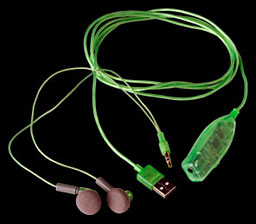 PR: The SoundTech LightSnake iChat stereo headset
with the built in microphone is an excellent solution for
multimedia applications as well as Voice over Internet Protocol
(VoIP) or any application that requires clear and crisp audio. Now
you can use the same product to conduct video-conferences and voice
chats over the Internet, take advantage of the latest speech
recognition technology, and enjoy your favorite music or games.
Just plug in this headset to your USB port and get started
immediately. The in-line volume and mute control features
soft-touch surface for fingertip convenience. The dynamic stereo
sound lets you immerse yourself in your games and music. You can
connect your own headphones instead of the supplied ear bud
headphones or use a stereo mini adaptor and connect to you powered
speakers.
PR: The SoundTech LightSnake iChat stereo headset
with the built in microphone is an excellent solution for
multimedia applications as well as Voice over Internet Protocol
(VoIP) or any application that requires clear and crisp audio. Now
you can use the same product to conduct video-conferences and voice
chats over the Internet, take advantage of the latest speech
recognition technology, and enjoy your favorite music or games.
Just plug in this headset to your USB port and get started
immediately. The in-line volume and mute control features
soft-touch surface for fingertip convenience. The dynamic stereo
sound lets you immerse yourself in your games and music. You can
connect your own headphones instead of the supplied ear bud
headphones or use a stereo mini adaptor and connect to you powered
speakers.
Features
- USB headphone/microphone
- Perfect for multimedia applications, VoIP (Voice over Internet Protocol), multiplayer gaming, music playback, online conferencing, voice commands and online voice chat.
- Simple plug-and-play operation with Mac and Windows computers. No soundcard needed.
- Convenient soft-touch volume control lets you adjust ear bud volume precisely.
- Advanced digital USB streaming audio provides superior clarity with the simplicity of a single USB plug-and-play.
- Use your headphones or speakers instead of ear buds by using convenient 1/8"stereo plug
- Digital quality sound input without the need for a sound card.
- Embedded 16 Bit ADC Input with audio signal boost.
- HSDL (Host Side Data Loss) Noise Reduction Function.
- 48/44 KHz 16-Bit Sampling Rate for Recording
- Compatible with Win 98 SE, ME, 2000, XP and Mac OS 9, X without additional driver
Specifications:
- Resolution 16bit 48/44.1 KHz
- THD + N (-3dBr): -76.1 dB*SNR: 83.1 dB
- Dynamic Range: 81.6 dB
- Ear bud Frequency Response: 20Hz - 20 KHz
- Microphone Frequency R3sponse: 100Hz to 16 KHz
- Signal Input Range: 0 - 2.88 Vpp
- Signal Boost Gain: +20 dB
- Microphone Sensitivity: -59dB/Vµbar, -38 dBV/PA±-4dB
System Requirements:
- PC with Windows 98/SE, ME, 2000 or XP
- Mac OS 9.0.4 or higher
- Computer with USB port
Package Contents
- STICHAT
- Stereo Ear buds
- PC driver CD for older OS
- User's Guide
$29.99
Link: SoundTech Lightsnake iChat Multimedia Headset
24" iMac Users Now Get 802.11n Wireless Networking
PR: QuickerTek now makes the huge speed improvement of 802.11n wireless available to 24" Intel iMac and Mac Mini users. With this N upgrade, iMac users are not "left behind" in the wireless networking speed race. The user-installed version is available for $179 while the upgrade can be installed by QuickerTek for $199 plus shipping of the customer's choice.
This 802.11 N Upgrade is made to the same specifications as the Apple wireless networking card. This upgrade requires OSX 10.4.8 or later and the supplied QuickerTek software. Although it comes with a second antenna to complete the MIMO functionality, it is easy to attach and use. QuickerTek's n Upgrade works with all common WiFi equipment including 802.11b, g and of course n as well as the Apple AirPort, AirPort Extreme even the new AirPort N version recently announced.
The user-installed upgrade includes all of the parts, illustrated instructions and tools required to complete the upgrade. For the QuickerTek upgrade service, the customer selects the shipping method they prefer and the iMac is upgraded and return shipped to the customer using the same shipper and service speed.
Like most QuickerTek products, the 802.11n wireless upgrade for the 24" iMac is backed with a one-year warranty on parts and labor.
Link: 802.11n Upgrade for 24" iMacs
WiebeTech Accepting Orders for One Terabyte Hard Drives
PR: WiebeTech is accepting pre-orders for new 1 Terabyte hard drives, which will begin shipping in June.
These drives feature SATA II interface with a 32MB buffer, quieting acoustics, SMART, and a 7200 RPM spindle speed.
One Terabyte drives will be available in several WiebeTech products, including the ToughTech XE enclosures, SilverSATA IV SJ JBOD, and trays for tray based configurations.
In all, 14 1 TB models are offered.
Link: WiebeTech
Software
Rember, a Free Memory Test Utility
PR: Rember is a front-end GUI to the 'memtest' command line memory testing program. This application will allow the user to select the number of test loops, as well as the amount of memory to test. There is a 'Log' tab that will allow the user to monitor memory testing. The user can toggle a 'verbose' switch to limit the amount of output.The user can choose to quit Finder and other applications.
Defective memory can cause computers to malfunction, crash, and behave in a variety of ways which can sometimes baffle end users and computer technicians alike. Apple provides hardware test CDs with most of their products, and there are some third-party utilties for Mac OS X which perform memory testing. In my experience, these tools have not always been able to quickly and efficiently diagnose memory problems. Rember has been designed to simplify the testing, and diagnosis of these problems.
System requirements:
- Rember v.0.3.3b (Mac OS X, 10.3.9 and higher)
- Rember v.0.3b (Mac OS X, 10.3.8 and lower)
- Rember v.0.2.1b (Mac OS X, 10.2.x)
This software is free, and is covered under the GNU GPL.
Link: Rember
Desktop Mac Deals
Low End Mac updates the following price trackers monthly:
- Mac mini deals
- Intel iMac deals
- Mac Pro deals
- Power Mac G5 deals
- iMac G5 deals
- Power Mac G4 deals
- iMac G4 deals
- eMac deals
- Power Mac G3 deals
- iMac G3 deals
For deals on current and discontinued 'Books, see our 13" MacBook and MacBook Pro, MacBook Air, 13" MacBook Pro, 15" MacBook Pro, 17" MacBook Pro, 12" PowerBook G4, 15" PowerBook G4, 17" PowerBook G4, titanium PowerBook G4, iBook G4, PowerBook G3, and iBook G3 deals.
We also track iPad, iPhone, iPod touch, iPod classic, iPod nano, and iPod shuffle deals.
Join us on Facebook, follow us on Twitter or Google+, or subscribe to our RSS news feed
Links for the Day
- Mac of the Day: PowerBook 500 Series, introduced 1994.05.16. 'Blackbird' includes a 25 to 33 MHz 68040 along with smart batteries and grayscale or color displays.
- Support Low End Mac
Recent Content
About LEM Support Usage Privacy Contact
Follow Low End Mac on Twitter
Join Low End Mac on Facebook
Favorite Sites
MacSurfer
Cult of Mac
Shrine of Apple
MacInTouch
MyAppleMenu
InfoMac
The Mac Observer
Accelerate Your Mac
RetroMacCast
The Vintage Mac Museum
Deal Brothers
DealMac
Mac2Sell
Mac Driver Museum
JAG's House
System 6 Heaven
System 7 Today
the pickle's Low-End Mac FAQ
Affiliates
Amazon.com
The iTunes Store
PC Connection Express
Macgo Blu-ray Player
Parallels Desktop for Mac
eBay

