
Mac News Review
Woz Slams Apple for 'Worst Software', FireWire Not Dead but on Life Support, 'I Love My Mac' Song, and More
This Week's Apple and Desktop Mac News
Compiled by Charles Moore and edited by Dan Knight - 2005.12.16
PowerBook, iBook, iPod, and other portable computing is covered in The 'Book Review. News about Apple's transition to Intel CPUs and other Intel developments is covered in The Macintel Report. iPod news is covered in The iNews Review.
All prices are in US dollars unless otherwise noted.
News & Opinion
- Woz Slams Apple for 'Worst, Worst Software'
- FireWire Not Dead, but It's on Life Support
- iMac G5: Business or Personal?
- "I Love My Mac" Song on MacAddict CD-ROM
- Samsung Producing 50% Faster Graphics Memory
Tips
Products
- Acrylic Mounts Put Mac mini on Wall or under Desk
- New Antenna Boosts Wireless Performance for iMac G5 Owners
Software
Desktop Mac Deals
News & Opinion
Woz Slams Apple for 'Worst, Worst Software'
Macworld UK reports:
"Apple co-founder Steve Wozniak loves and loathes Apple.
"He's full of praise for the company's hardware and its strategies, but frustrated that the firm he founded seems to have lost its grip on the user interface lessons attempted in the Apple Lisa.
"Interviewed by a Stanford University journalism graduate, he said: 'I would try to take us back to the early Macintosh, the failed Lisa-type thinking of philosophies that the human is the centre of the world and the computer gets designed around that person.'
"He also condemns large software makers, such as Microsoft and Apple for delivering buggy software: '[Microsoft, Apple and AOL] tend to turn out the crappiest products, you know, software-wise. The ones that have the most bugs, the most items that are supposedly in there but don't work.'
"'I get the worst, worst software almost always from Apple.'"
- Woz Slams Apple Software
- Talking to Woz, John Stafford, The Cardinal Inquirer
FireWire Not Dead, but It's on Life Support
ZD Net blogger Jason D. O'Grady says:
"I was genuinely surprised when Apple dropped FireWire sync from the iPod nano. So much so that I almost returned mine when I first made the gruesome discovery. I thought for sure that FireWire would live forever in the bigger iPods and that it was just a casualty of the nano's small size. Unfortunately, FireWire's almost dead completely.
"...I'm hearing that FireWire is gone completely from the new Intel iBooks that are coming next month...."
Link: FireWire Not Dead, but It's on Life Support
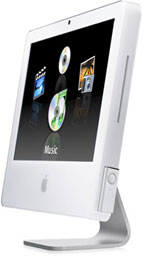 iMac G5: Business or Personal?
Gene Steinberg, the Mac Night Owl, writes:
"When I first read about the latest iteration of the iMac, I got the impression that, absent the remote control, it would serve well in an office environment. Having spent a week with the computer, my opinion remains unchanged. Sure, it's got a wealth of features that are ideally suited for the home user, but only professional users who require the utmost in processor power and perhaps a larger display would feel something is lacking."
Link: iMac G5 Review Addendum: Business or Personal?
"I Love My Mac" Song on MacAddict CD-ROM
PR: "I Love My Mac", a song created entirely using Apple's GarageBand, has been included on MacAddict's most recent CD-ROM. The song, written by Daphne Kalfon*, won first place in a song contest put on by the people at macCompanion Magazine.
Concurrent to the contest, the song received much attention on www.macjams.com , an online GarageBand community, and quickly rose to the top of the pop category. To date, it has received the most number of visits of any song on the site.
A Swiss fan of the song - Antonia Lutz - translated and recorded her vocals into German, and soon followed a Swedish version, translated and sung by a well-known Mac programmer, Ingemar Ragnemalm. An entire website has now been devoted to the song and its story: www.ilovemymacthesong.com
Since its release, the song has generated countless blogs and is being featured on podcasts and internet radio stations all over the world. New versions in Japanese, Dutch, Portuguese, Hungarian, French, Norwegian and Spanish are in the works and soon to be posted at www.ilovemymacthesong.com
*Daphne Kalfon is an extraordinarily versatile and talented songwriter and composer. Her works span the genres of pop, rock, jazz, spoken word, theatrical, jingles, rap, Americana and film music.
Samsung Producing 50% Faster Graphics Memory
Editor's note: Apple uses Nvidia video in all the current Power Macs. The GeForce 7800 GT and Quadro FX 4500 both use GDDR3 memory. dk
PR: Samsung Electronics Co., Ltd. has announced that it is mass producing the fastest graphics memory device in the world - a 900 MHz Graphics Double Data Rate 3 (GDDR3) chip. The device - already being used in graphics cards for PCs, workstations and notebooks - is 50 percent faster than the previous computer memory chip produced in large volume.
"NVIDIA is now shipping the GeForce 7800 GTX 512 graphics card, which some experts have proclaimed the fastest graphics card on the planet(1), and which benefits greatly from Samsung's new 900 Mhz GDDR3 memory chips," said Bryn Young, Director of Memory Marketing and Sales, NVIDIA Corporation. "Samsung's 900 Mhz GDDR3 helped NVIDIA achieve the highest memory clock speed of any commercially available graphics processor."
Joe Macri, Director, Engineering, ATI Corporation, said, "Samsung's aggressive memory roadmap meshes quite well with our efforts to push the limits of speed to enable top-notch graphics for gamers and enthusiasts. We have worked closely with Samsung and have redesigned the memory controller in our recently announced architectures to take optimal advantage of its high-speed memory."
With the new 900 Mhz memory, the latest high-end graphics cards will be offering not only faster animation, but also richer graphic textures and images that are more realistic, bringing the digital world a step closer to true cinematic rendition.
"We are considerably upping the ante for enriching the imagery for gamers and professionals in the video and graphics industries," said Mueez Deen, Director of Marketing for Graphics, Mobile and Consumer DRAM, Samsung Semiconductor, Inc.
The last mass-produced computer graphics memory was the 256Megabit (Mb) 600 Mhz GDDR3 chip - also a first for Samsung at that time. The 512Mb 900MHz GDDR3, aligned in 32 rows of 16Mb chips, is enabling high-speed 256 and 512 Megabyte (MB) graphics cards.
According to Mercury Research, a PC component market research firm, the market for high-end graphics memory is expected to grow by 42 percent next year, from $1.1 billion in 2005 to $1.5 billion in 2006.
(1) NVIDIA claim based on statements by the Tech Report.
- Samsung
- Review of Nvidia GeForct 7800 GTX, Tech Report
Tips
Using Restore Discs with Mac OS X 10.2 through 10.3.3
A new Apple Knowledge Base Article says:
"Learn how to restore bundled applications or Mac OS 9 on computers that shipped with 10.2 to 10.3.3.
"The Restore discs included with some computers that ship with Mac OS X 10.2 through 10.3.3 are significantly different from those used with earlier model Macintosh computers. This includes the Power Mac G4 (Mirrored Drive Doors). The restore process of each model varies slightly, so the description in this document is intended as a general overview and not a model-specific set of instructions."
Link: Using Restore Discs with Mac OS X 10.2 through 10.3.3
Products
Acrylic Mounts Put Mac mini on Wall or under Desk
PR: The problem is that there was often no suitable place on a table surface, and the Mac mini isn't very stable when placed on its side. So Hubbell Consulting came up with the design of the Mini mount. Like the Mac mini, it's a simple, elegant, yet extremely functional design that serves its primary purpose, to put the Mac mini on the wall or under the desk - and out of the way.
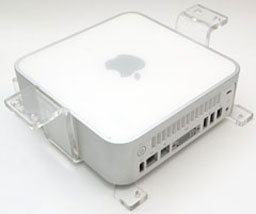 Hubbell Consulting says:
As a home automation design and consulting company, we were faced with the challenge of placing our control system (a Mac mini) in just about any location that the customer wanted. The problem was that there was often no suitable place on a table surface and the Mac mini isn't very stable when placed on its side. So, we came up with the design of the Mini mount. Like the Mac mini, it's a simple, elegant, yet extremely functional design that serves its primary purpose, to put the Mac mini on the wall, or under the desk- and out of the way. Here are some of the key features of the Mini mount Universal and Mini mount Shelf models.
Mini mount Universal
No case mods required
The Mac mini doesn't lend itself to being mounted easily. As Mac lovers ourselves, case modification was out of the question so we had to come up with a design that would safely and securely support the weight of the Mac mini but not stick out like a sore thumb. With the exception of the four small tabs holding the Mac in place, there is little else that can be seen - and the two tabs at the bottom don't even wrap around to the front. We use 1/4" cast acrylic for maximum durability.
Sturdy, functional base
The base of the mount ensures maximum airflow by not obstructing the air intakes of the Mac mini. Apple recommends that you not place the Mac mini in a location that obstructs the intakes. Our design not only ensures that the intakes aren't blocked, it actually adds an additional 1/4" of clearance.
Doesn't block the DVD/CD drive
The tabs at the bottom of the case support the weight of the Mac mini, but don't wrap around to the front so that you can still access your DVD/CD drive. If you're using your Mac mini for an entertainment system or simply need to get at the DVD/CD drive, the Mini mount will do the trick.
Mounts with only two screws
The Mini mount can be secured with the two provided wood screws by drilling right into a wall stud. With anchors (not included), you could install the Mini mount in just about any location.
Exhaust ports aren't blocked
Key to the design was to not block any part of the back (top, when mounted) of the Mac mini. Since that's where all of the ports are as well as the computer's exhaust, we wanted to make sure that the Mini mount remained free and clear of that area.
Optional Backlight kit
We know Mac users love cool. That's why we offer an optional backlighting kit for an additional US$20 that you can plug into a standard 110VAC plug and get a cool, white glow from the back of the Mac mini (see the picture below). It looks great in dim or dark rooms.
Great for home automation or media center applications
Being that we designed this mount for using in a home automation setup, we know it works great for that application. You can also use this mount for media center setups where you want the Mac mini accessible, but out of the way. Use the Mini mount with a touch-screen LCD and you have the world's most powerful home automation and media center available on your wall - right at your fingertips.
Price: $49.99 - $69.99 with backlight
Mini Mount Shelf
Where there's a surface, there's a way
Not everyone has a wall that they can put the Mac mini on but there's a heck of a lot of shelves and desks out there who's undersides are largely going unused. Enter the Mini mount Shelf. We've taken from the design of the Mini Mount Universal and changed a few things around to give you a stable, secure surface that attaches to the underside of just about any surface. Tables, shelves, desks, even the occasional Mac-mini-in-a-car project.
Clean and simple
The Mini mount Shelf tucks your Mac mini up under a desk or shelf with ease. Four screws hold the mount in place and keep the mount flush with the surface. All you see are the two front posts keeping the Mac mini from sliding out of the front.
Secure
Sometimes, you may need to keep that Mac mini from growing legs and walking away on you. The Mini mount Shelf has two blocking posts that can be mounted at the rear to prevent the Mac mini from sliding out of the rear. Simply anchor the mount, slide in your Mac mini, and then screw down the blocking posts. You'll still have full access to the rear ports on the computer, but your Mac mini stays put.
Keeps things in place
We use the same 1/4" clear cast acrylic for the Mini mount Shelf as with the other Mini mount products. The material looks great while providing a remarkably sturdy surface to mount your Mac mini on. Even if something were to strike the Mini mount Shelf from the bottom, your Mac mini would be well protected.
Four screws and you're done
The Mini mount Shelf uses four screws to keep the unit in place. We also provide 1" spacers in case you need additional vertical clearance.
Comes with power supply mount
Are we the only ones who think that manufacturers should include the dimensions of their power supply when talking about the overall size of their gadget? Sheesh, the Mac mini's power supply is roughly half the size of the computer itself. So, of course it needs its own mount when going under a shelf. But, the problem is that everyone's mounting situation is unique and we didn't want to just attach a built-in power supply mount, so it's separate. Put the power supply wherever you want it.
Great for media center or office environments
Entertainment centers have lots of shelves. Many homes have built-in coves for televisions and A/V equipment. Sometimes, there's just not a convenient place to put your Mac mini, but mounting it under one of those shelves will do the trick. Likewise, while the Mac mini is only 6.5" square, there are times where you may want it off of the desk with easy access but not so easy to remove. The Mini mount Shelf solves these problems and a great deal more.
Mounting under a desk, cabinet, or shelf is a snap. Once in place, the sturdy 1/4" clear cast acrylic provides excellent support while keeping the air intakes and exhaust ports totally clear.
The rear of the mount allows for full access to all of the ports at the back of the Mac mini. The two holes at the rear allow for bolts or screws to be driven through to prevent the Mac mini from being removed.
Price: $49
Link: Mini mount
New Antenna Boosts Wireless Performance for iMac G5 Owners
PR: QuickerTek's new 5.5 dBi omni-directional antenna offers iMac G5 users the best all-around antenna solution for networks where a directional antenna limits AirPort signal strength and speed
Press Release Edited By Applelinks Contributing Editor Charles W. Moore
Apple iMac G5 users can now get improved wireless networking performance with a new external antenna. QuickerTek's new 5.5 dBi omni-directional antenna offers iMac G5 users the best all-around antenna solution for networks where a directional antenna limits AirPort signal strength and speed.
The new iMac G5 Antenna offers 5.5dBi of RF power, which means that wireless networking distances can be as much a three times further than when using the stock antenna. It also means that the signal will also allow a full speed connection - so that not only will users be able to use more networks, but also use them at the highest speeds possible. The suggested retail price is $99.95.
A three-foot coax cable comes with the antenna for mounting up where signal strength can be maximized. It works with Mac OS already on the iMac G5 and is equally suitable for AirPort and AirPort Extreme networks.
"The only thing the super-cool iMac G5 could possibly need is better wireless and this new antenna delivers," said Rick Estes, president QuickerTek. "Whether you need upstairs and downstairs connections to your AirPort Base Station, or you just need more distance and speed, this new anntena solves the wireless challenges iMac G5 users face every day" he stated.
Like most QuickerTek products, it's backed with a one-year warranty on parts and labor. QuickerTek has been a recognized leading innovator of antennas and RF products for Apple Power Macintosh, iMac and PowerBook computers. QuickerTek products can be purchased online and from authorized dealers.
Link: iMac G5 5.5dbi Omni Directional Antenna
Software
coconutIdentityCard Tells Where and When Your Mac and iPod Were Made
PR: coconutIdentityCard is just a small app that reads out where and when your Mac and your iPod were built by Apple.
Just plug in your iPod while the app is running and it will show you the information about your iPod instantly.
Because it's UniversalBinary, it will run also ob the upcoming Intel-Based-Macs.
Format of the date: dd.mm.yyyy
New in v1.1
- more bugfixes (thank you for your emails!)
System-requirements:
- Apple Macintosh built in or after 1997
- Mac OS X 10.4 (should also work with 10.3.9)
- optional: iPod (does currently not work with iPod shuffle)
Link: coconutIdentityCard
Desktop Mac Deals
Low End Mac updates the following price trackers every two weeks:
- Low End Mac's best Mac mini deals
- Low End Mac's best eMac deals
- Low End Mac's best iMac G5 deals
- Low End Mac's best iMac G4 deals
- Low End Mac's best iMac G3 deals
- Low End Mac's best Power Mac G5 deals
- Low End Mac's best Power Mac G4 deals
- Low End Mac's best blue and white Power Mac G3 deals
- Low End Mac's best beige Power Mac G3 deals
For deals on laptops, see our Best Aluminum PowerBook G4 Deals, Best Titanium PowerBook G4 Deals, Best iBook G4 Deals, and Best White iBook G3 Deals. For deals on iPods, see our Best iPod Deals.
Join us on Facebook, follow us on Twitter or Google+, or subscribe to our RSS news feed
Links for the Day
- Mac of the Day: Power Mac 7500, introduced 1995.08.08. This workhorse introduced a new desktop case and CPU daughter cards for easy upgrade.
- Support Low End Mac
Recent Content
About LEM Support Usage Privacy Contact
Follow Low End Mac on Twitter
Join Low End Mac on Facebook
Favorite Sites
MacSurfer
Cult of Mac
Shrine of Apple
MacInTouch
MyAppleMenu
InfoMac
The Mac Observer
Accelerate Your Mac
RetroMacCast
The Vintage Mac Museum
Deal Brothers
DealMac
Mac2Sell
Mac Driver Museum
JAG's House
System 6 Heaven
System 7 Today
the pickle's Low-End Mac FAQ
Affiliates
Amazon.com
The iTunes Store
PC Connection Express
Macgo Blu-ray Player
Parallels Desktop for Mac
eBay

