

Keeping Those Old Macs Useful
- 2007.12.10
My Turn is Low End Mac's column for reader-submitted articles. It's your turn to share your thoughts on all things Mac (or iPhone, iPod, etc.) and write for the Mac web. Email your submission to Dan Knight .
I recently "kluged" a battery (two actually) for an old PowerBook 190CS. I tore apart the old battery case and stuffed it with 12 AA NiMH batteries I bought at a local CVS pharmacy. I included the old overheating sensors, etc. I also had to build up a replacement PRAM battery (that center-tapped 6V lithium rechargeable) with four AAA NiMH cells in a case (the PRAM apparently doesn't care about the difference between 5.4 and 6 volts). It hangs on the side of the battery slide. (Actually I found that 8 of the original slightly oversize AA NiMH were still okay and rechargeable.)
The machine operates pretty well; however, it has to be kept plugged into the AC adapter. The batteries tend to self discharge and won't start up the system if I leave it unplugged for more than a day or so - even when shut down. The sleep mode works okay.
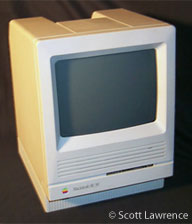
I still have a Mac SE/30 that has a bad internal hard drive, but also an outboard external one that works. I will have to start it up someday.
Keeping Old Macs Running
I used to be (still am, actually) in charge of the Prescott, Arizona Macintosh User Group recycling project, so I saw a lot of older Macs come through, and we usually got them working again. We gave them to organizations like Big Brother/Sister and individuals that needed them.
Most were easy to work on. A Performa 6400 with a TV tuner made a great TV/cable set, among other things. I still use a Power Mac 6100/60 AV as a monitor for a VHS recorder. A couple models were a real pain (the 6500 and 8500 come to mind - you have to disconnect mother board cables to even expand memory; they ended up at the computer abbatoire).
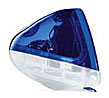 Recently I received a Blue iMac G3 with 1 GB
memory. To my surprise I found it could run Tiger (Mac OS X 10.4) very
well. I put a library program into it for use at a local church. Note
that the slot-loading iMacs that
have a FireWire port and the little door in the bottom to get at
memory/AirPort board/battery (if you have small fingers) are desirable
older machines. The older tray-loading iMacs are seriously
limited.
Recently I received a Blue iMac G3 with 1 GB
memory. To my surprise I found it could run Tiger (Mac OS X 10.4) very
well. I put a library program into it for use at a local church. Note
that the slot-loading iMacs that
have a FireWire port and the little door in the bottom to get at
memory/AirPort board/battery (if you have small fingers) are desirable
older machines. The older tray-loading iMacs are seriously
limited.
Third-Party Peripherals
My biggest gripe about Apple Inc. and Apple dealers is that they have never made an attempt to reconcile the many devices available through such outlets as Staples, Best Buy, etc. as to Mac compatibility. For example, wireless routers and links are all specified for Windows. The "Wizard" on the disk that comes with them is for Windows. Buried on the disk is a PDF user guide which usually on one line somewhere mentions that they can be used with Macs, but you have to set them up manually. (This was true for a Linksys Router which I bought from a Macintosh retailer in the area. No one ever bothers to write up a one- or two-page outline of what information there is applicable.)
David (also sometimes referred to as General Lud)
PS: I'm writing this on a Beige G3/266 MHz with 288 MB RAM running Mac OS X 10.2.8.
Share your perspective on the Mac by emailing with "My Turn" as your subject.
Join us on Facebook, follow us on Twitter or Google+, or subscribe to our RSS news feed
Today's Links
- Mac of the Day: PowerBook 500 Series, introduced 1994.05.16. 'Blackbird' includes a 25 to 33 MHz 68040 along with smart batteries and grayscale or color displays.
- Support Low End Mac
Recent Content
About LEM Support Usage Privacy Contact
Follow Low End Mac on Twitter
Join Low End Mac on Facebook
Favorite Sites
MacSurfer
Cult of Mac
Shrine of Apple
MacInTouch
MyAppleMenu
InfoMac
The Mac Observer
Accelerate Your Mac
RetroMacCast
The Vintage Mac Museum
Deal Brothers
DealMac
Mac2Sell
Mac Driver Museum
JAG's House
System 6 Heaven
System 7 Today
the pickle's Low-End Mac FAQ
Affiliates
Amazon.com
The iTunes Store
PC Connection Express
Macgo Blu-ray Player
Parallels Desktop for Mac
eBay

