

Why We Acquire Macs
- 2007.12.04
My Turn is Low End Mac's column for reader-submitted articles. It's your turn to share your thoughts on all things Mac (or iPhone, iPod, etc.) and write for the Mac web. Email your submission to Dan Knight .
Once upon a more innocent time, I had a Macintosh. Please note that I say "a Macintosh". As in one and only one.
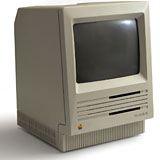 It was a
Macintosh SE, which I got new
and used for years. I was determined that I'd avoid buying a different
computer until I had to. I was able to keep that SE going for nearly
nine years, at which time the video circuitry started to fail. I
replaced the SE with a Classic.
It was a
Macintosh SE, which I got new
and used for years. I was determined that I'd avoid buying a different
computer until I had to. I was able to keep that SE going for nearly
nine years, at which time the video circuitry started to fail. I
replaced the SE with a Classic.
Logically, there was no reason to keep the old SE. But I could not bear to just toss it out. It was an old friend. It had seen me through a lot. I had used it for every task imaginable - writing college papers, writing some bad short stories, and more. This SE held a lot of history. It had been the computer that allowed me to explore the Digital Wilderness. So I kept the SE without even thinking. I knew I'd probably never use it again, although I figured - what is one unused and unusable computer when it holds personal history?
Two months later, I bought an SE/30 to replace the Classic. I decided to keep the Classic as a backup. It's understandable that one using old hardware would have an extra Mac for backup.
What's harder to understand is what happened over the next four years. I went through four Macs. Each step was a definite step up. Yet I kept every computer I'd had before! I'd become a Man with Macs!
Yes, it's good to have backups - but even the unluckiest man alive surely didn't need this many!
But wait! It gets worse! One day I bought an old LC as part of a package deal. It was, practically, pointless to keep it. It was among the least powerful computers I had. Despite this, I kept it.
It wasn't the last Mac I'd buy that had no apparent use.
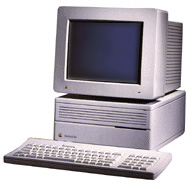 I now have a small mountain of such Macs. Including, but not
limited to, a Centris 650, a
IIci, a 7200, a PowerBook 190, and who knows what
else.
I now have a small mountain of such Macs. Including, but not
limited to, a Centris 650, a
IIci, a 7200, a PowerBook 190, and who knows what
else.
I have a problem, as people around me tell me. I can take comfort in only one thing - I'm not alone - not if what I read on Low End Mac is any indication.
Then I have a friend who loudly preaches the "one computer is enough" lecture. Yet if you go digging in her house, you'll stumble across a SE. In storage, she has, she admits sheepishly, at least three or four more old all-in-one Macs. She's not quite sure how many. At least she got rid of the old IIsi. (I'll give you one guess who the new owner might be!)
Why do so many of us have a stack of obsolete computers? I can't really give a good reason, except to use that clichéd line: a Macintosh is more than just a computer.
A collection of old computers also gives those of us who have been using Macs for years a chance to own old dream machines. This was the reason I bought my IIci.
One thing that I've started realizing is that part of my fetish is a respect for the history of the machine. Just about every Macintosh I have has some "breakthrough". The IIci was one of the best ever made - the most powerful when introduced. And it was the first to support onboard video. It gracefully aged into being a "middle of the road" Mac. Even when discontinued, many people continued to use it in the real world for years.
Even Macs considered "compromised" Macs had some breakthroughs. The LC was limited, and it definitely could have been better, but it brought an external monitor and color to a previously unimagined price.
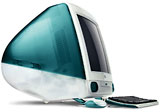
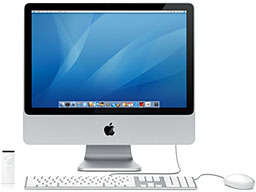 It can be easy to forget the past. The
industry releases anything new and suddenly . . . that's all
there is. The latest
iMac overshadows the
original iMac. Some would say that the original looks like a
plastic toy when placed by the new iMac, yet that new iMac wouldn't be
here if it wasn't for its ancestors - including the "blue toy".
It can be easy to forget the past. The
industry releases anything new and suddenly . . . that's all
there is. The latest
iMac overshadows the
original iMac. Some would say that the original looks like a
plastic toy when placed by the new iMac, yet that new iMac wouldn't be
here if it wasn't for its ancestors - including the "blue toy".
With a collection of old Macs, you don't forget where we've been.
The history also can help show what today's world is going to be. Of course, computers change, and I've heard many predictions of "the next trend" that never came, but some things never seem to change.
The best current example of history repeating itself is the Windows Vista fiasco. Vista keeps reminding me about past versions of Windows. Each is hyped as a great breakthrough, yet it's really not that innovative . . . except by Windows standards. Indeed, in many ways, it's a copy of OS X. Sort of like Windows 95 was Apple 1986. It can be hard - even impossible - to install Vista on an existing computer. Just like Windows 95.
Looking into the Vista future, I'd say that those predicting failure of Microsoft due to Vista may not be right. I know Microsoft has survived bad Windows problems before with its monopoly intact. (Remember Windows Me - the Windows version even Windows lovers hate?)
I think the people who have the real problem aren't those with a big pile of computers but the people who forget the past - although one can appreciate history without having a barn full of old computers. But those computers make conversation pieces. And, who knows, maybe they'll be useful again someday.
For example, I usually use my Quadra 650 for writing. But for part of this column, I used my old PowerBook 190 because I needed something portable.
Share your perspective on the Mac by emailing with "My Turn" as your subject.
Join us on Facebook, follow us on Twitter or Google+, or subscribe to our RSS news feed
Today's Links
- Mac of the Day: PowerBook 500 Series, introduced 1994.05.16. 'Blackbird' includes a 25 to 33 MHz 68040 along with smart batteries and grayscale or color displays.
- Support Low End Mac
Recent Content
About LEM Support Usage Privacy Contact
Follow Low End Mac on Twitter
Join Low End Mac on Facebook
Favorite Sites
MacSurfer
Cult of Mac
Shrine of Apple
MacInTouch
MyAppleMenu
InfoMac
The Mac Observer
Accelerate Your Mac
RetroMacCast
The Vintage Mac Museum
Deal Brothers
DealMac
Mac2Sell
Mac Driver Museum
JAG's House
System 6 Heaven
System 7 Today
the pickle's Low-End Mac FAQ
Affiliates
Amazon.com
The iTunes Store
PC Connection Express
Macgo Blu-ray Player
Parallels Desktop for Mac
eBay

