

Some Old Dogs Already Know the New Tricks
There's a new limited-use computer available this holiday season, but how new is it really?
Dec. 8, 2000 - J.S. Garrison
My Turn is Low End Mac's column for reader-submitted articles. It's your turn to share your thoughts on all things Mac (or iPhone, iPod, etc.) and write for the Mac web. Email your submission to Dan Knight .
If you shop any of the electronics outlets this holiday season, you'll find there are some exceptional bargains to be had in personal computers. The newest categories, email appliances and Internet appliances, are the bargain-hunter's paradise. Priced from under US$200, they offer a simple solution to the casual Internet user or the busy executive whose effectiveness depends on constant email contact with coworkers and clients.
There's nothing new about this technology, however. Step back in
time about fourteen years to the introduction of a 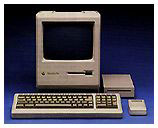 little miracle called the Macintosh Plus. This machine, along
with the others mentioned below, were primed for use as email
appliances way back then. The small, all-in-one computer with a nine
inch black-and-white screen, a built-in floppy drive, and up to
4 MB of memory, is, to me, the epitome of computing simplicity.
Practical, too. These little guys take up very little room on an
already crowded desk.
little miracle called the Macintosh Plus. This machine, along
with the others mentioned below, were primed for use as email
appliances way back then. The small, all-in-one computer with a nine
inch black-and-white screen, a built-in floppy drive, and up to
4 MB of memory, is, to me, the epitome of computing simplicity.
Practical, too. These little guys take up very little room on an
already crowded desk.
Used with or without a hard drive, these Macs (the Plus, SE, and Classic) are totable wonders that send and receive email with elegance and style. Without a hard drive, the Plus with its internal floppy drive and an external floppy are all that's needed to set up the machine. Add an external modem, connection software, and email software (available widely and for free on the Internet), and you're on.
With a hard drive you can store information or work with the many programs available for these venerable old fellows: from word processing to drawing, painting, spreadsheets, and more!
The choice of new-old email appliances doesn't stop here, either.
Following the Mac Plus, there are a slew of small Apple computers in varied styles and configurations, many of which are powerful enough to browse the Internet as well as providing carry-with emailing.
The SE is like a Mac Plus, but usually comes with an internal hard drive (some had two floppy drives). With this machine, you can have the convenience of a built-in storage device. Get the software off the Internet or from user group, and you've got a personal information manager with email and contact manager.
Want more? Try the SE/30. This powerhouse is the best of the group of Compact Macs, with a CPU twice the speed of the SE and Mac Plus, and memory power enough to beat many other machines eleven years old. Crank the SE/30 up to 128 MB of RAM, and you've got a right fine Internet machine. Network over the World Wide Web with clients and coworkers or the boss with a small, carry-along appliance years ahead of its time, and light years ahead of plain email appliances costing much more than a used SE/30.
Looking for a more modern-looking machine? Plug-in with the Classic or the Classic II. They look slightly different from the earlier compact Macs, with a more rounded and stylish look than their predecessors. The Classic is outfitted with an 8 MHz CPU, just like the Plus and SE. It accepts up to 4 MB of RAM, while the Classic II gives you room for a total of 10 MB of RAM. The Classic II runs at 16 MHz and can do quite nicely, thank you, as a slow, but workable Internet trawler. Both these Classics will email with the appropriate software and an external modem.
Teaching old dogs new tricks a problem? Not here!
You've just been introduced to five "old dogs" that already knew these tricks before they became new again.
Where do you find them? eBay, newspaper ads, and email lists (such as the Compact Macs list sponsored by Low End Mac) - all are great sources for your new-old email and Internet appliance. Software is peppered all over the Internet that will give your machine the ability to do many modern tasks those $200-and-up devices would do, but at a fraction of the price.
Show your stuff in a stylish, cost-cutting and unique way this holiday. Give a compact Mac as a gift. Think Different.
Share your perspective on the Mac by emailing with "My Turn" as your subject.
Join us on Facebook, follow us on Twitter or Google+, or subscribe to our RSS news feed
Today's Links
- Mac of the Day: PowerBook 500 Series, introduced 1994.05.16. 'Blackbird' includes a 25 to 33 MHz 68040 along with smart batteries and grayscale or color displays.
- Support Low End Mac
Recent Content
About LEM Support Usage Privacy Contact
Follow Low End Mac on Twitter
Join Low End Mac on Facebook
Favorite Sites
MacSurfer
Cult of Mac
Shrine of Apple
MacInTouch
MyAppleMenu
InfoMac
The Mac Observer
Accelerate Your Mac
RetroMacCast
The Vintage Mac Museum
Deal Brothers
DealMac
Mac2Sell
Mac Driver Museum
JAG's House
System 6 Heaven
System 7 Today
the pickle's Low-End Mac FAQ
Affiliates
Amazon.com
The iTunes Store
PC Connection Express
Macgo Blu-ray Player
Parallels Desktop for Mac
eBay

