
Let me ask you this question: On a PowerBook, have you ever seen an out of memory warning? If not, you must have a newer machine. Every time I use my PowerBook 190cs, I get the same warning, but now that problem is gone. You could even say a birdie told me. A camera birdie that is.
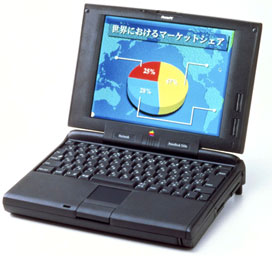 One day at the elementary school where I help out, we were viewing some pictures on a CompactFlash (CF) card. When I got home, I was thinking how to solve my memory crisis (my 190cs is running Mac OS 8.1 in only 7 MB of RAM). Suddenly something came into my head: Why not use CF cards as RAM?
All you need is this:
- A CompactFlash card
- A PC Card slot or USB socket
- A PC Card or USB CF card adapter
The way you do this is to format the CompactFlash card as a hard drive and use it for Virtual Memory (instead of using your hard drive).
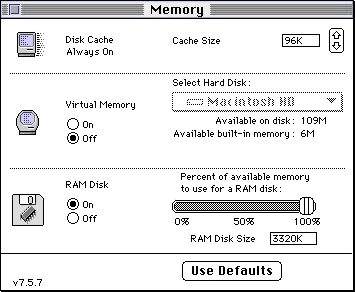
I do warn you, try this out with someone who already has a CompactFlash card. I’ve only tested 8 and 32 MB CF cards on a PowerBook 1400. If you get big enough cards, your PowerBook could have over 1 GB of RAM. Other computers this may be useful for are PCI Performas and some low-end PCI Power Macs like the 5500 & 6500, iMacs, iBooks (especially the Rev. A), and some clones
For desktop models, you will need a USB card and some form of adapter such as VST’s Tri-Media Reader (it works with Compact Flash, Smart Media, and floppy disks). For first generation Power Macs and 68K Macs, low memory is hopeless.* The earlier the model, the less memory it will support. For some Power Macs, it could be a waste of time. The 7300 I’m using right now can be upgraded to 1 GB for less than the cost of a Flash card upgrade. If you have any trouble, email me, and I’ll try to help you.
- * You can use Virtual Memory, but it’s very slow on 68K Macs and not terribly fast on first generation Power Macs. Your best bet after installing maximum memory is to try RAM Doubler.
Visit Amazon.com, eBay, and ramseeker to see if Compact Flash cards fit your budget. Then compare that to current memory upgrade prices for your Mac.
Update, Jan. 2015: This article was published before Mac OS X arrived and applies specifically to the Classic Mac OS. There are a lot of factors involved with CF performance, which we are trying to quantify in a separate article to be published soon. USB 1.1 is horribly slow (about 1 MB/s) and probably the worst option for Virtual Memory, but it was all Macs had when this article was first posted in 2000. PC Card adapters run CF cards at up to about 33 MB/s, but only for cards rated at 233x and higher – and even then they may not achieve their claimed speed. CardBus was a huge step forward for PowerBooks, providing about 133 MB/s. USB 2.0 should be able to achieve 40 MB/s with a 333x CF card.
Keywords: #compactflash #virtualmemory #powerbook
Short link: http://goo.gl/OpwTTK
searchword: compactflashvirtualmemory
