
2011 – I got lots of positive and encouraging feedback on my article about going back to OS 9, Back to Mac OS 9, Because It’s All I Need. The main point of my article was that I could go back to OS 9, because it provides me with everything I want to do with a computer.

Well, admittedly, after a couple of weeks of use I’ve come to the point of “you can’t do this or that with OS 9”. Like yesterday morning, when I got an email from a friend, including a hyperlink to a YouTube video.
YouTube, Flash, and Mac OS 9
Flash videos obviously are a problem with Mac OS 9 today. YouTube is one of the most popular services on the Web, but they’re rather restrictive in whom they offer their service to. That is thanks to Adobe, whose proprietary Flash software is limited to a few platforms. (And it’s frickin’ slow and bloated, but that’s a whole different topic.)
Since Adobe can hardly make any money on platforms like Haiku, AmigaOS or Mac OS 9, there are no (recent) versions for these systems. However, smart developers have developed workarounds. They use downloaders that will automatically download the video to your computer and play it using an integrated player. Many developers use the open-source MPlayer to do it. Sadly, no one has yet come up with such a solution for OS 9, although some folks seem to be working on that.
Convert It Online
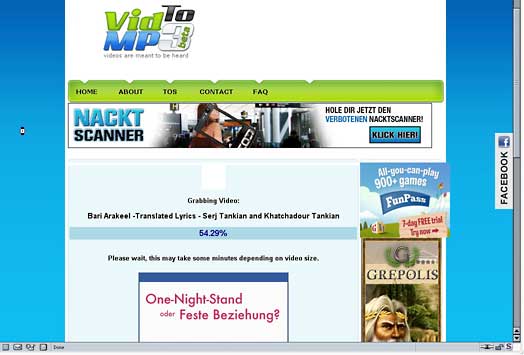
What about those online video converting services? Indeed, there are several services on the Web, free to use. Once I had JavaScript enabled in Classilla 9.2.1, a couple worked fine. I would simply paste the address to the YouTube video, set encoding to the desired format, and let it start. Once the service downloaded and converted the file, I could download it to my computer. A reliable, OS 9-friendly service that I found is online-convert.com, as well as vidtomp3.com for converting video to MP3.
Two sites for converting files online to formats Mac OS 9 can use:

Another solution involved a little ResEditing. I use the past tense here, because it doesn’t work anymore for me since I reinstalled my system. I have no idea why, but it might be still worth trying out for those of you with the desire to experiment: ResEdit is one of the best-known OS 9 tools; it allows you to edit basic settings of files. I won’t go into details here, there are a couple of fine books available on ResEdit (keep an eye out for them on eBay, they usually sell for very little money). This solution includes tricking Flash 7 into pretending it is a later version of Flash. You simply open your Flash file in your browser/plugin folder and set the Flash version from 7 to 10. As absurd as it sounds, it has made some YouTube videos play again, as this screenshot taken 8-10 month ago below proves.
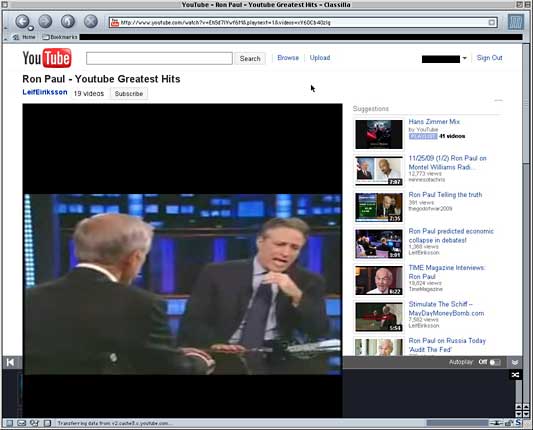
Using ResEdit, you can make Flash 7 appear as version 10 and display video in OS 9.
I haven’t thoroughly researched the issue. It could be that the code was changed too drastically in the meanwhile. But it used to work by overriding a lockout mechanism. Newer videos obviously weren’t displayed – the screen stayed dark.
Also be aware that this hack distorts the layout of YouTube. The video box will overlap with the site, and you’ll have to use your imagination and push the invisible play button in the lower left corner. A workaround is to register and add videos to your playlist list, which will automatically start to play.
It’ll be interesting to see what HTML5 will bring in this matter. Cameron Kaiser, developer of Classilla, announced that he’ll add HTML5 support for his OS 9 browser Classilla. It is questionable whether that will include video support. Probably not, but hope dies last.
.docx Causing Headache for OS 9 Users
Another problem I’ve run into is .docx documents created by Microsoft Word. People keep sending me these every now and then. This is the new standard format for Word files introduced by Microsoft in Office 2007. It was created to sell their new version to improve upon the old .doc standard. What a coincidence that older Office versions can’t handle .docx and Microsoft suggests upgrading to a recent version. No surprise. Though there is no “recent” version for Mac OS 9. To the best of my knowledge, there is no OS 9 software that can handle .docx files. (Shoot me an email if you know of one.)
So what to do when someone sends you a .docx file? For some time I’ve asked them to resend the file as a normal .doc file, but that can be annoying and sometimes feels inappropriate. This raises the question: What to do in such a situation?
Online converters are your friends again. As with videos, they can help you convert various formats. Not all work with OS 9 and Classilla though. I’ve found doc2pdf.net to be reliable. I upload the .docx file, choose PDF as the output format, and go. There are more free online services for converting documents out there that I haven’t tried. Google search is your friend.
Why OS 9 Today?
After reading this article, maybe you’re preparing to send me an email: Why all the hassle? Go and buy yourself a used $300 Power Mac G5 with OS X 10.5. Why would anyone want to use Mac OS 9 today?
It’s simple – because it’s both fun and economical. I find it a challenge to find solutions and think about possible workarounds. It feels a bit like playing with that Rubik’s Cube from the 1980s.
There are solutions for almost every problem today, we just have use our brain cells to find them.
Publisher’s note: This article was edited and uploaded using Claris Home Page 3.0, a 1997 app that runs beautifully in Mac OS 9 – as well as in Classic Mode in OS X. dk
Keywords: #macos9 #classicmacos
Short link: http://goo.gl/5LrDN0
