
2011 – I’ve done it. I’ve sold both my Intel iMac and my MacBook Pro (Late 2008). I took the money and spent it on a very nice trip with my girlfriend. Wonderful memories. That left me with my old configuration, a dual 1 GHz Power Mac G4 MDD maxed out with 2 GB of RAM. It was one of the last Power Macs able to boot natively into Mac OS 9.
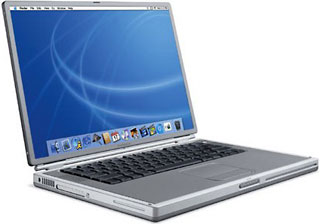 As for my computing needs on the road, I recently got a used and abused 800 MHz Titanium PowerBook (TiBook) G4 DVI that I rescued from a trashy home. The TiBook’s color is chipped off around the edges and the polarizer, the protective film on top of the screen, is damaged. It looks like children with dirty little fingers just touched the screen. This TiBook won’t win a prize at a beauty contest, but otherwise it is fully operational.
Two Obsolete Operating Systems
With Mac OS X 10.4 Tiger becoming increasingly left behind, the choice between using OS X 10.4 and OS 9.2.2 on the TiBook is the choice between two obsolete operating systems. Both won’t be updated by Apple anymore.
Most developers have dropped support for 10.4 and/or the PowerPC architecture – not that it is much of a hassle to me. There are thousands of programs out there for each OS, and I only use a handful of them.
The most important software today is arguably your browser. Thanks to the efforts of tireless Cameron Kaiser and others, both operating systems still have functional browser software. For OS 9, it is the Mozilla-based Classilla that gets the job done. Demoralized by the disappointing results of iCab 3.05 and Internet Explorer 5.17, I turned to Classilla and was greatly impressed.
Going with OS 9.2.2 for the TiBook
Encouraged by the performance of Classilla, I installed OS 9.2.2 on my TiBook. With 1 GB of RAM, it just flies.
Admittedly, OS 9 is quite an ugly duckling by default. OS X spoiled us all in terms of GUI appearance. Luckily that is no problem, thanks to the easy customization of OS 9. I downloaded an Aqua Theme for the Appearance Manager (which you can download from Low End Mac’s Dropbox account), added a nice wallpaper, and voilá – it lost its 90’s smell. I didn’t even bother with Kaleidoscope yet.
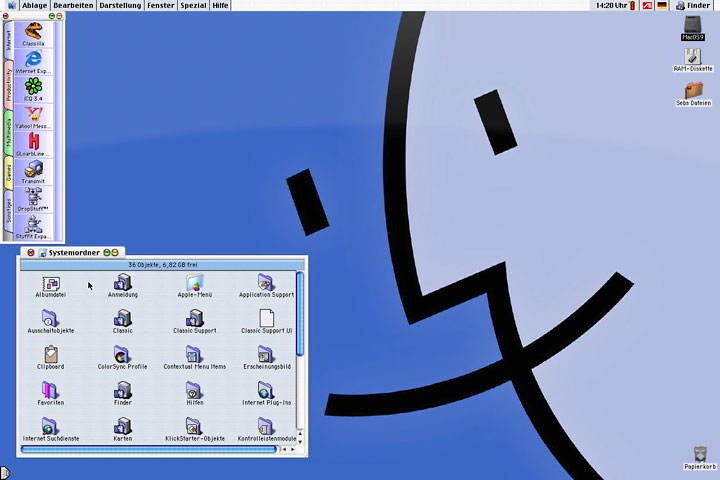
Mac OS 9 desktop with Aqua theme and DragThing.
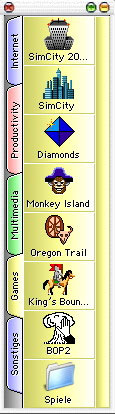
DragThing 2.9
Next, I added DragThing 2.9, an incredibly powerful shareware utility I’ve become very accustomed to. Basically, it gives you the functionality of a dock, but with enhancements such as tabs and free positioning on the screen. It’s also available for OS X and makes you wonder why Apple sticks to its limited dock.
There are many more small utilities that I use to increase my productivity. The Internet is full of them. Every now and then I bump into one formerly unknown to me.
Thanks to the abandonware movement,* most of that software for Mac OS 9 is free and available for everyone today. This is where the fun part starts: It allows you to build an OS 9 system perfectly suited for your needs. It’s all about tweaking the “perfect system”, following the Low End Mac theme of getting the most out of your old Mac.
I no longer need to check back with my bank account to buy and use the software I’d like, though sometimes I still register old OS 9 shareware to show my appreciation. Not without mentioning the continued use of OS 9. I’d like to see the faces. 
Faster, Higher, Further? No More for Me!
Back to everyday use: I found that I don’t need an Intel Mac to get my regular tasks done. That includes office work, surfing the Internet, emailing, light photo editing, MP3 and DVD playback, instant messaging, and games. Why should I buy a new Macintosh if my old one is still just fine?
 It took me a while, but finally I’ve learned to resist the “faster, higher, further” scheme of modern computing. For me, good old OS 9 gets the job done on the TiBook.
The same goes for my Power Mac G4, although it has with a partition with OS X that I’ve recently updated to OS X 10.5 Leopard. Leopard performs great on the old hardware, thanks to the 2 GB RAM. However, I rarely boot it. The only reason is for printing or scanning stuff, since my HP Photosmart C3180 All-in-One doesn’t have OS 9 drivers. Sure, one could fetch an old printer somewhere. But then again, I print and scan rarely, so it doesn’t really bother me.
Please don’t get me wrong: It’s not that OS X hasn’t evolved into a great experience since its humble beginnings. It’s just that I don’t need it. I keep on using OS 9 because it’s both economical and fun!
* See Legal Software for Older Macs for more on the abandonware movement. Macintosh Garden is a good source for Mac abandonware. We also have links to some freeware, shareware, and abandonware on our Select Software Downloads page and Applications Compatible with 68000-based Macs.
Sebastian lives in Germany and is very happily running PowerPC Macs with Mac OS 9 and OS X 10.4.
searchwords: classicmacos, macos9
