
Classic Macs in the Intel Age
PowerBook 150 Still a Winner
- 2008.03.27 - Tip Jar
My Turn is Low End Mac's column for reader-submitted articles. It's your turn to share your thoughts on all things Mac (or iPhone, iPod, etc.) and write for the Mac web. Email your submission to Dan Knight .
Old PowerBooks can be a lot more useful than you might expect. Sure, they may not run recent games and high-end video editing software like Final Cut Pro, but if you just do a little Googling, you'll find lots of nice apps to make your oldie just as useful as a new MacBook.
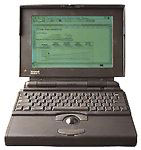
I am a big fan of classic Apple notebooks, because they have a nice, sturdy design and are also very good word processing machines. When I first got my 1994 PowerBook 150, I was just using it occasionally to do some word processing for school in ClarisWorks.
But all of a sudden, things changed. I read the 30 Days on Vintage Macs articles here on Low End Mac, and I was stunned at how the author could use his old Macs for so many of his normal tasks that were usually performed on a modern computer.
I decided to do the same thing.
 My
PowerBook 150 already had 8 MB of RAM and a 250 MB hard drive, but the
battery was done for. So I got a new one off
eBay, and suddenly my little Mac was useful on the go again. But I
still wanted to do more with it.
My
PowerBook 150 already had 8 MB of RAM and a 250 MB hard drive, but the
battery was done for. So I got a new one off
eBay, and suddenly my little Mac was useful on the go again. But I
still wanted to do more with it.
I found my old ImageWriter printer and hooked it up. It worked fine. I made sure to install System 7.5 on the Mac, and I also gave it the iCab web browser and some old version of Eudora for mail. It was a little slow in iCab, but Eudora was quite fast.
I also made a small LocalTalk network between it and my "Pizza Box" Quadra 610. It worked just fine, and I was able to share the printer and the Internet connection, too.
The 150 is a great machine. Unlike most people, one thing I like about it is the screen. My PowerBook is in very good shape, and the screen is among the most crisp and nice b&w screens I have ever seen on a laptop - way better than my old PowerBook 160. Plus, the screen is big. It offers a resolution of 640x 480 - much better than other old PowerBooks with 640 x 400 black and white screens.
In conclusion, the PowerBook 150 is a great machine that makes a nice networking buddy to my Quadra and PowerBook 165c (which I rarely use these days - the trackball broke).
Forward Into the Past
But my PowerBook 150 adventure isn't over yet. On Thursday, March 27, I will pick up a Classic II and two PowerBook 100s. I hope to make a nice little vintage Mac network with the Quadra being the server, the Classic being my office machine, and the 150 being my laptop of choice for trips. Finally, my PowerBook 100 will most likely serve as a compact writing machine.
Count on me to get you another article as soon as the 100s and the Classic II are set up.
Go to the index of articles by Carl Nygren.
Share your perspective on the Mac by emailing with "My Turn" as your subject.
Join us on Facebook, follow us on Twitter or Google+, or subscribe to our RSS news feed
Today's Links
- Mac of the Day: PowerBook 2300, introduced 1995.08.28. The only Duo equipped with a PowerPC processsor run at 100 MHz.
- Support Low End Mac
Recent Content
About LEM Support Usage Privacy Contact
Follow Low End Mac on Twitter
Join Low End Mac on Facebook
Favorite Sites
MacSurfer
Cult of Mac
Shrine of Apple
MacInTouch
MyAppleMenu
InfoMac
The Mac Observer
Accelerate Your Mac
RetroMacCast
The Vintage Mac Museum
Deal Brothers
DealMac
Mac2Sell
Mac Driver Museum
JAG's House
System 6 Heaven
System 7 Today
the pickle's Low-End Mac FAQ
Affiliates
Amazon.com
The iTunes Store
PC Connection Express
Macgo Blu-ray Player
Parallels Desktop for Mac
eBay

