
2002 – It all started with the purchase of a refurbished iceBook three months ago. No longer would I have to retreat to my study to check my emails – instead I could sit in the lounge, keeping half an eye on the TV, and being part of the family at the same time. Other work could happen on the kitchen table, with far more space for books than my monitor and keyboard filled study desk ever allowed. And I love Mac OS X!
Soon, I realised that my faithful Power Mac, a 6500/128 MB/6 GB model with a G3 upgrade, was no longer earning either its keep or the space it took up. Selling it would bring in some useful cash; waiting another year might make it almost valueless. It sold on eBay, the G3 upgrade reaching twice the price of the Power Mac itself!
But before that, the implications of this decision had started to be realised. What about my SCSI CD-writer, my SCSI scanner, and my software, such as the TextBridge Pro character recognition package, which I don’t use enough to justify replacement by Mac OS X compatible packages on the iBook?
 The answer was obvious – use one of the Colour Classics that I “play” with for my recreation! The Power Colour Classic, with a 275 MHz Power Mac 6500 logic board, had already been sold to help finance the iBook purchase. My “Taco” project to put a G3 logic board in an LCD-equipped CC is a few months from completion, and another Colour Classic has a slot-load CD drive in place of the floppy, whereas I need a floppy drive to read discs from my elderly Sony Mavica camera.
That left my most recently acquired CC – not quite “bog standard,” but benefiting from an increasingly common pair of CC upgrades, a screen upgrade to 640 x 480, and the logic board from an LC 575, with a 33 MHz 68040 rather than the CC’s 16 MHz 68030. This particular “Mystic,” as the 575-upgraded CC is called, has been overclocked to 43 MHz and has 68 MB of RAM. This makes it one of the fastest possible CCs, short of the full “Takky” PowerCC upgrade.
All this is a well-worn path for Colour Classic fans – what was new ground for me was trying to use it as my only desktop Mac. What has amazed me in the last couple of weeks is just how much serious work can be done with a 10-year-old pre-PowerPC Mac.
CD writing? The Toast software that came with my SCSI CD-writer is 68K compatible. I installed it. I wondered if trying to burn a CD on such a slow machine would simply produce some shiny coasters. I needn’t have worried; in fact the Mystic can throw data at the 4x writer as fast as it can write it!
Likewise, the Agfa scanner drivers from the mid 1990s run fine on a 68K Mac, as does Photoshop 4LE, as does TextBridge Pro, as does Quark XPress 3.3.
Once a year, I freelance for a British weekly church newspaper, supporting its coverage of the national Methodist Church Conference and providing the hardware for the Conference end of a production system that emails copy in Word (spit!) format to the London office for page make-up and receives back Quark files for checking before printing. In the past, I’ve lugged a 6500 with 17″ screen or “borrowed” my children’s 5500. Neither was a pleasure to carry up the numerous flights of steps to the rooms usually allocated to the press in British Town Halls.
This year, the CC will slip into its padded case and provide very similar functionality, complete with a modem in the Comm Slot and an ethernet card in the PDS slot, giving connectivity to printers and other Macs. (During the day, the iBook is in the Conference with me, for reporting, and the CC will be the email station for the reporting team. On the long night before printing, the 1024 x 768 display on the iBook will come to our aid for Quark page checking. One year, dawn was breaking before the last page was “signed off,” but that’s another story!)
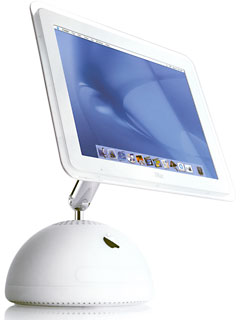 Of course, Mac OS X, iMovie, and the rest of the digital-hub technology revolution is beyond this modestly upgraded machine. But its footprint remains unmatched short of a G4 Cube or G4 iMac – and my experiences of the past two weeks have taught me that Colour Classics can be far more than material for upgrade projects.
Now a CC sits where a 6500 and 17″ screen once resided. The iceBook is alongside, and between them the two Macs – ancient and modern – provide me with a very flexible and powerful working environment.
When Stuart Bell is not playing with his new iBook or his collection of compact Macs, he is a minister in the British Methodist Church. Bell was the keeper of the Power Colo(u)r Classic website.
Keywords: #colorclassic #colourclassic
Short link: http://goo.gl/gAF0hp
