

My Turn is Low End Mac's column for reader-submitted articles. It's your turn to share your thoughts on all things Mac (or iPhone, iPod, etc.) and write for the Mac web. Email your submission to Dan Knight .
Lean Word Processor Specifics
- 2001.02.28
After Low End Mac published my piece about the lack of lean word processors for Mac OS X, I received several emails from readers pointing me towards existing and future products that might fulfill my needs.
Initially I wanted to be a good sport and write this follow up with the only OS X word processor (well, word processing module) in existence, AppleWorks 6, but then I discovered a very big bug. In spite of the move to Mach, BSD, and OpenStep, this very old Macintosh bug still wasn't squashed: the letters had variable spaces between them - a very unpleasant sight (see AppleWorks 6 sample below and note how characters run into each other).
There isn't any way to avoid this bug when using Mac OS 9. WordPerfect tries to fix it while you type, but it still isn't a very pretty sight. Apple must have dropped the ball somewhere in the past decade, because my a 14 year old Mac Plus running System 6.0.8 with the TrueType extension doesn't generate this problem at all and delivers more or less WYSIWYG.
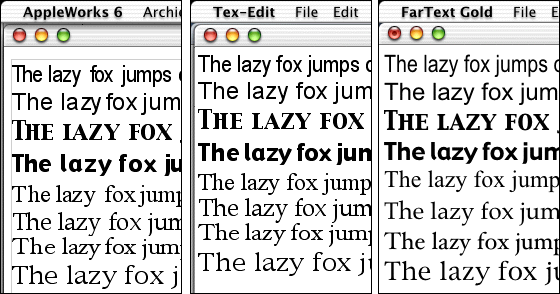
Two rather limited Cocoa-based text-editors displayed fonts beautifully, though, so I guess it is a Carbon problem.
Well, let's start discussing the emails I got from readers. One of the things I wrote in my first piece was that the only carbonized word processor around, AppleWorks 6, could not save as anything but AppleWorks 6. One of the readers, a Mr. Mortensen, wrote me this was no longer the case since Apple released update 6.0.4. AppleWorks can now save as RTF. This is, of course, a far cry from the conversion possibilities this program used to have, but since RTF is the most common exchange format, at least it makes AppleWorks useful again in a real world situation.
Mr. Mortensen also pointed me to the fact that Nisus is moving Nisus Writer to OS X, and Star Office is also on it's way.
I might give Nisus a try when they deliver. Maybe it has grown more stable since the last time I tried it (years ago). I heard they are gonna do a Cocoa port, so it must turn out quite right. Star Office is a Sun product. I never had the opportunity to use it, because they failed to produce a Mac version earlier. Bad thing. I don't think we should forgive Sun for this. At least Microsoft put some effort into porting it's stuff to the Mac.
Talking of Microsoft, another reader wrote that I was not telling the truth about MS Word when I said that this program still wasn't able to print backwards and remember the cursor location. He turned out to be right. Somewhere hidden under a button on the print window is an option to print backwards, and command-option-Z will take your cursor to the place it was the last time you saved and closed the document. This is all very nice, but what I really want is the cursor to automatically jump to the last location, just like most of the other word processors. I don't want to have to learn all kinds of weird key combinations in order to be able to use a computer program. I am a Mac user, remember?
Other people wrote me about a text editor already available for Mac OS X: Tex-Edit plus. I tried it, but it is not a word processor, and it doesn't posses the basic features even a lean word processor needs in order to be usable (see the bottom of this article for a summary). It also crashed a lot. Another text editor, FarText Gold, was actually pretty good. It is the one program I would recommend for now when looking for a lean OS X word processor.
I also got an email from an actual developer, Marc Zeedar, who created the world's first nonlinear word processor, Z-Write. It's a 1.0 product, but it looks pretty promising, and Marc wants to build an OS X Version of Z-Write before the summer. This shouldn't be too difficult, since he wrote it with REALbasic, so it's just a matter of recompiling. He is also planning a future Cocoa version, and that will be the most interesting one, because of the Carbon font bug.
For all of you people who are thinking about developing a lean word processor for OS X, I have the following to say: Try to get your hands on a copy of a discontinued word processor called WriteNow. Study it closely, because this is how a lean word processor should work. It is the best program ever written. And the wonderful thing is that this program was originally developed by NeXT, so I guess you'll get quite close when developing with the Cocoa-tools (a must!).
A lean word processor needs to do the following:
- save as RTF and HTML (at the least)
- remember the cursor location
- print backwards (last page first)
- spellcheck (system wide available in OS x)
- find/replace
- count the words of a complete document or a selection
- have a ruler
- insert headers, footers, footnotes, and endnotes
- insert a page break
- insert another document or a picture
- have separate font, size, and style menus.
- optionally show "invisible" characters.
- offer a page view option.
- change the view size (very important now that we work on bigger and bigger screens)
Share your perspective on the Mac by emailing with "My Turn" as your subject.
Join us on Facebook, follow us on Twitter or Google+, or subscribe to our RSS news feed
Today's Links
- Mac of the Day: 17" MacBook Pro Core Duo, (2006.04.24. The top-end MacBook Pro has a 1680 x 1050, 2.16 GHz Core Duo CPU, and supports Apple's 30" Cinema Display.)
- Support Low End Mac
Recent Content
About LEM Support Usage Privacy Contact
Follow Low End Mac on Twitter
Join Low End Mac on Facebook
Favorite Sites
MacSurfer
Cult of Mac
Shrine of Apple
MacInTouch
MyAppleMenu
InfoMac
The Mac Observer
Accelerate Your Mac
RetroMacCast
The Vintage Mac Museum
Deal Brothers
DealMac
Mac2Sell
Mac Driver Museum
JAG's House
System 6 Heaven
System 7 Today
the pickle's Low-End Mac FAQ
Affiliates
Amazon.com
The iTunes Store
PC Connection Express
Macgo Blu-ray Player
Parallels Desktop for Mac
eBay

