

Internet Charges and Low End Mac
Daniel Jones - 2001.12.03
My Turn is Low End Mac's column for reader-submitted articles. It's your turn to share your thoughts on all things Mac (or iPhone, iPod, etc.) and write for the Mac web. Email your submission to Dan Knight .
Being in the Navy, I find it hard to muster the financial strength to go out and purchase new Apple products after they hit the showroom floor. Most people will probably agree with me that Apple is the flagship computer maker and can charge more because the quality and longevity of their products is next to none. Still, Apple would rather you purchase new units every few years. This brings me to a sore spot: Apple support for older Macs.
Support for older Macs (pre-1998) is almost nonexistent, except for downloads and the knowledge base. Most companies will charge you for support of older units and get a pretty penny for that service. Yes, support for old units is not a moneymaker for Apple. Pre-G3 machines are not even supported for Mac OS X. From a business standpoint there is no real advantage to expending the finances to support older equipment. Others must now bear the burden.
That is where Low End Mac comes into play. LEM is taking over for the lack of support provided by the manufacturer. It is a guiding light into the depths of Macintosh through the ages.
If you are using a Compact or a pre-PPC Mac, do you really think that Apple has the resources to help you if you are having problems finding the right browser or would like to know what memory to use? I don't think so; most PC users don't have to deal with machines 5-10 years old, because they were obsolete the day they were purchased, and require frequent upgrades. So PC companies don't even think about older unit support.
Mac users, on the other hand, can go on using the same machines for years without ever having to upgrade. Apple having to support older equipment is a financial burden and keeps them from their core business of new unit sales and development. That is why Apple cannot afford to keep support around for older units.
Dan Knight and the team at Cobweb Publishing (the publisher of
LEM) have filled the gap. They would like to see 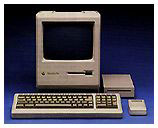 that Plus stay a
usable computer for whomever. There are people out there who would love
nothing more than to be given a Performa 630 CD. For a new user this
might be the perfect machine. Without guidance on what to do for
upgrades, where to go with problems, or just simple system facts about
the computer, the new user might never know what they can or can't do
with their older machines. LEM has taken over the job of tech support
when others have stopped.
that Plus stay a
usable computer for whomever. There are people out there who would love
nothing more than to be given a Performa 630 CD. For a new user this
might be the perfect machine. Without guidance on what to do for
upgrades, where to go with problems, or just simple system facts about
the computer, the new user might never know what they can or can't do
with their older machines. LEM has taken over the job of tech support
when others have stopped.
LEM currently gives away what other companies charge for. With the information they provide you may no longer have to spend money having others do your upgrades. With the assistance of LEM you can do the job yourself for the most part. Whereas before you might have paid labor fees in a computer shop to get your memory and hard drive upgrades, you can do it yourself to avoid all of the extra costs that you might incur due to labor.
Finding out what software works the best or what hardware is compatible is another LEM specialty.
LEM has stated numerous times that ad income has fallen short in these Internet hard times. I say that $2-5 a month would be a small price to pay for a wealth of knowledge not given out anywhere else. When the subscription charges start (if that is the route chosen), I will be standing outside the door six hours early - like at a new OS release. I want to keep a Mac user's "must" online and in business.
I say great job, Dan and crew, and keep up the good work; we are here for you.
Share your perspective on the Mac by emailing with "My Turn" as your subject.
Join us on Facebook, follow us on Twitter or Google+, or subscribe to our RSS news feed
Today's Links
- Mac of the Day: PowerBook 500 Series, introduced 1994.05.16. 'Blackbird' includes a 25 to 33 MHz 68040 along with smart batteries and grayscale or color displays.
- Support Low End Mac
Recent Content
About LEM Support Usage Privacy Contact
Follow Low End Mac on Twitter
Join Low End Mac on Facebook
Favorite Sites
MacSurfer
Cult of Mac
Shrine of Apple
MacInTouch
MyAppleMenu
InfoMac
The Mac Observer
Accelerate Your Mac
RetroMacCast
The Vintage Mac Museum
Deal Brothers
DealMac
Mac2Sell
Mac Driver Museum
JAG's House
System 6 Heaven
System 7 Today
the pickle's Low-End Mac FAQ
Affiliates
Amazon.com
The iTunes Store
PC Connection Express
Macgo Blu-ray Player
Parallels Desktop for Mac
eBay

