

Speeding Up the Internet
Frank C. Modica - 2001.08.10
My Turn is Low End Mac's column for reader-submitted articles. It's your turn to share your thoughts on all things Mac (or iPhone, iPod, etc.) and write for the Mac web. Email your submission to Dan Knight .
Slow moving lines in the grocery store and slow loading Web pages on my low-end PowerBook drive me crazy.
Sometimes I can jump to a faster line at the grocery store, and I've found that text-only browsers can speed up my access to the web.
Most of the sites that I navigate are heavily textual, so I usually
don't need all of the images from traditional 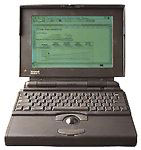 full-featured browsers. I've found that surfing with
text-only browsers on a PowerBook
170 can be a remarkably easy approach for web surfing.
full-featured browsers. I've found that surfing with
text-only browsers on a PowerBook
170 can be a remarkably easy approach for web surfing.
Over the past several weeks I've tried WannaBe, MacWeb, and MacLynx, and I've found that WannaBe meets most of my needs. I really like the speed of this program; most sites will pop up in less than 5 seconds. And Wannabe is a free download from the Gamba Web site.
Wannabe doesn't allow sorts or searches, so I have used MacWeb to snag URLs through searches in Google, and then I'll paste the URL into the WannaBe address bar. However, MacWeb searches feel slow, and using cut and paste for URLs bogs down my surfing, so I've tried a few other tricks to speed things up.
In WannaBe, you can set a homepage when the program loads, so I've set mine to Low End Mac. There are many useful links to the Mac universe, so I've found it to be a good jumping off point. To further expedite my surfing, I've copied a number of URLs on Stickies notes. Stickies are a part of System 7.5, but they've worked well on my PowerBook 170 with system 7.1. Whenever I want to go to a particular site, I simply paste the URL from the Stickies note into the WannaBe address bar.
I've even figured out a work around for searching with Google. I noticed that Google searches all have similar URL's. For instance, a search for Low End Mac and PowerBooks looks like this: <http://www.google.com/search?q=lowendmac+powerbooks&safe=off&start=-9&sa=N>. I copied that URL for one search into a stickies note, and use it as a template for other searches. Whenever I start a search I cut out the words lowendmac and powerbooks and add any other words with a +.
I've also used Lynx because I have ZTerm, a shell account through my ISP. I can connect to my school server using telnet and ZTerm. I'm keeping Lynx as a backup, but after trying Wannabe, I've found Lynx clumsy by comparison. WannaBe has a clean interface that is easy on the eyes.
Of course, if you really want a full-featured browser that will work on a 68030 machine, you can use iCab. It has a small footprint and actually works fine on my PowerBook 170, albeit slowly.
I don't always find that faster line in the grocery store, but text-only browsers almost always speed up my sojourns on the Internet.
Share your perspective on the Mac by emailing with "My Turn" as your subject.
Join us on Facebook, follow us on Twitter or Google+, or subscribe to our RSS news feed
Today's Links
- Mac of the Day: PowerBook 500 Series, introduced 1994.05.16. 'Blackbird' includes a 25 to 33 MHz 68040 along with smart batteries and grayscale or color displays.
- Support Low End Mac
Recent Content
About LEM Support Usage Privacy Contact
Follow Low End Mac on Twitter
Join Low End Mac on Facebook
Favorite Sites
MacSurfer
Cult of Mac
Shrine of Apple
MacInTouch
MyAppleMenu
InfoMac
The Mac Observer
Accelerate Your Mac
RetroMacCast
The Vintage Mac Museum
Deal Brothers
DealMac
Mac2Sell
Mac Driver Museum
JAG's House
System 6 Heaven
System 7 Today
the pickle's Low-End Mac FAQ
Affiliates
Amazon.com
The iTunes Store
PC Connection Express
Macgo Blu-ray Player
Parallels Desktop for Mac
eBay

