Low End Mac Reader Specials
TypeStyler For Mac OS X is Now Shipping! Download The Free Fully Functional 60 Day Tryout at www.typestyler.com
OWC: Get the Right Memory / Ram for your Mac. Top Quality, Competitive Prices, Lifetime Warranty. Expert Support and Video Installation Guidies too! 4.0GB Matched Sets from $87.99, Options up to 32GB. Click here
Don't install Parallels to play poker online! Poker Mac will show you how
to download and install a native Mac poker application such as Full
Tilt Poker Mac.
Laptop Hardware Provided by TechRestore - Overnight Mac & iPod Repairs.
Compare products like desktop computers, apple laptops, apple macs, and LCD Monitors side by side! All the information and reviews to make the best purchasing decision for new mobile phones, sat nav systems, or MP3 players. The Ciao online shopping community makes searching products easy for you.
Mac Musings
Designing a Computer Room
Part 3
27 March 2000 - Dan Knight - Tip Jar
There are a lot of factors involved in designing computer furniture. Will the computer sit on the desk or stand on the floor? Do you want a keyboard drawer? How big is your monitor? What other equipment should be within reach from your chair? I covered a lot of this in the previous column.
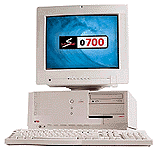
I'm in the position of being able to pick between
a desktop and a minitower - I can put my current system in a desktop J700 case or leave things in the
S900 minitower. It takes a couple
of hours to move all the components between the computers, but that's
not a big deal.
On the other hand, I now have four of the six expansion slots full in my S900. Using the J700, which has only four PCI slots, means I'd have to pull a card to test a new PCI card. That's enough to tip things in favor of the S900.
For my office, access to the system board is important. How else will I be able to review PCI cards and CPU upgrades? For this reason, I don't want my computer on the floor or in some cubby beneath the work surface. It should be at a good working height, leaving the microphone and headphone jacks readily accessible, too.
For convenience, I want my computer to the left of my 19" monitor and workspace on the right.
Ever since our cable modem was installed, I've been getting by with an old computer worktable 48" wide and 26" deep. The monitor hangs several inches over the back, my keyboard sits immediately in front of the monitor, and there's no room for a wrist rest. This is a temporary setup, and my 18" deep computer sits on the floor for now. That's inconvenient for access to the CD-ROM, floppy, and sound ports, but it is temporary.
I've designed a computer table and provided the design to Tim, the contractor who installed our kitchen, a real craftsman. Here's what I've come up with:
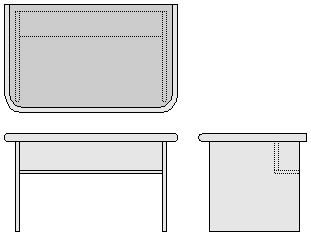
The dimensions are approximate; I'll let the contractor worry about details, but we're looking at about 48" wide, 30" deep, 27" high. There's no keyboard shelf, no drawer, no hutch - just a large work surface. Ideally the top will be Formica to match what's used in the kitchen with 2" rounded hardwood around the edges, possibly cherry to match the kitchen cabinets. Again, I'm leaving the details on that to Tim.
I don't care whether the sides are solid, as in the illustration, or four separate legs. If the hardwood is to expensive, we might go with a different type of edge around the work top.
The one important thing is keeping the wires out of site. Looking through office supply catalogs, I saw that some included a purse shelf, which gave me the idea for a wire and UPS shelf. Instead of being accessible from the front, however, the front blocks view of the UPC and cables; all access is from the rear. It should look very nice, easily hold a 500 VA UPS, and provide some additional rigidity to the desktop.
The plan is three of these: one 30" deep, the other two 20" deep. One will site back-to-back with the main desk, holding my scanner, LaserJet, and possibly a future Epson Stylus Photo printer. The other will hold my wife's Canon MultiPASS c635 (printer, scanner, fax), typewriter, and PowerBook.
I think it's all going to work very nicely. The relatively narrow 48" desk means there's a lot less room for clutter to accumulate than on the 7' x 7' Ambassador desk I've been using for the last year, a great desk that's simply too big for the new computer room.
The key in all this isn't designing the perfect computer desk or
office. There's no such thing. The key is designing the computer desk
and office layout that meets your personal needs and fits the available
space. I think I'll have that for several years with this setup. I'll
provide more details when the tables are constructed.
Dan Knight has been using Macs since 1986, sold Macs for several years, supported them for many more years, and has been publishing Low End Mac since April 1997. If you find Dan's articles helpful, please consider making a donation to his tip jar.
Recent Mac Musings
- IDE Is Dead; Long Live SATA!, 11.04. SATA has displaced parallel ATA. While IDE hard drives haven't disappeared, the best deals are in SATA hard drives.
- The Future of Personal Computing: Personal Servers and Low Cost Portables, 11.02. With WiFi everywhere, virtual network computing, and remote access, your iPhone, iTouch, iTablet, or MacBook Air becomes a gateway to your home or office computer.
- The Late 2009 Mac mini Value Equation, 10.21. We called the Mac mini 'the best value in desktop Macs' two months ago, and the refreshed Mac mini only improves that value.
- The Late 2009 MacBook Value Equation, 10.21. The redesigned consumer MacBook uses unibody construction, gains LED backlighting and battery life, but loses FireWire.
- More in the Mac Musings index.
Links for the Day
- Mac of the Day: 17" iMac G4/800 MHz, July 2002 - The iMac 'grows up' with a 17" 1440 x 900 display.
- Group of the Day: LisaList supports Lisa users.
- November 8 in LEM history: 99: OS 9: I think I like it - 01: The simplified Mac life - Soured on Windows - Flea market Mac - 02: Little room for improvement in new 'Books - Combo drive upgrade for iceBooks - 04: Re-Porter - 05: Fix the old iMac or buy a Mac mini? - Apple's Copland project - 06: MacBook Core 2 - MacBook value equation - Cheap is as cheap does - 07: Problems with Classic mode in Tiger - The G4 Power Mac that won't run Leopard
- Support Low End Mac
Recent Content on Low End Mac
- Quad-Core CPU Makes Sense in MacBook Pro, OS X 10.6 Causing Overheating, Overseas Power, and More, The 'Book Review, 11.06. Also Late 2009 MacBook reviewed, how to add RAM to new MacBook, 18.4in Acer notebook used Intel i7, and SanDisk SSD chosen for Sony VAIO X.
- Dumping Macs for Google Apps, SSD in iMac, Late 2009 iMac Performance Problems, and More, Mac News Review, 11.06. /newsrev/09mnr/1106.html
- WiFi Paranoia, iMac-O-Lantern, Magic Mouse Does Click, Free Clipboard Managers, and More, Charles W. Moore, Miscellaneous Ramblings, 11.05. Also strange time stamps, problem with ColorIt on Intel Mac, and the story behind OS X 10.5.4 install discs.
- QuickTime X in Snow Leopard Imports, Trims, and Publishes Video Quickly and Easily, Alan Zisman, Zis Mac, 11.04. The long, slow process of importing video into iMovie to edit it, then render it to another format, is history as QuickTime X does that much more quickly.
- More links in our archive.
Recent Deals
- Best Mac Pro Deals, 11.03. Used 2.66 GHz 4-core, $1,300; 3.0 8-core. $2,299; refurb 2.66 4-core Nehalem, $2,149; 2.93, $2,549; 2.26 8-core, $2,799; 2.93, $4,999.
- Best iPhone Deals, 11.03. New 8 GB iPhone 3G, $$99; refurb 16 GB 3GS, $149; new, $199; 32 GB, $299.
- Best 12" PowerBook G4 Deals, 11.03. Used 867 MHz SperDrive, $348; 1 GHz, $499; 1.33 Combo, $298; SD, $559; 1.5 Combo, $448; SuperDrive, $589.
- Best Power Mac G3 and PCI Video Card Deals, 11.02. Used beige 300 MHz, $25; G4/366, $49; blue & white 350, $80; 400, $90; 450, $105; PCI video cards from $15; shipping additional.
- Best Power Mac G4 and AGP Video Card Deals, 11.02. Used 400 MHz, $50; 733 MHz, $69; 933 MHz, $209; 1.25 GHz dual, $299.
- Best 15" MacBook Pro Deals, 11.02. Used 2.0 GHz, $800; 2.2, $900; 2.4, $1,000; refurb 2.53, $1,449; 2.66, $1,699; 2.8, $1,949; 3.06, $2,169; new 2.53, $1,579; 2.66, $1,799; more.
- Best Mac mini Deals, 10.30. Used 1.33 GHz G4 mini, $379; 1.42, $389; 1.5, $419; 1.83 GHz Core Duo, $350; Core 2, $439; new 2.26 GHz nVidia, $580; 2.53 GHz, $770; Server, $990.
- Best G4 iBook Deals, 10.30. Used 12" 1.07 GHz Combo, $225; 1.33 GHz, $298; 14" 1 GHz, $349; 1.33 GHz, $398; 1.42 GHz SuperDrive, $498.
- Best Classic Mac OS Deals, 10.30. System 6.0.8 floppies, $10; 7.1, $12; 7.5, $20; 7.5 CD, $4; 7.6 $13; 8.1, $11; 8.5, $20; 8.6, $90; 9.0, $20; 9.2.2, $30.
- More deals in our archive.
About LEM | Support | Usage | Privacy | Contacts
Navigation
Used Mac Dealers
Apple History
Video Cards
Email Lists
Favorite Sites
MacSurfer
MacMinute
MacInTouch
MyAppleMenu
InfoMac
Macs Only!
The Mac Observer
Accelerate Your Mac
RetroMacCast
PB Central
MacWindows
The Vintage Mac
Museum
DealMac
DealsOnTheWeb
Mac2Sell
ramseeker
Mac Driver Museum
JAG's House
System
6 Heaven
System 7 Today
the pickle's Low-End
Mac FAQ
Abandonware
Petition
Mac vs. PC Info
Affiliates
The Apple
Store
Mac
Connection
B&H
MacMall
TechRestore
ExperCom
Crucial
Memory
batteries.com
Advertise
MacMinute
MacInTouch
MyAppleMenu
InfoMac
Macs Only!
The Mac Observer
Accelerate Your Mac
RetroMacCast
PB Central
MacWindows
The Vintage Mac
Museum
DealMac
DealsOnTheWeb
Mac2Sell
ramseeker
Mac Driver Museum
JAG's House
System 6 Heaven
System 7 Today
the pickle's Low-End
Mac FAQ
Abandonware
Petition
Mac vs. PC Info
Mac Connection
B&H
MacMall
TechRestore
ExperCom
Crucial Memory
batteries.com
