
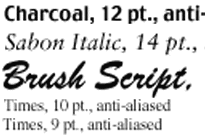
 1998 – Thanks to utilities like SmoothType, ATM, and the anti-aliasing built into Mac OS 8.5, type today can look better on the screen than ever before. For instance, in the black and white sample to the right, anti-aliasing (courtesy of Photoshop) uses shaded pixels in spots where neither black nor white best fits the character.
This is a big improvement from the days of 1-bit displays and less smooth type.
 However, it doesn’t solve all of our problems, as users of the PowerBook G3 with its 1024 x 768 screen have discovered. Anti-aliasing does a wonderful job at 1024 x 768 resolution, but when emulating 800 x 600 or 640 x 480 (as in the image on the right), the combination of anti-aliasing and scaling the 640 x 480 pixel image to an actual 1024 x 768 screen resolution gets, to say the least, fuzzy.
In my previous column, Changing Computing Paradigms, I speculated how a 1920 x 1440 screen, by offering three times as many pixels vertically and horizontally (compared with 640 x 480), could provide a remarkably sharp image. But using simple scaling technology to remap 640 x 480 to such a large screen would result in something like this:

Granted, it would be a lot smaller than it appears here, so it would look better than this, but it would still be a lot of fuzzy text – just smaller fuzzy text.
What if that high resolution screen didn’t simply remap pixels, but actually drew the characters using all those extra pixels?* QuickDraw already has the capability to do this, as shown by displaying text and graphics at 72 dots per inch on the screen while printing them at 144 dpi on an ImageWriter, 300 dpi on an older LaserWriter, and 1440 x 720 dpi on an Epson Stylus, just to give a few examples.
Using all those extra pixels, the above text would look this crisp:

This could give Apple a real visual edge in the laptop market, one place where the PowerBook line already shines. It would surpass Microsoft’s ClearType technology (based on an expired Apple patent), although there’s no reason Apple couldn’t incorporate that idea as well.
Since QuickDraw already has the capability to do this, we can hope Apple will include resolution independent display on future PowerBooks, building the necessary hooks into ROM or the Mac OS so programmers can readily work with the technology. (And, of course, doing the same for the next generation of LCD monitors.)
Feedback
Doug responded to Changing Computing Paradigms, writing:
“This is actually the original intent of QuickDraw.
“The BitMap/PixMap data structures, which are the heart of QuickDraw, have horizontal and vertical dpi [dots per inch] fields. They also have a lot of other fields which were intended to be more general than it actually turned out. These resolution fields are actually looked at when QuickDraw renders output to a printer. The problem is that on the display side everyone took for granted that 72 ppi is the resolution – and that assumption metastasized throughout the entire GUI.
“DisplayPostscript is obviously resolution independent, as QuickDraw was intended to be.
“DisplayPostscript is dead, but functionally PDF succeeds it and it is also resolution independent. It would be a nightmare to restore QuickDraw to its resolution independent roots, but perhaps this will occur as part of the adoption of PDF as the metafile format for Mac OS X. CopyBits comes to mind as one of the biggest offenders. Then, of course, all the GUI code which skirts QuickDraw will have to be excised. Legacy apps will look/behave oddly, although it could be stipulated that all Blue Box apps behaved as before.”
* Editor’s note: This is exactly what Apple did in 2010 when it introduced the iPhone 4 with its “Retina” display. It’s also been built into Mac OS X all along, although Macs didn’t get Retina displays until the 15″ MacBook Pro with Retina Display was released in June 2012.
Keywords: #displaypostscript #quickdraw #resolutionindependentdisplay #resolutionindependence
Short link: https://goo.gl/lDBdZN
searchword: resolutionindependentdisplay
