Low End Mac
Search LEM 
Donate · Amazon.com · MacResQ · Advertise
Other Cobweb sites: Low End Living · Reformed.net
Quicklinks: · Power Macs · 'Books · Early Macs · Week's Best Deals · Best Buys · OS Downloads

Mac Musings - Tip Jar

Low End Mac Reader Specials

Memory To Go Special: MacPro 8 Core Memory 4GB kit $154 / 2GB kit $94, New 2008 iMac 2GB $46. MacBook Pro / MacMini / iMac Intel Core2 DUO 2GB $44 / 1GB $23--Free shipping available.

Download Typestyler, still the Ultimate Styling Tool for Internet, Print and Video Graphics. Works great in Classic with a Native OS X Version on the way. Free Tryout: www.typestyler.com

LA Computer Company: Specials on AppleCare, iMac's, Apple Batteries and Apple A/C Adapters. Also Great prices on Used Apple Computers. Call 1-800-941-7654 Click Here.

OWC: Upgrade to a Larger Hard Drive, Add Additional Drives SATA for Mac Pro and G5s, up to 1.0TB in each Bay. 500GB from $90!

Mac users can finally play Party Poker for Mac. Not only that, they can also learn how to play PokerStars for Mac.

Laptop Hardware Provided by TechRestore - Overnight Mac & iPod Repairs.

Compare products like desktop computers, laptops, and LCD TVs side by side! All the information and reviews to make the best purchasing decision for a new cell phone GPS products or MP3 players. The Ciao network makes searching products easy for you.

MacPro Memory 667Mhz With Apple Spec Heat Sink 2GB $ 82 / 4GB $128 / 8GB $256 - Click to Maximize your Macs...

Plain Old Email

10 February 2000 - Dan Knight

I cut my teeth on personal computers in the Apple II+ era. My first computer was a Commodore VIC-20. My first "real" computer was an 8 MHz Zenith XT-compatible. My first Mac was a Plus - which I got just as the computer was being discontinued.

Through it all, computers communicated in plain ASCII, whether by 300, 1200, or eventually 2400 bps modems. The communication software had to convert one brand of not-quite-ASCII to the defined standard, send it, and convert true ASCII to the computer's character set to display what was received.

It's a good thing computers are good at things like that. To this day Macs and Windows PCs use different character sets. And I'll bet the Unix, Linux, BSD world uses something different from ether - probably something as radical as the full ASCII character set.

Thanks to ASCII, computers around the world can communicate regardless of hardware or OS. They all understand ASCII.

Until maybe eight or ten years ago, email was plain ASCII, too. No bold face. No italic. No fonts. No color. Just text.

I don't know who started the migration to formatted text, but I know AOL had it several years ago. It only worked when sending to other folk on AOL. For the rest of the world, AOL stripped the styling and send plain ASCII text.

The world has become a lot messier since then. Not only is there styled text, but there are several different kinds of styled text. And I have no use for it as far as email is concerned, let alone for embedded graphics.
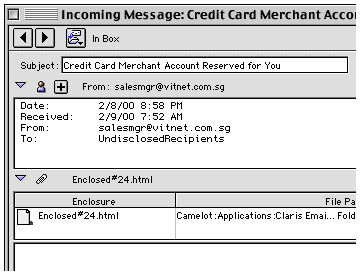
Every day I receive blank email. There's a subject and a sender, but no text. Nothing. Not a word of plain ASCII explaining what the sender has sent me as an attachment.

Because Claris Emailer (as well as many other email clients) doesn't display styled text or embedded graphics, I figure it's probably spam and delete it. Fortunately I noted the return address on one at work before deleting it - it was a quote from our wiring contractor.

It's infuriating. These people are sending email that's 100% attachment, 0% ASCII. In this case, I didn't even have the right version of Microsoft Word to view their document with its embedded graphics. How thoughtless!

At the very least these people should send some plain text saying, "We're sending an attached file in Word 2000 format. Hope you can open it."

Well, something like that.

Others at least send HTML attachments. I can't open them in Emailer. I could open them in Netscape or Internet Explorer, but if there's no text telling me what the attachment is, I don't do that. I just delete it. At least I don't have to worry about these HTML documents linking my computer to a site and downloading who knows what.

Still others send the styled text as ASCII, so I get a plain text email message with all sorts of <commands> in it. That's really hard to read. Most of the time I don't bother - into the deleted mail folder.

ASCII email is an internet standard going back long before the web was created. If people want to extend that standard with styled text and embedded graphics, fine. But why can't they automatically send plain text than any normal email client can read?

It's even more frustrating in my capacity of "listmom" of the dozen or so Low End Mac email lists. My list server is set to reject any message with an attachment. Not only does this prevent viruses from being spread and my mail server from being overwhelmed sending an 18K attachment to 700 subscribers, it also bounces email with styled text attachments and those infernal VCF files. If people want to post to these lists, they have to use the email standard so every subscriber can read their messages.

Still, as I mentioned above, some programs send styled text as plain ASCII within the body of the message. It's terribly unreadable for those with plain text email clients, so I always send these subscribers a message. "Please don't send styled text - a lot of us can't read it properly."

The problem is email clients that don't understand or enforce the email standard. Sure, you can use an email client to send a Word document, a Photoshop image, a sound file, or a web page, but that's not the primary purpose of email. Email can be used simply as a container, but it's intended as a means of communication in and of itself.

Email software needs to understand and facilitate that. It should natter mercilessly at anyone who sends an attachment with no text in the body of the email. It should always send the body of the message as plain ASCII with no styling - always. It should make it easy to disable sending VCF files and styled text attachments. Users shouldn't have to dig through a lot of preferences to do that; there should be a button that tells the software to "send as plain text with no attachments."

But in the whiz-bang world of Outlook Express, Netscape Communicator, and who knows how many other email clients, they seem to spend all their time making things fancier and more powerful, neglecting the need to communicate readily with anyone regardless of their email client.

Since most email software has gone well of the deep end in this respect, it's up to you, the email user, to discover just how you tell your email client how to send plain ASCII text (unless you're fortunate enough to use something like Claris Emailer that understands nothing else).

You have nothing to lose but the ability to send email others can't or won't read - even if they have ancient computers.

<this article available in a printer-friendly version>

Dan Knight has been using Macs since 1986, sold Macs for several years, supported them for many more years, and has been publishing Low End Mac since April 1997. If you find Dan's articles helpful, please consider making a donation to his tip jar.

Recent Mac Musings

Links for the Day

  • Mac of the Day: PowerBook 170, Oct. 1991 - At 25 MHz, the PB 170 was at the top of the original PowerBook line.
  • List of the Day: The iPhone List Low End Mac's forum for discussing and supporting Apple's iPhone.
  • August 30 in LEM history: 99: The truth about USB speed - 00: Could Eazel kill the Mac? - Mac OS 8.1 on a IIci and LC III - 01: Beyond MHz and GHz - Getting a handle on email - Thanks for the IBM PC, Dad - Apple's anniversaries - 02: Mac OS X v10.2 - iBook video out - 04: Things that freak out my students - 06: Nvu and SeaMonkey can't replace Home Page - 07: DVD-RAM support

Recent Content on Low End Mac

  • First 3 Million Mac Quarter, Skinny on Mac mini Pricing, Mac-like gOS, and More, Mac News Review, 08.29. More plan to buy Apple products than ever before, complete reset can fix MobileMac synch problems, Apple boosting computer and smartphone share, and more.
  • New 'Books Likely in September, 17" PowerBook Display Fault Site, SSD Security, and More, The 'Book Review, 08.29. Also 6 ways to speed up your MacBook, next generation MacBook Air CPU, MacBook Air Update, LapStrap carrying solution, rise and fall of ultraportables, bargains from $220 to $2,699, and more.
  • iPhone 3G Reception 'Completely Normal', AT&T International Data Plans for iPhone, and More, iNews Review, 08.29. Also longer life for iPod earbuds, an alternative to MobileMe, new cases and apps for iPhone, AppStoreGems website launched, and more.
  • Best Power Mac G4 Deals, Low End Mac Deals, 08.29. Used 450 MHz AGP, $75; 500, $99; 800 QS, $199; 1.25 GHz MDD, $375; 450 MHz dual, $179; 867 dual, $300; 1 GHz dual, $395; 1.42 dual, $575.
  • Best iBook G3 Deals, Low End Mac Deals, 08.29. Used 300 MHz clamshell, $150; 500 CD, $150; 800, $200; 600 CD-RW, $240; 900 Combo, $300; 14" 600, $360; 900, $400.
  • Best iPod nano Deals, Low End Mac Deals, 08.29. Used 2 GB iPod nano, $89; refurb 3G 4 GB, $99; new, $140; refurb 8 GB, $149; new, $179.
  • 10 Mac Browsers Compared, Simon Royal, Mac Spectrum, 08.28. A look at Internet Explorer, Radon, Opera, Safari, Shiira, iCab, Firefox, Netscape Navigator, Flock, and Camino running in Leopard.
  • Clone and Boot: Another Advantage of the Mac OS, Kev Kitchens, Kitchens Sync, 08.28. Unlike Windows, Apple makes it possible to clone a bootable drive (Classic Mac OS or OS X) and use it with another supported Mac.
  • Best MacBook Deals, Low End Mac Deals, 08.28. Used 1.83 GHz, $799; 2.0 black, $875; refurb 2.1 GHz, $899; 2.4, $1,099; black, $1,299; new 2.1, $1,019 after rebate; 22, $1,094; 2.4, $1,219 a/r; black, $1,394 a/r.
  • Best iMac G5 Deals, Low End Mac Deals, 08.28. Used 17" 1.6 GHz Combo, $499; 1.8 SuperDrive, $530; 2.0, $600; 1.9 iSight, $625; 20" 1.8 GHz, $580; 2.0, $650; 2.1 iSight, $700.
  • Best classic Mac OS Deals, Low End Mac Deals, 08.28. System 6, $10; 7.1, $12; 7.5.1, $4; Mac OS 7.6, $13; 8.0, $13; 8.1, $48; 8.5, $25; 8.6, $20; 9.0, $20; 9.2.2, $20; more.
  • CrossOver Strikes Out, Frank Fox, Stop the Noiz, 08.27. Running Windows apps on a Mac without paying for Windows is great in theory, but actually getting Windows software working is another story.
  • Resurrecting a Dead Pismo, Spotlight Search Tip, and EasyFind a Good File Finder, Charles W. Moore, Miscellaneous Ramblings, 08.27. Lots of tips on bringing a comatose Pismo back to life, a Spotlight file name search tip, and EasyFind as an alternative to Spotlight.
  • Best Intel iMac Deals, Low End Mac Deals, 08.27. Used 17" 1.83 GHz, $625; 20", $599; 2.16, $749; 24", $950; refurb 20" 2.4, $999; 2.66, $1,299; 24" 2.4, $1,299; 2.8, $1,549; new 3.06, $2,094 after rebate; more.
  • Best 15" PowerBook G4 Deals, Low End Mac Deals, 08.27. Used 1.25 GHz Combo, $600; SuperDrive, $650; 1.33 Combo, $640; 1.5, $680; SD, $725; 1.67, $730; hi-res, $800.
  • Best Time Capsule and AirPort Deals, Low End Mac Deals, 08.27. 500 GB Time Capsule, $294; 1 TB, $468; AirPort Extreme Card, $39; 802.11n Base Station, $166; 802.11g AirPort Express, $60; 802.11n, $98.
  • More links in our archive.

Go to the Mac Musings index.


Have a question?
Ask an expert!

Navigation

Used Mac Dealers
Apple History
Best Used Macs
Video Cards
Email Lists
InfoMac's Low
End Mac Forum

Favorite Sites

MacSurfer
MacMinute
MacInTouch
MyAppleMenu
InfoMac
Macs Only!
The Mac Observer
Accelerate Your Mac
RetroMacCast
PB Central
MacWindows
The Vintage Mac
   Museum

DealMac
DealsOnTheWeb
Mac2Sell
ramseeker
Mac Driver Museum
JAG's House
System 6 Heaven
System 7 Today
the pickle's Low-End
   Mac FAQ

Abandonware
   Petition

Mac vs. PC Info

Affiliates

The Apple Store
Mac Connection
MacMall
TechRestore
MacResQ
ExperCom
Crucial Memory
batteries.com

Advertise

Open Link