Mac Musings
Older Macs in the Age of Leopard
The Future of eMacs in the Age of Leopard
Daniel Knight - 2007.10.24, updated
Apple announced the system requirements for Mac OS X 10.5 Leopard last week: a drive that can read the DVD install disc, at least 512 MB of memory, and an 867 MHz G4 or better.
Although 700-800 MHz eMacs aren't officially supported, we have lots of tips on installing Mac OS X 10.5 on unsupported Macs in our article on Unsupported Leopard Installation.
First Generation
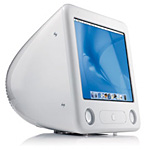
When the iMac moved to a G4 CPU and flat panel display, it priced itself out of the education market. AppleDesigned the eMac to fill that void, using time tested CRT technology with G4 power. The "great white Mac" had a flat 17" CRT display and weighed 50 pounds, making it one of the heaviest Macs ever.
 eMacs are tightly packed,
so if you don't have to open them up, don't. Putting them back together
is a bit tricky, and the cooling system looks a bit fragile.
Fortunately you don't have to take the eMac apart to add memory or an
AirPort card. Replacing the hard drive or optical drive is something
better avoided, but it can be done if you're careful.
eMacs are tightly packed,
so if you don't have to open them up, don't. Putting them back together
is a bit tricky, and the cooling system looks a bit fragile.
Fortunately you don't have to take the eMac apart to add memory or an
AirPort card. Replacing the hard drive or optical drive is something
better avoided, but it can be done if you're careful.
The first eMacs, released in April 2002, ran at 700 MHz or 800 MHz, came with 128 MB or 256 MB of RAM (expandable to 1 GB), and included a 40 GB hard drive, often a 5400 rpm one. These eMacs have three USB 1.1 ports, two FireWire 400 ports, and a slot for the original Apple AirPort Card. Maximum resolution is 1280 x 960, and this is supported by GeForce 2 MX 3D AGP 2x graphics and 32 MB of dedicated video memory.
Initially sold only to the education market, Apple released the eMac to the consumer market in June 2002. My first eMac was a 700 MHz Combo drive model bought refurbished when the second generation came to market.
First generation eMacs are not officially supported by Mac OS X 10.5, but they should be able to run it reasonably well, especially with maximum RAM ($120 for two 512 MB modules) and a 7200 rpm hard drive. Because of the dangers of damaging the cooling system and other components, it probably makes more sense to use an external hard drive with the eMac than replace the internal drive.
Second Generation
Apple updated the eMacs like clockwork - once a year in April. The second generation switched from Nvidia GeForce graphics to an ATI Radeon 7500 AGP 4x chip set and bumped clock speeds to 800 MHz and 1 GHz. The 2003 eMacs use PC133 memory, and you can currently buy 512 MB modules for under $45 each.
These were the first eMacs to use AirPort Extreme, Apple's name for 802.11g WiFi and nearly five times as fast as the earlier 802.11b specification. As with the first generation eMacs, these tended to come with slower, lower cost hard drives. For best performance, 1 GB of RAM and a 7200 rpm hard drive are recommended.
The 1 GHz 2003 eMac is the oldest eMac officially supported by Leopard.
Third Generation
The 2004 eMac was the first to include USB 2.0 ports, and graphics was updated with the ATI Radeon 9200 AGP 4x chip set, still using 32 MB of dedicated memory. There was an entry-level 1 GHz eMac with CD-ROM and no modem, as well as 1.25 GHz Combo drive and SuperDrive models.
Although officially supported to 1 GB, users have discovered that these eMacs can handle up to 2 GB of RAM with a pair of 1 GB PC2700 memory modules. If you really want to unleash Mac OS X (any version), a big, fast hard drive and more than 1 GB of RAM will do it. You can buy 512 MB modules for under $15 nowadays to reach 1 GB total RAM for $30; 1 GB modules aren't cheap, with prices starting just below $50.
I have a pair of these, one use by my wife (a convert from Windows when her Win2K PC gave up on her) and one that's awaiting a clean installation of Tiger, which I hope will resolve a problem with screen spanning (if I disable it using Screen Spanning Doctor, it only displays a 640 x 480 desktop in the middle of the screen; if I enable spanning, the main display is fixed at 1024 x 768 with a virtual 640 x 480 display off to the side). These eMacs are where I learned what a bear it is to take apart and reassemble an eMac, and I've done both hard drive and optical drive upgrades in them, too often having to go back in because of a reassembly error.
Most third generation eMacs seem to have shipped with 7200 rpm hard drives, especially those with 80 GB hard drives, which makes them that much readier for Leopard. I'm thinking of partitioning one of the eMacs so I can try Leopard on it - but not for a while.
Fourth Generation
In 2005, Apple unveiled the final version of the eMac, boosting CPU speed to 1.42 GHz for most users, 1.25 GHz for the low-end CD-ROM model. In addition to more CPU speed, Apple upped the ante with ATI Radeon 9600 AGP 4x chip set and 64 MB of video memory - the only eMac with more than 32 MB of VRAM. The 2005 eMacs use the same PC2700 memory as the 2004 model.
Both the third and fourth generation eMacs are fully supported for Leopard, and it should run quite nicely with sufficient RAM.
Further Reading
- Low End Mac's best used eMac deals, updated biweekly.
Join us on Facebook, follow us on Twitter or Google+, or subscribe to our RSS news feed
Dan Knight has been using Macs since 1986, sold Macs for several years, supported them for many more years, and has been publishing Low End Mac since April 1997. If you find Dan's articles helpful, please consider making a donation to his tip jar.
Links for the Day
- Mac of the Day: Motorola StarMax 3000, introduced 1999.09.07. This inexpensive clone used lots of off-the-shelf parts.
- Support Low End Mac