Mac Musings
Older Macs in the Age of Leopard
The Future of G4 iMacs in the Age of Leopard
Daniel Knight - 2007.10.18, updated
Apple has announced the system requirements for Mac OS X 10.5 Leopard: a drive that can read the DVD install disc, at least 512 MB of memory, and an 867 MHz G4 or better.
Several G4 iMacs aren't officially supported, but we have lots of tips on installing Mac OS X 10.5 on unsupported Macs in our article on Unsupported Leopard Installation.
First Generation
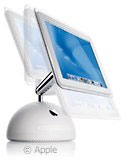
Those who subscribed to Time magazine were the first to learn about the flat panel, G4-based iMac, as it appeared on the cover of the magazine before Macworld Expo opened. Still, few would have conceived of the design Apple came up with for this one - it looks like half a volleyball with a flat screen attached to a stick. It's even more distinctive than the G3 iMac, which saw a handful of lookalikes.
 The first
generation G4 iMac had a 700 MHz or 800 MHz G4 processor, a 1024 x 768
15" display that almost seemed to float above the hemisphere base, and
Nvidia GeForce 2 MX with AGP 2x support and 32 MB of VRAM. Standard
memory was 128 MB or 256 MB, expandable to 1 GB. There are two
FireWire 400 ports and three USB 1.1 ports, and it supports the
original AirPort card for wireless networking.
The first
generation G4 iMac had a 700 MHz or 800 MHz G4 processor, a 1024 x 768
15" display that almost seemed to float above the hemisphere base, and
Nvidia GeForce 2 MX with AGP 2x support and 32 MB of VRAM. Standard
memory was 128 MB or 256 MB, expandable to 1 GB. There are two
FireWire 400 ports and three USB 1.1 ports, and it supports the
original AirPort card for wireless networking.
Although not officially supported under Leopard, these should handle it reasonably well with 1 GB of PC133 RAM installed (from $120 for two 512 MB modules these days) and a faster (and probably larger) hard drive. The drive bus in G4 iMacs supports drives over 128 GB in size, a limitation found in many older Macs.
The 15" iMac was joined by an 800 MHz 17" iMac in July. It has a 1440 x 900 display and weighed 1-1/2 pounds more.
Second Generation
The iMac was updated just over a year later in Feb. 2003. The newer 15" model runs at 800 MHz, includes a Combo drive and 256 MB of RAM, and had the same graphics chipset as the first generation. It also uses the same PC133 memory. The 17" iMac G4 runs at 1 GHz, uses PC2100 memory (as low as $25 per 512 MB module), and supports AirPort Extreme (the 15" model still used the original AirPort). Memory remains limited to 1 GB.
Apple made a 7200 rpm hard drive standard on the top-end iMac, which makes it well suited for Leopard and other flavors of Mac OS X. The 17" 1 GHz iMac G4 is the oldest iMac officially supported by Leopard.
Third Generation
The next revision came to market in Sept. 2003 - the first iMacs to support USB 2.0. The 15" model had pretty much the same specs as earlier 17" model, but with USB 2.0 added. The 17" iMac G4 bumped clock speed to 1.25 GHz, and these were joined by a 20" 1.25 GHz model in November 2003. These iMacs all use PC2700 memory, and you can pick up a pair of 512 MB modules for under $30 nowadays. Although not supported by Apple, you can use 1 GB memory modules in these iMacs, but at a cost of $48 or more per module, it may make more sense to stick with a pair of 512 MB sticks.
The entire third generation of G4 iMacs is officially supported by Leopard, and to get the most out of the next version of OS X, you will want to bring memory to at least 1 GB. The 17" and 20" iMacs came with 7200 rpm drives, but the 15" may have a slower drive. If so, replacing it with a 7200 rpm drive will boost overall performance.1
Further Reading
- Low End Mac's best used iMac G4 deals, updated biweekly.
Join us on Facebook, follow us on Twitter or Google+, or subscribe to our RSS news feed
Dan Knight has been using Macs since 1986, sold Macs for several years, supported them for many more years, and has been publishing Low End Mac since April 1997. If you find Dan's articles helpful, please consider making a donation to his tip jar.
Links for the Day
- Mac of the Day: Power Mac 8200, introduced 1996.04.22. The minitower version of 7200 was never sold in America.
- Support Low End Mac