Mac Musings
Older Macs in the Age of Leopard
The Future of 'Mirrored Drive Doors' Power Macs in the Age of Leopard
Daniel Knight - 2007.10.09
Apple introduced a new look to the Power Mac G4 in August 2002 with the first "Mirrored Drive Doors" (MDD) models. They also fully embraced dual processors, as the three models introduced then each had a pair of PowerPC 7455 CPUs
With Mac OS X 10.5 Leopard rumored to require an 867 MHz G4 CPU, the MDD Power Macs should be officially supported.
Mirrored Drive Doors
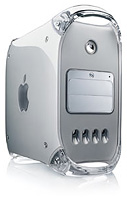 The Summer 2002 Power Mac G4s shipped
with a pair of 867 MHz, 1 GHz, or 1.25 GHz G4 processors, and the
two faster models adopted a 167 MHz system bus, the fastest ever used
by any G4 Mac. For the first time, 7200 rpm hard drives were the norm
on all configurations. These were the first Power Macs to support up to
2 GB of RAM, and they shipped with both Mac OS 9.2.2 and OS X
10.2. These models provide full support for Quartz
Extreme.
The Summer 2002 Power Mac G4s shipped
with a pair of 867 MHz, 1 GHz, or 1.25 GHz G4 processors, and the
two faster models adopted a 167 MHz system bus, the fastest ever used
by any G4 Mac. For the first time, 7200 rpm hard drives were the norm
on all configurations. These were the first Power Macs to support up to
2 GB of RAM, and they shipped with both Mac OS 9.2.2 and OS X
10.2. These models provide full support for Quartz
Extreme.
The 867 MHz MDD has a 133 MHz system bus, 1 MB of level 3 (L3) cache per CPU, and normally shipped with Nvidia GeForce 4 MX graphics on an AGP 4x bus and a Combo drive. The 1 GHz also had 1 MB of L3 cache per CPU, a Combo drive, and an ATI Radeon 9000 Pro video card by default. The 1.25 GHz MDD included 2 MB of L3 cache per CPU and shipped with a 4x SuperDrive.
FireWire 800
The fastest G4 Power Mac ever was introduced in January 2003, and it introduced two new features to the Power Mac: FireWire 800 (FW800) and the inability to boot into any version of the classic Mac OS. This OS X-only model shipped with Mac OS X 10.2.3, and it reintroduced the single CPU Power Mac.
The entry-level FW800 model had a single 1 GHz PowerPC 7455 CPU with a 1 MB L3 cache. It included the same GeForce 4 graphics and Combo drive as the previous entry-level MDD Power Mac and was the only FW800 model with a 133 MHz system bus.
The midrange FW800 model had dual 1.25 GHz CPUs, each with 1 MB of L3 cache, and also used the same ATI Radeon 9000 Pro graphics as the previous MDD design. It included a Combo drive by default.
At the top of the line was a dual 1.42 GHz model with 2 MB of L3 cache per CPU and a SuperDrive.
The Last Gasp for OS 9
In June 2003, Apple reintroduced booting into the classic Mac OS with a pair of 1.25 GHz G4 MDD models, one with a single CPU, the other with two (essentially the top-end Summer 2002 model), as there continued to be demand for a Power Mac that could run classic apps natively. The single processor model has 1 MB of L3 cache and Radeon 9000 Pro graphics.
Approaching the Age of Leopard
The Mirrored Drive Doors and FireWire 800 Power Macs should be fully supported by Mac OS X 10.5 Leopard, and their ability to support up to 2 GB of RAM will be a real plus for heavy users. (At current prices, you can buy 2 GB of RAM for as little as $100.)
There are very few CPU upgrades available for Power Macs with the 167 MHz bus. Other World Computing lists only two: 1.6 GHz and 1.8 GHz dual PowerPC 7447A Sonnet upgrades currently retailing for US$449 and $599. Giga Designs sells a 1.33 GHz PowerPC 7455B upgrade for $499.
Frankly, it would be hard to justify upgrading the top-end 1.42 GHz Power Mac G4 for at best a 20% boost in performance. The dual 1.25 GHz models might see a 40% boost in computing power with a 1.8 GHz CPU, which is pretty iffy in terms of cost vs. benefit. That said, these upgrades could make economic sense for a single processor or sub-1.25 GHz model.
These Power Mac run Mac OS X 10.4 very nicely; we're using a dual 1 GHz MDD Power Mac as our main production machine at Low End Mac (it's also installed on our 1.25 GHz eMac). We expect these Macs will handle Leopard very nicely.
With the right AGP video card, you can have full Core Image support, and if you're willing to "flash" the Windows version of the Sapphire Radeon 9600, which you can buy refurbished for $27 on eBay.
Bear in mind that it's not always easy to find Mac video cards. One workaround is to flash the ROMs in a Radeon or GeForce card intended for Windows PCs, and The Mac Elite is a great resource for people who want to do that. They also have an article that explains how to get some AGP 8x cards working in older G4 Power Macs with nonstandard AGP sockets.
Closing Thoughts
We're Low End Mac, and although we're disappointed that it appears that all G3 Macs and a lot of G4 Macs are not going to be supported by Leopard, we think that the Mirrored Drive Doors and FireWire 800 Power Macs should be very good Leopard machines.
For those interested in running Leopard on these Power Macs, we recommend dual processors, lots of RAM (they support up to 2 GB), and an AGP video card that supports Core Image for best performance.
Further Reading
- Low End Mac's best used Power Mac G4 deals, updated biweekly
- Guide to Power Mac G4 Upgrades for Power Mac G4 with AGP Graphics
- Make AGP 8x video cards work in G4 Power Macs, The Mac Elite. Instructions for disabling pins 3 and 11 so Mac compatible AGP 8x video cards will work in most G4 Power Macs.