Mac Musings
Disadvantage Macintosh
Daniel Knight - 2007.10.03
Sometimes the problem isn't where you think it is - something I learned through reader feedback and further testing. While Mac formatted hard drives and flash drives aren't compatible with Windows PCs, the current Mac OS does burn hybrid CDs that can be recognized on all PCs. The problem appears to be hardware: The particular photo kiosk didn't recognize this disc. For the full story, see our Low End Mac Mailbag follow up, Disadvantage Macintosh Debunked. dk
Sometimes it sucks to be a Mac user.
Not often, and I apologize to anyone offended by my choice of verbs, but there are times when being a Mac user makes it very difficult to do things that are easy to do on Windows PCs.
For instance, last week we got a lot of photos at our church musical. We imported them into iPhoto. We used the marvelous Enhance command to make a lot of them look much better than they were originally. And then we used iPhoto's Export command to burn one to CD so we could get an 8x10 printed for the director.
Can you guess what happened when my wife got to Sam's Club? Their photo equipment couldn't read the CD-R.
Can't Read This
Why not? Because Macs don't burn CDs that anyone but Mac users can mount without special software.
Likewise, you get better performance with flash drives on your Mac when you reformat them using the Mac file system. But just try to use that flash drive to move files to or from a Windows PC. No dice, unless they happen to have MacDrive installed.
And what are the odds of that?
Fortunately it's not hard to copy everything on your flash drive to a folder, use Disk Utility to reformat it using the MS-DOS file system, and then copy everything back to it.

Using Disk Utility to reformat a flash drive for Windows.
You can't do that with CD-R discs. In fact, there appears to be no way to burn a data CD in OS X that Windows and Linux machines can use without resorting to third-party software.
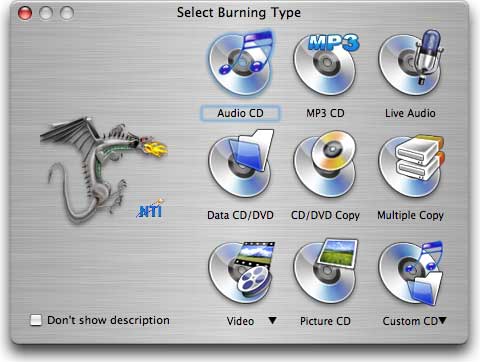
DragonBurn gives you lots of burning options.
I've been using DragonBurn on my Macs for years. It lets me copy CDs and DVDs, even make multiple copies. It lets me save a disc image so I can easily burn another CD or DVD later on. And it lets me create data CDs that the rest of the world can access.
Macs Only
I have to wonder why Apple doesn't give us the ability to burn data discs that can be mounted on Windows computers without the expense of third-party software? Mac OS X supports networking with Windows computers and even using shared Windows printers. And as far back as 1987, Apple made it possible to access DOS formatted floppies on Macs. But when it comes to burning your data to a CD or DVD, OS X gives no choice but to use Apple's incompatible disc format.
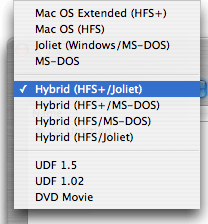 DragonBurn gives me a host of options: Macintosh HFS
or HFS+, Joliet, MS-DOS, and hybrid discs that work well in both the
Mac and Windows worlds. It even adds a great feature that you don't get
with OS X: The ability to burn multiple sessions on a CD-R instead
of just being able to write to it once. It's a great way to archive a
project at each step along the way.
DragonBurn gives me a host of options: Macintosh HFS
or HFS+, Joliet, MS-DOS, and hybrid discs that work well in both the
Mac and Windows worlds. It even adds a great feature that you don't get
with OS X: The ability to burn multiple sessions on a CD-R instead
of just being able to write to it once. It's a great way to archive a
project at each step along the way.
My choice is to burn HFS+/Joliet hybrid CDs that will work readily with both Macs and Windows.
Mac Superiority
Of course, there's another problem with multiple sessions on a CD. While my Macs can mount them just fine and show every session, the Windows users I've given multisession discs to can only see the last session burned. This may be an issue with Windows XP or drivers, but I haven't yet had a Windows user be able to mount both sessions.
The drawback to all of this is that DragonBurn is nowhere near as easy to use as Apple's burning software. With OS X, you just pop in a blank disc, drag files to it or have your app (such as iPhoto) write files to it, and then burn the disc. With DragonBurn you have to run the app, choose what you want to do, drag files to the program's window, and then select burn.
It doesn't sound like a lot more work, but the big difference between DragonBurn and the native OS X burning is that you can't write to a DragonBurn disc from your apps. There's no way to have iPhoto write to a Joliet, MS-DOS, or hybrid disc either within OS X or by calling on DragonBurn. (I'm not a Toast user, but I suspect it's the same story there. DragonBurn costs half as much.)
The Work Around
So how do you take your images from iPhoto and get them on a CD that photo kiosks can use?
You have to take an extra step. Instead of having iPhoto export to a blank CD, you have to export to another locations first. That could be a flash drive, a network volume, or a folder on your hard drive.
After you've done that, launch DragonBurn, Toast, or whatever other disc burning utility you might have, choose a format compatible with Windows, and drag your files over. Now you can burn a CD that any Windows computer and any photo kiosk should recognize.
A Serious Oversight
It would be a wonderful thing if Apple addressed this in an update to Mac OS X, as it's a terrible oversight that while Macs can mount MS-DOS volumes, connect to Windows networks, and print to shared Windows printers, they can't burn a CD that you can mount on a Windows PC or take to your favorite photo kiosk.
The Mac experience is wonderful overall. Everything is so well integrated. Things mostly just work - until you want to burn a CD so you can print your favorite images from iPhoto at the corner pharmacy, superstore, or whatever. Then you're up a creek without a paddle.
There are several paddles available. Here are some you might want to look at:
- Toast Titanium, $80-100
- DragonBurn, $40
- Burn, free
- Burnz, free
- Disc Blaze, $20 shareware
- LiquidCD, free
This list is not exhaustive, and DragonBurn is the only one I've used other than Toast 4.0 or so - a long time ago. The freeware and shareware programs listed have received 4-5 star ratings on MacUpdate, which indicates that people who have tried them have found them to work as advertised. (DragonBurn has very mixed user reviews on MacUpdate, so I suggest you try before you buy if the freeware and shareware alternatives don't meet your needs.)
Apple, this is something you really need to address. Without native support for data CDs that work in the rest of the world, a lot of Mac users are going to be very disappointed when they take a CD of iPhoto images to a photo kiosk or burn a CD of car show, Christmas, or whatever photos for a friend only to discover that the disc can't be read.