
1998: The original Macintosh of 1984 was an incredibly cool computer – but impractical. With just 128 KB of RAM and a single 400 KB floppy drive, using it was an exercise in frustration involving a lot of disk swaps. A second floppy drive made the Macintosh a much more practical computer, but it was still quite limited.
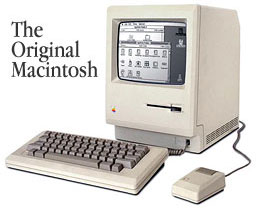
Introduced in September 1984, the Macintosh 512K (a.k.a. “Fat Mac”) was much more practical. With 512 KB of memory, it minimized the tedious disk swapping. While the original Mac showed what could be done, the Fat Mac was the first practical Macintosh – Apple even had a 20 MB serial hard drive available for it.
The Mac Plus was introduced on the Mac’s second anniversary. Although it shared the same compact case, 9″ b&w screen, and 8 MHz 68000 CPU as the earlier models, it had several innovations”
- 1 MB RAM, expandable to 4 MB, using SIMMs
- SCSI port for attaching up to seven external devices
- double-sided floppy drive, 800 KB capacity
- numeric keypad on the keyboard
The Plus was joined by the 512Ke in April 1984. Like the Plus, it used double-sided floppies. Like the earlier 512K, it did not have a SCSI port, nor was it designed to accept memory upgrades. It was not a practical alternative to the Plus, nor was it particularly popular.
These were the last quiet Macs: no fan, and no internal hard drive.
The Mac Plus had the longest product life of any Macintosh; it was kept in the line for 4 years and 9 months, finally phased out in October 1990. Apple continued parts support for it until August 31, 1998.
Preparing Your Mac Plus for Use
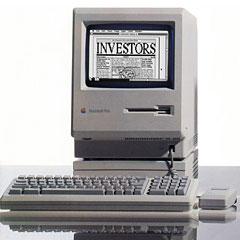
Macintosh Plus
The first Mac I ever used was a Plus. Several years later, the first Mac I owned was also a Plus.
Memory
I strongly recommend upgrading your Mac Plus to 4 MB if at all possible (see our Memory Upgrade Guide). The extra memory will let you comfortably use System 6 with MultiFinder or System 7. You can go as high as System 7.5.5, which is the version I’m most comfortable with; but with less than 4 MB, System 7 or later is not very practical, also due to its slow 8 MHz CPU. (Save money – buy used SIMMs from someone who has upgraded a newer Mac. That shouldn’t cost more than $20 in the U.S., and possibly a good deal less.)
Hard Drive
I recommend a hard drive, preferably a newer drive of at least 40 MB capacity. Older hard drives didn’t have decent data buffers, so they had to send data no faster than the computer could receive it. With the Plus, that usually meant three rotations of the drive platter to send one track’s worth of data. Newer drives with larger buffers can read the entire track in one pass, buffering data in memory and then sending it as fast as the computer can take it.
I also recommend SCSI Accelerator 2.1 (pre-System 7) and SCSI Accelerator 7.0 (requires System 7) to further improve hard drive throughput, whether you’re using a buffered drive or an older one.
Cool It
The earliest Macs were designed to cool by convection. Bumping memory to 4 MB can increase the heat level inside your Plus. You may want to consider a cooling fan, although they are hard to come by these days. (I never used one on my Plus.)
Faster
What I don’t recommend, unless you’re inordinately fond of your Plus or find an incredible bargain, is putting in an accelerator. With a used SE/30 going for under $100, you’re better off with a faster used Mac than dropping more money into a Plus.
For the record, I put a $200 Brainstorm upgrade in my Mac Plus, which replaced the original 8 MHz CPU with a 16 MHz 68000 CPU that more than doubled overall speed. That was probably 5-6 years before I wrote this article when it still made sense to invest in speeding up the Mac Plus.
Don’t Fix It
Likewise, at this point, I don’t recommend spending much money, if any, to repair a Mac Plus. Used ones can cost less than the repair. Faster used Macs can cost less than repairing your Plus.
Uses for Your Mac Plus
- Just use it. It may not be fast, but it works. You can run ClarisWorks 3 (requires System 7), Microsoft Word 5.1a, MacWrite Pro v1, FileMaker Pro 3, Excel 2.2, HyperCard, and a host of other programs. (For a fairly extensive list, see Applications Compatible with 68000-based Macs.)
- You can connect a Mac Plus to the internet to read email and even surf the web – but don’t expect fast graphics (if any).
- With all the talk of network computers today, you’d think it was a new idea. It’s not. I was using my Mac Plus as a network computer back in 1990. Boot from a floppy, connect to the server over the network, launch Excel from the server. (I didn’t have a second floppy or hard drive at the time. This was slow, but it worked – and it let me work.)
- If you have several Macs in the house tied together with LocalTalk, a Mac Plus makes an adequate file server. For light use, you can get by with File Sharing in System 7. For heavier use, you might want to consider AppleShare 3. Either way, be sure to read Settings Up a Home File Server. And remember, you can run as large a SCSI hard drive as you can afford, although throughput will be limited.
- If you need ethernet, look for a SCSI-ethernet adapter. These plug into the SCSI port and provide decent ethernet performance. Again, you will find SCSI throughput on the Plus is somewhat limited, but this will still be a lot faster than LocalTalk.
- The Mac Plus plays games. Dark Castle was simply stupendous on the Plus – best b&w graphics I’ve ever seen in a game (but it won’t run with an accelerator). It’s no Nintendo or iMac, but there are a lot of fun games that run on the Plus. (Educational software, too.)
- Set it up in the kitchen or near the phone and use it as a message center. Use Stickies (part of System 7) to leave messages for family members.
- Add Eudora Lite, network it, and use it as a general purpose email terminal in the workplace. You can tunnel TCP/IP over LocalTalk, which is plenty fast for sending and receiving text.
- Use it to train friends, children, or new employees on the Mac. No clutter. It’s not intimidating. And whatever Mac you move them to next will seem incredibly powerful compared with the Plus.
- Last resort, and please only do this if your Plus has died and you promise to take care of the fish: Build a Macquarium.
Suggestions from the Field
- Into music and MIDI? The Mac Plus makes an excellent, compact, portable MIDI controller. (Thanks, Kevin Pedersen)
- Home automation with the X-10 system using Xtensions from <http://www.shed.com/> or <http://www.smarthome.com/mac.html> (requires System 7.1 or later). There is a lot of information to be found about home automation with a Mac in the July 1997 issue of MacAddict Magazine. (Thanks, Kevin Connery and Fang-Pin Chang )
- With a modem and Zterm or telnet, use the Plus as a Unix terminal. (Thanks, Martin Wynne)
- Computerized recipe file in the kitchen (you might want to cover the keyboard with plastic).
- A school is using a Mac Plus to allow TI-80 series graphing calculators to upload and download programs. (Thanks, MtEast)
- With a properly equipped modem, a Mac Plus can do caller ID. (Thanks, William Kushner)
Other suggestions?
keywords: #macplus
short link: https://goo.gl/YBa79Y
