
1999: There’s a lot to like about iCab, the Mac-only browser from Germany – but is it good enough to replace Netscape or Internet Explorer?
 I’ve set iCab as my default browser with Internet Setup Assistant. This means that any time I follow a link in an email message (I use Claris Emailer) or Sherlock, I go to iCab.
Still, I also depend on WebChecker for all the sites I visit daily. Since WebChecker doesn’t work with iCab, I use Netscape 4.08 a lot.
The Good
Keep in mind that the current versions of iCab are preview releases, not finished products. Each new version adds some polish and features.
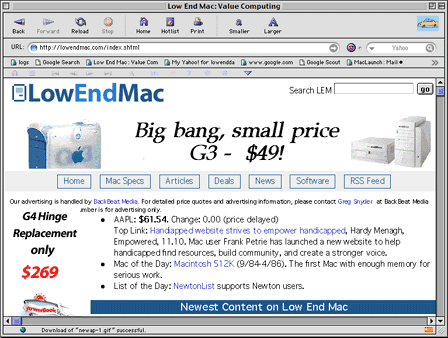
As I write this, Preview 1.5 is current, available in both PowerPC and 68K versions.
Program Size
One big advantage of iCab: It’s compact. Where both Netscape Communicator and Microsoft Internet Explorer are 10 MB+ downloads, the entire unstuffed iCab folder is only 2.3 MB. On a Power Mac, it can run in as little as 3162 KB, although suggested size is 3282 KB. (Using Virtual Memory decreases this by 1882 KB.)
For best performance, I suggest adding 2000 KB or more. Just like the other browsers, it is less responsive with less memory, more responsive with more.
Compatibility
There are two versions of iCab, one for the PowerPC Macs, the other for earlier Macs. The 68k version will run in as little as 2.7 MB on any Mac with Color QuickDraw, which is just about everything since the 1987 Mac II. (It’s also a bit smaller than the PPC version, using just 1.8 MB of hard drive space.)
Font Size
Another great iCab feature is the ability to change font sizes on the fly. Internet Explorer offers this on a limited basis, but you can’t define your default font as a certain point size or make the type larger or smaller beyond its 7 predefined sizes. Netscape lets you change your default font size in Preferences, but it has a tendency to crash afterward.
With iCab, the Smaller button will make text smaller and smaller until it becomes completely unreadable. And the Larger button can make text positively huge. Unlike Netscape, you don’t have to open Preferences to change font sizes. And unlike Internet Explorer, you aren’t limited to the few sizes Microsoft predefines.
With so many sites designed for Windows and using very small type (“size = -2”), the ability to click Larger once or twice and have readable text is a real blessing. I think it’s my favorite iCab feature.
Cut and Paste
As a webmaster, I spend a lot of time cutting and pasting URLs and quotes from articles when creating links on Low End Mac, the iMac channel, MacInSchool, etc.
Netscape has an annoying habit of deselecting the URL when the page loads, meaning I have to put the cursor in the URL line, select all, then copy. iCab keeps the URL selected. Nice.
And for some links, I like to pull a line or two from the article, using that to help explain the headline or as a teaser to get visitors to follow what I see as a significant article. When I cut and paste from Netscape, each line on the browser is a separate line of text. Worse, if it’s in a table cell or inset from the side of the page, I get a lot of blank spaces with the text.
I don’t have that problem with iCab. Instead, I get a continuous line of text. No need to remove all those spaces or remove line feeds. Very nice.
Looking Different
Unlike either Netscape or Internet Explorer, iCab lets you define body type and display type separately. If the page designer hasn’t specified the type, you can have iCab display headlines in Charcoal and body text in Palatino – or whatever your choice is.
This isn’t a big deal, but it is a neat idea. Nice to see someone else thinking different.
Designing Different
As a webmaster, I like to look at the source code of interesting pages. iCab gives you a button for that in the icon bar.
Again, not a big deal, but a clever idea that shows iCab’s bias toward good coding.
Judging Different
Speaking of good code, iCab even has a smiley face on the URL line. If it smiles, the page you’re viewing is fully HTML compliant (you can even pick which version and at what level in the preferences). If it frowns, the page is not fully compliant.
Clicking the face will tell you just how noncompliant the page is.
Regardless, it still displays the page properly even when the code isn’t completely up to spec. (If you’re using iCab, you’ll notice that none of my pages are 100% compliant. They work; that’s all I’m really concerned about.)
Yet again, a clever feature, although considering how rare fully compliant pages are, you have to wonder what’s the thinking behind it.
The Bad
Speed
At this point, iCab can be very slow. Scrolling is slow, often very slow. Graphic-dominated pages are slow, especially when the webmaster doesn’t bother to specify image sizes (shame on them). Giving iCab more memory does speed it up – as is true for any browser.
- One interesting thing about using both browsers: I find some sites are much faster with iCab, others with Netscape. For instance, Slashdot can be pretty poky loading in Netscape but comes in very quickly with iCab.
Too Many Windows
One annoying feature is that Sherlock always opens a new browser window in iCab. It didn’t do that with Netscape, so I’m guessing this is an iCab issue. The drawback here is that each window eats up memory and slows down iCab.
If there’s a setting in iCab to change this behavior, I can’t find it. So I have to remember to close windows when I’m using Sherlock for Web searches – otherwise, iCab gets slower and slower.
External Style Sheets
Programmers are lazy by nature. Or, put another way, we always want to find the most efficient way of doing things.
This doesn’t always translate over to web designers, but in my case, I’ve decided that using external cascading style sheets (CSS) lets me overhaul the look of an entire site by changing just a few files. The style sheet defines the typeface, color of different styles (heading 1 can be one color, heading 2 another, etc.), link behavior, and more.
Both Netscape (4.0 and later) and Internet Explorer (3.0 and later) offer some, albeit incomplete, support for external style sheets. Estimates are that 85% of the browsers in use today support external CSS.
To date, iCab does not.
It will. In fact, the iCab team hopes to completely implement the CSS specification – something neither Netscape nor Microsoft currently does.
Unsupported Macs
Maybe it was too much to hope iCab would run on a Mac SE.
Although there is a 680×0 version of iCab, it requires Open Transport. That means it works with 68020, 030, and 040 machines, but not with 68000-based Macs.
If you’re using a Plus, SE, or Classic, you’re out of luck. Even if you can free the 2.7 MB iCab needs to run, it won’t run on those models.
Rough Edges
Sometimes iCab just won’t go back to the previous page, especially ones created by CGIs. This is a real problem when I want to check site stats on Mac Promote Xchange.
You can’t use iCab with My Yahoo, either, unless you have iCab tell Yahoo your browser type is Mozilla. (That’s Yahoo’s problem, not iCab’s. Commendably, iCab can be told to “lie” to sites like My Yahoo.)
Conclusion
Because of the shortcomings, and especially because it doesn’t interface with WebChecker, I can’t use iCab as my only browser. Still, I like working with it. The features it has are well thought out and well implemented.
Although at present I have to keep Netscape on my computer, I am very much looking forward to the day when iCab can become my primary browser.
And I don’t think I’m alone – in the few months since iCab was released, it has grown to the point where almost 1.5% of traffic to Low End Mac by Mac users come via iCab.
Further Reading
- A Very Hot Mac OS Web Browser: iCab!, Browserwatch, 1999.02.22
- iCab: New Browser with Structural Navigation, usit.com, 1999.02.23
- Browse Different, TechWeb, 1999.02.25
- ATPM Interview: Oliver Joppich, iCab Company, ATPM 5.03, 1999.03
- Millennium to Usher in iCab Final, MacCentral, 1999.05.04 (no longer online)
Keywords: #icab
