
1999: Please note that Freewwweb has not only gone out of business, but their domain has been purchased by a porn site. We are retaining this article written by Rob Myers for historical interest but have removed all links to the domain. Dan Knight, publisher.
Freewwweb used to sell client software for about $100. It only ran on Windows and Power Macs – and it placed ads on the user’s desktop. However, there was no monthly charge.
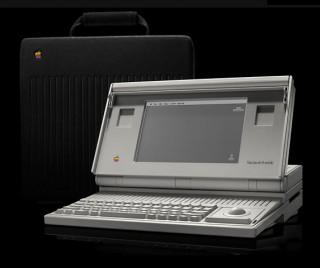 Recently, Freewwweb changed their style of business. They no longer put ads on your desktop. They now use a simple PPP connection, and the company is supported by advertising on their home page. Since they use a regular PPP connection like any other ISP, their service will work on any Mac that can run MacPPP and MacTCP. I use their service to connect my Mac Portable, Performa 475, and IBM 6×86 to the ‘net. All three computers have no problem connecting, not even the Portable’s internal 2400 bps modem.
So far the service has worked well for me. Sometimes the net gets congested for a while, and I have gotten a busy signal now and then. But compared to AltaVista’s free service, which I used to run on my IBM, the service is really good.
Freewwweb
The service is paid for by advertising on the Freewwweb home page, not by streaming ads on your browser (which most free ISPs use). Using MacPPP and MacTCP, I am able to connect to the Internet through my Freewwweb account. The usual caveats apply: Make sure the dial-up number is really a local number for your area, and they do require a credit card for age validation.
Anyway, Eudora, Fetch, Gopher, and NCSA Telnet all work great on the Portable. I would have to upgrade to System 7 to use MacLynx or Mosaic. (Yes, you can even run System 7.5.5 on a Plus or Portable, if you have enough memory and drive space.)
This is the process you go through to set up an account:
- Go to
http://www.freewwweb.com/quick/quick.html - Write down the Registration Code
- Click the autoreg.freewwweb.com link
- Register. When you select your dial-up number, make sure it is not a toll call, then write it down.
- Set up MacPPP or FreePPP by entering your dial-up number, username, and password. Important: Your username will be “username@freewwweb.com” where “username” is the user name you entered when you registered. You will also get a free POP mail account with the address, “username@freewwweb.com”.
- Set up MacTCP. Choose “MacPPP”, then select a “Server”-assigned IP address and enter the following DNS servers:
Enter 216.70.64.1 for the Primary DNS Numbers and
Enter 216.70.64.2 for the Secondary DNS Numbers
Check the box to use the primary DNS server as the default… - You might have to reboot here. Then you use MacPPP/FreePPP to get onto the Internet…
The only glitch I’ve found is that after about 5 hours, MacTCP wants to establish a connection any time a program is launched or exited. This is a known glitch and is cured by FreePPP. (Select “Do not automatically log in…”) FreePPP does not work under System 6, so the only way to cure this problem is to do this when you are logged off the Internet:
- Go into MacTCP’s Control Panel
- Select AppleTalk networking
- Reboot
When you want to use the net again, you will have to select MacPPP in the MacTCP Control Panel and reboot. The other server settings are straightforward. The SMTP server is smtp.freewwweb.com, POP3 is pop3.freewwweb.com, news is news.freewwweb.com. The username is always “username@freewwweb.com” – and the password is always the one you entered.
BTW, Freewwweb will ask you to complete a demographic survey in exchange for this free web access. Based on this, you will receive some advertising email. You may consider this a fair price for free access – or not.
