Mac Musings
Not the End of the Mac as We Know It
Part 1
Daniel Knight - 2001.02.19 -I must respectfully disagree with Adam Robert Guha's article, The End of the Mac as We Know It. Mac OS X is not the end of the Mac as we know it. The Mac as we know it has a long life ahead of it.
It also has a long history.
January 24, 1984: Birth of the Macintosh
Until 1983, personal computers were text-based. Xerox was experimenting with a graphical user interface at PARC, the Palo Alto Research Center. The concepts behind the Mac were unveiled when Apple released the Lisa on January 19, 1983, a $10,000 computer with a mouse, 12" b&w graphical display (not green or amber on black), a 5 MB hard drive, a 5 MHz 68000 processor, and a stunning 1 MB of RAM.
Remember, this was the era of the 640 KB memory limit on DOS computers.
At $10,000, the Lisa didn't make much of an impact. But Apple had another project underway, one that in many ways improved on the Lisa at a fraction of the price. On Super Bowl Sunday 1984, the world was introduced to the Macintosh with the famous 1984 TV ad. It was the end of computing as we knew it.
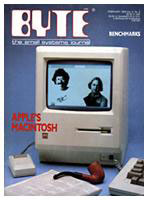
The first Macintosh was roughly half the width of the Lisa, ran a faster 8 MHz processor, and had square pixels. (Lisa pixels were 50% taller than wide; square pixels made it easier for the computer to display graphics quickly.) It also cost just $2,500, a quarter as much as Lisa, and was quieter than today's fanless iMac.
The compromises were barely enough memory (128K), a single internal 400K floppy drive, and a keyboard lacking function keys, arrow keys, and a numeric keypad. Expansion was limited to two high speed serial ports and a connector for an external floppy drive.
The Macintosh created quite a stir. It looked funny, smiled at startup, and let you see what your MacWrite,/a> documents looked like before you printed them. MacPaint let you directly manipulate each pixel of your artwork with the mouse.
The revolution had begun.
Six months later, Apple replaced the original Macintosh with the "Fat Mac," a 512K model that had enough memory. Eighteen months after that came the Mac Plus, which included a double-sided 800K floppy, introduced SCSI for adding drives and other peripherals, had arrow keys and a numeric keypad on the keyboard, and included 1 MB of memory - expandable to 4 MB. All this at just $100 more than the original Mac had cost two years earlier.
Starting in 1987, the Mac OS had MultiFinder, a Finder replacement that let you have more than one program open at a time, giving you a practical reason to want all that memory.
Today Mac Plus users are running System 6.0.x through 7.5.5. Some proudly (and carefully) run floppy-only with System 6, providing a quiet computing experience outside of key clack, mouse click, and floppy access. Others have external hard drives, ranging from 10 MB to today's multi-gigabyte SCSI monstrosities. All of them can run a modem, dial into an ISP, connect to the Internet, send and receive email, and even surf the Web in black and white. (For more on these stalwart souls, join the Compact Macs email list.)
March 2, 1987: The Macintosh Reborn
The Macintosh was cute, friendly, small, slow, and black-and-white. People wanted to scan, but grayscale scanning on a b&w (no grays) screen left something to be desired. Designers wanted to see more while working in PageMaker. And, as always, people wanted more speed.
Radius addressed the screen issue with the first portrait (870 x
640) monitors before 1987. Apple addressed the speed and 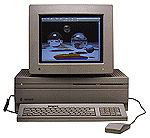 1-bit video issues on March 2, 1987, when the Macintosh II was introduced.
Speed: The Mac II had a 16 MHz 68020 processor. Because of the more efficient CPU and double the clock speed, it had 2-3 times the performance of the Mac Plus.
Video: The Mac II didn't include a monitor or video card. You could add a 1-bit video card and b&w monitor, which worked just like the Plus, only larger and faster (640 x 480 pixels vs. 512 x 342). Or you could add a 4-bit or 8-bit video card to use with a grayscale or color monitor. And soon you could buy full-page and two-page video cards and displays. Eventually we saw 24-bit color and multisync NuBus video cards.
That was the tip of the iceberg. The Mac II was expandable: There were six NuBus slots to support one or more video cards, coprocessor cards, SCSI accelerators, network cards, and whatever else might be dreamt up. There was room for two internal floppy drives and an internal hard drive. Memory started at 1 MB and could easily be expanded to the 8 MB limit of the Mac OS. (With later upgrades, it was possible to put 68 MB in the Mac II.)
And remember that power key on the keyboard that Apple used until the Pro Keyboard was introduced last summer? The Mac II was the first Mac to start up from the power key on the keyboard.
The Mac II was replaced by the Mac IIx in September 1988, which added support for virtual memory and up to 128 MB of RAM. The pinnacle of the Mac II line was the "wicked fast" Mac IIfx, which ran a 40 MHz 68030 processor, used dedicated I/O chips to reduce the CPU's load, and supported Apple's 8•24GC accelerated video card. It also had a $10,000 price tag, just like the Lisa, making it the most expensive Mac ever.
Computers from the Mac II series remain in use today. They all support huge hard drives and a maximum of 8-128 MB of memory. Except for the Mac IIsi, they all have 3 or 6 NuBus slots (the IIsi supports one NuBus device with an adapter). All begin at 16-40 MHz and accept accelerators. Some can even take PowerPC upgrades.
Like the compact Macs, these machines are used for email, surfing the Web, writing, and all the other tasks they supported when new. To learn more about these Macs from the people who use them, join the Vintage Macs email list.
May 1991: The Mac OS Reborn
Until Apple released System 7 in May 1991, the Mac OS was a single-tasking operating system by default. From 1987 onward, you could launch MultiFinder to enable task switching, but that was a deliberate choice and reduced system performance slightly (perhaps 15%).
System 7 changed all that - with a simple OS upgrade (the last one provided at no charge), any Mac from the Plus through the Quadra series automatically launched in a multitasking environment.
That was just one aspect of System 7. The new OS also introduced color icons, aliases, file sharing, balloon help, QuickTime, TrueType, virtual memory, and AppleScript. It also changed one behavior of the Mac OS: Before System 7, the computer emptied the Trash at shutdown; with System 7, the user chose when to empty the Trash.
System 7 was the first Mac OS to require more than 1 MB of memory. You could get along with 2 MB, although 4 MB was much more appropriate. System 7 also broke the 8 MB limit of System 6 via 32-bit memory addressing. Now there was a reason to put more than 8 MB in a IIci or SE/30.
Although System 7.0-7.5.5 will run on older 8 MHz Macs such as the Plus, SE, and Classic, because of System 7's overhead and the 4 MB memory ceiling of these three Macs, many users find System 6.0.x the best OS for these models. Others debate which version of System 7 (7.0, 7.1, 7.5.5) is best, especially with 16 MHz and faster Macs.
With System 7, Apple gave the oldest Macs that supported 2 MB of memory new features, allowing them to work better than under older versions of the OS. Best of all, System 7.0 was available for free. (With System 7.1, Apple began charging for the OS.)
Join us on Facebook, follow us on Twitter or Google+, or subscribe to our RSS news feed
Dan Knight has been using Macs since 1986, sold Macs for several years, supported them for many more years, and has been publishing Low End Mac since April 1997. If you find Dan's articles helpful, please consider making a donation to his tip jar.
Links for the Day
- Mac of the Day: PowerBook 500 Series, introduced 1994.05.16. 'Blackbird' includes a 25 to 33 MHz 68040 along with smart batteries and grayscale or color displays.
- Support Low End Mac