
Rhapsody was Apple’s code name for what eventually became Mac OS X. Yellow Box became the OS X interface, and Blue Box became the Classic Environment, which allowed OS X users to continue to use Classic Mac OS software on their PowerPC Macs through Mac OS X 10.4 Tiger. Red Box, the planned PC Environment for Rhapsody on Intel hardware, never saw the light of day, although today’s Intel-based Macs have virtualization solutions from other vendors which allow them to run Windows or Linux alongside Mac OS X.
I’m the first to admit that, although I believe Rhapsody will be the next insanely great operating system and propel Apple beyond 10% market share, I find all these colored boxes confusing. Why not just call them the Rhapsody, Macintosh, and Windows shells?
Remarkably, Apple is running ahead of schedule developing Rhapsody and has already shipped its first developer release and blue box release. (Microsoft, take a hint.) Rhapsody will run on at least two hardware platforms: PowerPC and Intel. It’s based on the Mach Unix kernel, either version 2.5 or 3.0. It will allow different levels of OS compatibility, allowing use of the Mac OS and Windows on a Rhapsody core.
Remember that the Mach kernel is underneath everything. Symmetric multiprocessing is integral to the kernel, which means that Rhapsody applications will be able to take advantage of multiple processors. (This is in contrast to asymmetric multiprocessing as implemented by Daystar, Apple, and other Mac OS computers. The Mac OS itself must run on a single processor, although it can allocate specific tasks to additional CPUs.)
Keep in mind that each “box” is not an operating system, but an application environment. Examples you might be familiar with are the way Windows runs on top of DOS. [Remember, this was written in 1997 when Windows 95 was popular.] The Mac OS has always been built around a kernel, one tightly integrated with the operating system.
Yellow Box
The Yellow Box is the application environment for “Rhapsody” software, whether on the PowerPC or Intel platform. It is preemptive (applications must share the CPU; no program can take over), multithreading (several applications can run at the same time, not just coexist in memory), and memory protected (an application may crash, but that will not crash the operating system).
Yellow Box is how Rhapsody appears to the user, whether native Rhapsody or as an environment running on the Mac OS or Windows. Yellow Box may have one of several different looks, including NeXT-like and Mac-like. Blue Box and Red Box run as environments within Rhapsody for PowerPC or Rhapsody for Intel, as noted below.
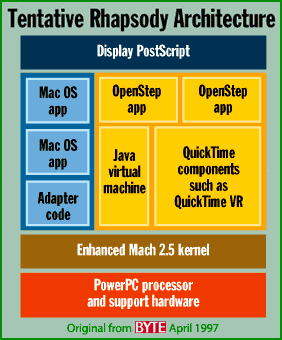 Apple produced the figure (right) showing Rhapsody architecture on PowerPC hardware. Note that Apple may use the Mach 3.0 kernel, not the older 2.5 kernel shown in this figure. Also, this is preliminary, so there may be architectural changes by the time Rhapsody finally ships.
Blue Box
Blue Box is how you run existing Macintosh applications under Rhapsody for PowerPC. It fully duplicates the Mac OS right down to its limitations, such as memory management and concurrent multitasking. (If it went beyond that and offered more robust services like Rhapsody does, many Mac applications might not work properly.) The first Blue Box release runs in full-screen mode, hiding Yellow Box; this may change in the future.
Byte notes that it is a mistake to call the Blue Box emulation, since all code executes natively on the PowerPC and all system calls are routed to kernel services, just like on the Mac OS. Apple intends that Blue Box fully match the latest version of the Mac OS. Later versions of Blue Box may incorporate newer version of the Mac OS.
Mac OS Rumors reports, “Speed of the Blue Box is just about on-par with that of the native Mac OS” (1997.09.17). It may also be possible to run multiple Blue Boxes, so if one crashes, Rhapsody and the other sessions will continue working. (Great for software development!)
At least initially, it seems that Mac OS applications will run within a Mac OS window. Right now, the first developer release works like the Apple DOS card – you work in one environment or the other, switching between them with a hot key. When the “unified” release comes out, the Mac OS may be seamlessly integrated with Rhapsody, allowing traditional Mac applications the current look and feel without forcing them into a Mac OS window. It is possible for the Blue and Yellow boxes to communicate via Apple events, although drag and drop between environments is not currently supported.
Blue Box for Rhapsody on Intel seems unlikely, since the PowerPC is such a powerful CPU that emulating it on a Pentium would be extremely slow. [Publisher’s note: Little did we anticipate Apple moving to Intel and including Rosetta to support PowerPC OS X software to run on Intel Macs.]
Red Box
Red Box, although not confirmed by Apple, would be how you run Windows applications under Rhapsody for Intel – and possibly under Rhapsody for PowerPC as well. Like the Blue Box on a Power Macintosh, the Red Box will give Rhapsody users a way to run Windows applications.
As with Blue Box on PowerPC, Red Box on Intel should run flat out, since there will be no need to emulate the Pentium processor. Products such as SoftWindows and Virtual PC show that it is possible to get reasonable performance emulating a Pentium on a PowerPC chip, so it is conceivable, even likely, that Red Box will be available under Rhapsody for PowerPC. (If Apple doesn’t do it, bet on Insignia or Connectix.)
A well executed Red Box could offer full PC compatibility, not just Windows. Virtual PC already provides this capability under the Mac OS, providing access to OS/2, Windows NT, and other Intel-based operating systems.
Other Boxes?
There were rumors Apple would create a box for OS/2, using code licensed from IBM. Since IBM appears to be moving away from OS/2, this seems unlikely.* If Apple develops Rhapsody for other hardware platforms, it seems likely they will provide boxes to support their standard software.
Summary
Confused? You probably should be, although you don’t have to be. There’s a lot going on under the name Rhapsody. As I understand it, there are four distinct products:
- Rhapsody for PowerPC, a PPC-native OS with Blue Box support for Mac applications.
- Rhapsody for Intel, an Intel-native OS with Red Box support for Windows applications.
- Yellow Box for the Mac OS, an environment for running Rhapsody applications on a Power Mac.
- Yellow Box for Windows, an environment for running Rhapsody applications on a Windows-based computer.
The key to understanding Rhapsody is seeing it as a universal operating system. You will be able to run Rhapsody applications under Rhapsody, with Yellow Box for Windows, or with Yellow Box for the Mac OS. You will also be able to run Windows applications under Rhapsody, both the Intel and PowerPC versions. And Power Macs will be able to run Mac software under Rhapsody.
Once Rhapsody becomes established, developers will be able to create a single version of their software that runs in the Yellow Box – regardless of CPU. Until then, Rhapsody provides all the hooks to let current OS users run Rhapsody programs and Rhapsody users to run their old software.
In brief, here’s the color code:
- Blue Box – lets you run Mac OS software
- Yellow Box – lets you run software written for the Rhapsody OS
- Red Box – lets you run DOS/Windows software
To see how Apple might position Rhapsody, read Send For the Clones.
Update
It looks as though the Yellow Box may also be ported to the Sun and Digital Equipment Corporation’s Alpha CPUs and possibly Intel’s forthcoming Merced [later named Itanium] CPU. MacOS Rumors reports that a Sun port was underway at NeXT before the Apple buyout. As for the Alpha port, the question is whether it will run as a Windows NT application, as a full-fledged operating system (undoubtedly with Red Box), or both.
* When I first wrote this, there were rampant rumors that OS/2 would soon be history. I have since heard that OS/2 is not being phased out.
Updated December 7, 1997 and March 20, 1998. Broken links to Rhapsody resources removed 2005.06.07.
Keywords: #rhapsody
Short link: http://goo.gl/BTCigu
searchword: rhapsody
