Mac Musings
Surfing With Big Fonts
Daniel Knight - 12 June 2000 -
I can't do it.
I've been very happy with Internet Explorer 5 since the day I launched it and changed the default font to 12 point Verdana and the default graphics to 72 dpi (see sample below). Those are the settings God and Jobs intended - and not necessarily in that order.
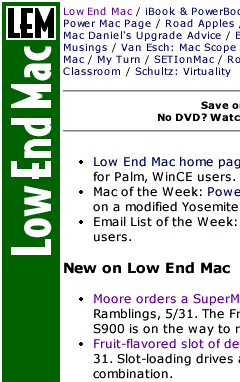
I like a lot of information on the screen (see Living Large for more on my love affair with big monitors). I can read 12 point text very comfortably on my big 19" monitor at home and 21" monitor at work - unless it's Times, a font that really doesn't do well on the screen or the printed page, in my biased opinion as a book designer, webmaster, and reader.
For some reason known only to God and Gates, again not necessarily in that order, Windows maps fonts a whole lot larger than the Mac OS does. Mac users are used to one pixel equals one point; in the Windows world, fonts are one-third larger, so 12 point text is 16 pixels high.
Bigger Isn't Better
This does three things:
First, it gives you beautifully formed characters on the screen. Even Times looks decent this large, although I still think it's too busy for extended use. As you can see in the second example, Verdana looks great at 16 pixels high, whether that's 16 point type on a Macintosh or what passes for 12 point type in the Windows environment.
 Second, those larger characters take
up a lot more screen space. They are one-third higher and one-third
wider than Mac users expect. Multiply 1-1/3 by itself and you get
only 56% as much text on the screen. Information density is much
higher on a Mac screen, whether it's the 9" b&w tube in the Mac
Plus (yes, compact Macs can surf!) or a 21" Sony on a G4.
Second, those larger characters take
up a lot more screen space. They are one-third higher and one-third
wider than Mac users expect. Multiply 1-1/3 by itself and you get
only 56% as much text on the screen. Information density is much
higher on a Mac screen, whether it's the 9" b&w tube in the Mac
Plus (yes, compact Macs can surf!) or a 21" Sony on a G4.
Third, because of the lower information density, Windows users have been abandoning 15" monitors in droves. While the iMac and iBook are very usable with their 800 x 600 pixel displays, Windows users need 1024 x 768 screens to provide the same amount of text in their browser, word processor, or spreadsheet.
That's why 17" monitors have become the norm in the Windows world. Running at a comfortable 1024 x 768 they show slightly less text than a Mac at 800 x 600.
That's right - because Windows maps fonts one-third larger, Windows users have to buy bigger screens to see as much as Mac users. And that's assuming they're not using the Windows option of even larger fonts!
The Way of the World
For some inexplicable reason, the W3 (the standards body for the Web) has embraced the Windows standard of 96 dpi as the norm. Every standard browser is now supposed to map fonts and images just like Windows does, even if you're running a Macintosh or a PC with BeOS, OS/2, Linux, or another Unix variant.
Maybe they chose it because 85-90% of the world's computers already support it. Now, thanks to IE 5, Mac users are being subjected to this wasteful standard - unless they know to change preferences to 12 point text and 72 dpi images. Once you do that, IE 5 displays text just like all the other Mac browsers of the past have done.
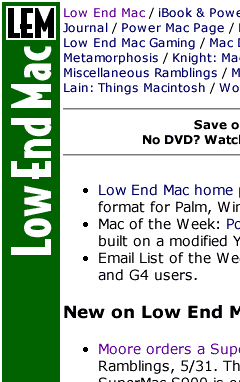 That's what I'm used to. That's what
I've always designed for. That's the way I prefer to surf.
That's what I'm used to. That's what
I've always designed for. That's the way I prefer to surf.
I've tried IE 5's default settings. I run away screaming in no time at all. Well, not quite, but I do switch back to the Macintosh standard, whether Microsoft and W3 like it or not.
Still, because much of the Web is platform agnostic and designed on and/or for Windows, I find myself using the "larger" button a lot. That's even the case on a few Mac sites.
As a compromise between the familiar and the grossly oversized, I've been experimenting with 14 point and 80-84 dpi settings, as in the third example. I don't really like it. For most Mac sites and a lot of others, I end up using the "smaller" button to provide a more familiar appearance. But I'm getting used to the idea of bigger fonts without jumping all the way up to 16 point text.
The loss of data density isn't as bad: 14 point type is only one-sixth higher and wider than 12 point, so you get 73% as much information on the screen. That's a far cry from 16 point, which reduces displayed information by almost half.
And it doesn't make me feel like I need to buy an even larger monitor. Believe me, my budget can't afford a Cinema Display or 24" monitor.
I'd just as soon stick with the Mac norms, but we live in a cross-platform world. With 40% of our visitors using Windows (we presume at work), it helps to know how the rest of the world sees Low End Mac.
I don't have to like it, but I can do it when I have to.
I just can't do it all the time.
Join us on Facebook, follow us on Twitter or Google+, or subscribe to our RSS news feed
Dan Knight has been using Macs since 1986, sold Macs for several years, supported them for many more years, and has been publishing Low End Mac since April 1997. If you find Dan's articles helpful, please consider making a donation to his tip jar.
Links for the Day
- Mac of the Day: PowerBook 500 Series, introduced 1994.05.16. 'Blackbird' includes a 25 to 33 MHz 68040 along with smart batteries and grayscale or color displays.
- Support Low End Mac