
1999: As the Mac specialist at a university-affiliated biological research facility in Philadelphia, I do my fair share of resolving computer problems, and therefore I know my way around the Mac quite well.
Recently, though, I was faced with what initially seemed to be a PC problem – a request from a woman who wanted to convert analog video from a camcorder to digital video on her PC
“This is an easy one,” I thought to myself. I pointed in the right direction and said, “The PC guy is down there.” Since it was getting close to quitting time, I figured I’d check my email, organize my desk, check my To Do list, and then go home.
Well, she came back. For some reason unknown to me, most likely because of the lateness of the day, the PC guy had thrown up his hands: He couldn’t or didn’t want to help her. Now, I can’t say that I blame him in certain respects. At the very least, since it was late, she should have come to us earlier.
Anyway, as I said earlier, I know my way around the Mac, but I have never helped someone with a problem like this one. Sure, give me an extension or SCSI conflict any day – not a problem. But video problems? I had absolutely no experience working with video of any sort.
After talking with her momentarily, I discovered that she was taking a Director 7 class and that her professor could just plug his camcorder into the back of a Mac and, with the assistance of a nameless piece of freeware, easily download and convert analog video to digital. Still somewhat apprehensive, I asked that she email her professor to find out the name of this program, and then told her that if she did, maybe I could help her the next day.
With that, she was on her way, and I thought I was too.
 Just after she left, though, I remembered Six Year Old Mac to the Rescue, an article that I had read on Low End Mac about a guy with a similar problem, and how he had used an old Mac to solve it. Thus I thought I’d at least see if I could find the article. Well, in a matter of moments I found the article, which listed Apple Video Player as the key piece of software I needed for solving my problem. So I printed off a copy of the article to show her.
I was excited. This was a new problem, and I wanted to see if I could solve it. Unfortunately, I didn’t know the woman’s name or the lab she worked in. I work in a fairly sizable building of approximately 500 to 600 people, so I decided to use another available resource in order to find her: I asked the housekeeping guy. Within a few moments he knew who I was talking about and pointed me towards the third floor, and shortly after arriving there I found her. She was actually a little surprised to see an IS guy coming to her to help solve a problem, rather than the other way around. Like I said, I was excited about solving this problem.
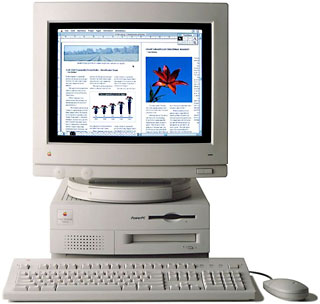 To make a long story short, my new Blue & White G3 didn’t have the right port (S-video in) in order to hook up the camcorder, but I remembered that I had a five-and-half-year-old Power Mac 7100/66av running System 7.5 lying around somewhere and thought that just maybe it would have the proper port – and it did.
So we set everything up. Then I launched the program; she hit “play” on the camcorder; and, lo and behold, we were recording her video to the Mac. I couldn’t believe how simple and intuitive it was; and not only that, but also that the whole process went without a hitch.
Apple Video Player saved the video in SimpleText format, but she needed it in QuickTime so her PC could recognize it. I knew that we needed the Pro version of QuickTime in order to save files, but I only had the free version. I had been planning on upgrading to the Pro version, so I decided that now was as good a time as any.
I thought it would take Apple up to 24 hours to send out the key code, so I figured that we could finish up the next day. But after supplying Apple with all the needed information and clicking the “confirm” button on their web page, the key code was in my mailbox in under 30 seconds! God bless Apple!  I just couldn’t believe how fast the service was. It was like something that you might have seen on The Jetsons as a kid, something that you thought was purely fictional, something that would never materialize in real life. (I almost think that we should all register our copies of QuickTime just to see how quickly we receive the confirmation email. Go Apple Customer Service!)
It was truly amazing!
Throughout this entire process, but especially after this surreal customer service from Apple, the woman’s comments were peppered with phrases like: Already? So soon? It’s done?
In the meantime, I transferred the file over the network from the 7100 to my G3. I then opened it with QuickTime Pro and saved it as a QuickTime movie. But we still needed to get the file to her PC, so she gave me someone else’s PC-formatted Zip disk. The disk had 29.4 MB of free space, whereas the file was 29.5 MB long. I couldn’t simply trash something from the disk because it didn’t belong to her.
Luckily, though, I had DropStuff on my machine. But since I couldn’t be sure she had Stuffit Expander on her PC, I decided to stuff it as a self-extracting archive (.sea). I launched DropStuff, went to preferences, and selected Save as Self-Extracting Archive; directly alongside this option was a set of radio buttons for choosing a Mac or Windows format. I selected Windows, and in a matter of moments, the job was complete.
Total job time (including finding her on the third floor of my building): only 45 minutes!
Both of us were completely and utterly amazed at how simple the entire procedure was. The woman then commented that she would never have been able to do this as flawlessly on her PC because she would have gotten too frustrated. And I added, “Let alone on a five-and-a-half-year-old PC!”
Now, I’m not saying that one couldn’t have done any or all of this on a PC but, since I have some experience with PCs, I sincerely doubt that it would have gone so smoothly – especially with all the extra hurdles of downloading and installing an unfamiliar program, registering a second program in order to unlock needed functionality, reading a disk formatted for a different platform (since this isn’t a standard function for Windows, as it is for the Mac), and finally compressing the converted file into a format readable on the other platform.
I think that the exact same task done on a PC, especially for someone like me who had never worked with video before, would have ended up, as this woman had said, in frustration. And the fact that I could do this with no real video experience and on a five-and-half-year-old Mac is a testament to the superior design of the Mac and its software.
Keywords: #avmac
