Mac Musings
Automatic Frustration Machines
Dan Knight - 1998.09.15 - Tip Jar
Some machines are designed to do a simple job simply. The best even do it with elegance.
But some make you wonder what their creators were thinking.
I have a long-term love/hate relationship with ATMs. They're so convenient: available 24 hours a day (except when you need cash), rarely a line (unless you're in a hurry), and they don't do all the slow transactions people need tellers for.
Banks sometimes go out of their way to make things convenient - sometimes for you, sometimes for themselves. I still miss $5 bills in ATMs, and I really hated it when my credit union stopped putting $10 bills in the ATM. (The bank I'm with now does put in $10 bills.)
The latest convenience is the fast $60 cash withdrawal from checking. Pop in the card, enter your PIN, and hit one button. The ATM asks if you want a receipt, then give you your money, your card, and (if you asked for it) your receipt.
But say you want $70. After logging on, you press the Withdraw button. Then you choose From Checking. Then you type in your amount. 7-0-0-0.
Well, sometimes that's $70, but sometimes it's $7,000 - if the ATM is overly friendly and knows you can't withdraw change. Of course, some work one way, some the other.
Then there are the ones that ask if I want to handle my transaction in English or Spanish. One more button to push.
I appreciate the cultural sensitivity, but I just want to do my transaction and drive off.
Of course, the other problem is that they seem to have a real problem lining up the text on the screen with the buttons on the side. If you're in a van, you look down and they line up one way. In a sedan, you're much lower and seem to point somewhere else.
Frankly, that's because most ATMs are living in the dark ages of text terminals while the entire computer world (*@&%#$ IBM AS/400 and a few other models excepted) has gone graphical.
Why not a graphical ATM? Instead of a small text arrow that looks like
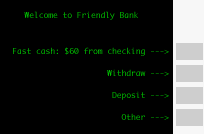
You could have a large arrow matching the size of the button beside it. If the bank is willing to spend the cash, you could even color code the buttons and the arrows on the screen. Instead of dim green characters on a black screen, you could really make it easy and friendly, as the second image shows.

Want quick cash? Press green. Almost too easy!
This eliminates the need for the tiny ASCII arrows, gets rid of the dark green phosphors, and could eliminate burn-in by running bank ads as screen savers.
While they're at it, banks should make the dumb terminals a bit more intelligent. When it scans my card, it should know that I always choose English (given the choice) and that I usually take $70 from checking on payday. So use some of that computer intelligence to do more than say "Hello Daniel Knight" after I enter my PIN.
And while they're doing that, how about a little speed? I swear the 300 baud modem on my VIC-20 was faster.
Put in the card. Wait. Enter my PIN. Wait. Choose English. Wait. Choose Withdraw. Wait. Type in $70. Wait. Tell it I want a receipt. Wait and wait and wait. Hear it put cash in drawer. Wait for drawer to open. Take cash. Wait and wait and wait for it to recognize that I've removed the money. Tell it I'm done. Wait for it to spit out my card and print my receipt.
Press one wrong button and wait even longer while you undo it or start all over again.
ATMs may be convenient, but they can also be frustrating.
This is one case where computers could serve us better with an improved interface - and it doesn't even require a mouse or pull-down menus.
Join us on Facebook. Follow us on Twitter.
Dan Knight has been using Macs since 1986, sold Macs for several years, supported them for many more years, and has been publishing Low End Mac since April 1997. If you find Dan's articles helpful, please consider making a donation to his tip jar.
Recent articles by Dan Knight
- Kill Caps Lock, but Leave the Rest of My Keyboard Alone (Mostly), 2012.02.03. It's too easy to hit Caps Lock by accident, but why change a keyboard layout that billions of users are comfortable with?
- Is This RIM's Macintosh Moment?, 2012.01.25. In 1996, Apple was in dire straits, but Steve Jobs redefined the company. Now it's do or die time for RIM.
- Saying Good-bye to Inkjet Printers, 2012.01.18. Apple has discontinued its $100 printer rebates, but even a free inkjet printer is false economy.
- More in the Mac Musings index.
Links for the Day
- Mac of the Day: Macintosh Portable, introduced 1989.09.20. The nearly 16 lb. behemoth was innovative but not a smashing success.
- February 13 in LEM history: 01: Layoffs may hurt Mac market - 02: Unix for the Mac - Rage against the Macintosh - 03: Options to move data from PCs to Macs - 04: Low cost RAM for older 'Books - 06: Apple, IBM, and Intel - 07: Picking the right cheap computer, new or used - 08: I needed to find an older Mac
- Support Low End Mac
Recent Content on Low End Mac
- Fix Home Button Delay, Tablet the Ultimate Mobile PC, iPad Notebook a Possibility, and More, iOS News Review, 2012.02.10. Also using your iPad at work, two photo editors, a new iPad text editor, Macally's magnetic iPad 2 stand, and more.
- White MacBook Goes End-of-Life, Logitech Touch Mouse Supports Gestures, Firmware Updates, and More, The 'Book Review, 2012.02.10. Also MacBook Air better than any Ultrabook, docks for MacBook Pro models, Intel offers improved SSDs, and more.
- Mac and iOS Browsers: Options Galore, Freeware Forum, 2012.02.10. Safari is adequate on Mac and great on iOS, but the range of good alternatives is stunning. LEM writers share their favorites.
- Apple's Support Lead Shipping, Smartphones Outsell PCs, OS X Ported to ARM by Intern, and More, Mac News Review, 2012.02.10. Also the power of Tex-Edit Plus, Google and Twitter are already censoring the Web, Snow Leopard Security Update, and more.
- LogMeIn: Remote Screen Sharing for the Rest of Us, Alan Zisman, Zis Mac, 2012.02.09. Configuring the Mac's built-in screen sharing to work over the Internet can be difficult or impossible. LogMeIn makes it easy.
- 15 Years Ago Motorola Unveiled the PowerPC G3, Low End Mac Round Table, 2012.02.06. The G3 processor was optimized for real world Mac software and made a big leap forward in efficiency.
- Don't Kill Caps Lock, Learning to Love the iOS Keyboard, and an Adaptive iPad Keyboard, Charles W. Moore, Miscellaneous Ramblings, 2012.02.06. The Caps Lock key has a useful function, the iPad's keyboard really is useful, and checking out an adaptive keyboard for the iPad.
- More links in our archive.
Recent Deals
- Best MacBook Air Deals
- Best iBook G4 Deals
- Best iPad Deals
- Best Classic Mac OS Deals
- Best Apple TV Deals
- Best 15" MacBook Pro Deals
- Best Power Mac G4 Deals
- Best Mac OS X 10.6 Deals
- More deals in our archive.
About LEM Support Usage Privacy Contact
Follow
Low End Mac on Twitter
Join Low End Mac
on Facebook
Low End Mac Reader Specials
TypeStyler 11 is now in the Mac App Store!! -- Special Introductory Price of $59.95!! -- To Buy From The Mac App Store Click Here Now!! Or buy direct
from Strider Software.
Don't install Parallels to play poker online! Poker Mac will show you how to download and install a native Mac poker and Mac Casino applications in minutes.
Favorite Sites
MacSurfer
Cult of Mac
Shrine of Apple
MacInTouch
MyAppleMenu
InfoMac
The Mac Observer
Accelerate Your Mac
RetroMacCast
PB Central
MacWindows
The Vintage Mac Museum
DealMac
Deal Brothers
Mac2Sell
Mac Driver Museum
JAG's House
System 6 Heaven
System 7 Today
the pickle's Low-End Mac FAQ
Affiliates
Amazon.com
The Apple Store
The iTunes Store
PC Connection Express
GainSaver
Parallels Desktop for Mac
eBay