
2012 – After years and years of offering a $100 rebate on inkjet printers, Apple discontinued the program this week. That got me looking back at the history of computer printing.
One of the most clever inventions in the history of computer printers was the dot-matrix printer. Prior to its invention, printers had been more like typewriters with special wheels or belts that contained the whole character set and a hammer to strike the right letter, which would imprint ink from a ribbon onto the printer’s paper.
Daisy wheel printers and line printers made a terrible racket, but they produced excellent output. Oh, they were also slow, as the printer had to keep spinning the letter wheel or moving the belt back and forth to align the right character with the small hammer.

Sample dot-matrix printer output.
Dot-matrix printers changed all that. Instead of using fully formed typewriter-quality characters, the printer had several tiny hammers – 8 or 9 was typical at first – that could be activated as the print head moved across the page. This was far more efficient, since the printer no longer had to move a wheel or belt full of characters.
The breakthrough concept was that you could create text characters with a matrix of dots. This also made it possible for computer printers to print images.

Epson MX-80, the first popular dot-matrix printer.
The first high-speed printer using fully formed characters was introduced by Remington-Rand in 1953, and IBM introduced the dot-matrix printer in 19571 – long before the personal computing revolution began in the mid-1970s. Although it wasn’t the first, Epson’s MX-80 dot-matrix printer, introduced in 1980, was the one that first caught on,2 becoming the de facto standard.
Enter the Laser

Xerox 9700 laser printer from 1997.
The next breakthrough in computer printing was the laser printer, which Xerox introduced in 1977. Using a laser to write an image to a drum and photocopy toner to transfer it to paper, laser printers provided letter quality output without any kind of hammer. Resolution was 300 dots per inch (dpi), far higher than an impact printer could produce.3 The Xerox 9700 could print two pages per second and was a lot quieter than impact printers.4

Original HP LaserJet printer from 1984.
Hewlett-Packard brought that technology to personal computing with its first LaserJet printer, introduced in 1984, which cost a princely $3,495. Like the Xerox 9700, it had 300 dpi output, but it was nowhere near as fast at just 8 pages per minute (ppm).5 Still, it was revolutionary, bringing laser printing to the desktop.
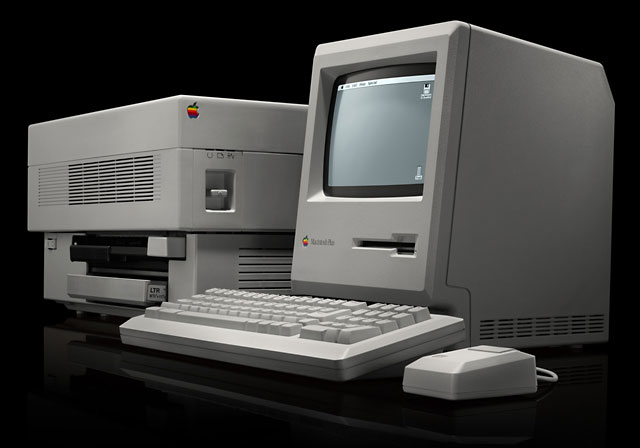
Original Apple LaserWriter printer from 1985.
The HP LaserJet was built around Canon’s CX laser printing engine, which is the same mechanism Apple used in its first laser printer, the 1985 LaserWriter, which distinguished itself from the HP LaserJet by including Adobe Postscript font technology and being networkable so two or more Macs could share the $6,995 device.
It was the Mac’s graphical user interface, the LaserWriter’s Adobe Postscript fonts, and Aldus Photoshop that launched the desktop publishing revolution, an area where Macs were a world ahead of the MS-DOS PCs of the era. And thanks to AppleTalk, a shop with multiple Mac users didn’t have to buy one printer per user or set up a dedicated networked print server.
Making Laser Quality Affordable

Original HP DeskJet printer from 1988.
HP had been working on inkjet printing even before it introduced the LaserJet, but it didn’t perfect the technology until 1988, when it introduced the first HP DeskJet printer.6 The DeskJet had the same 300 dpi resolution as the LaserJet, but it was smaller, lighter, slower (only 2 pages per minute), and a lot more affordable at $995.
HP added color to the mix with the DeskJet 500c in 1991. Unlike most color inkjet printers we’re familiar with today, the DeskJet 500c had separate color and black cartridges that you had to swap out depending on whether you wanted to print black/grayscale or color. Needless to say, using the color cartridge to print black used up a lot of ink, and images tended to be muddy, since there was no true black when printing in color.
The beauty of the inkjet printer is that as prices for the printers kept dropping, users were soon spending more for the ink than for the printer, creating a razor-and-blade scenario where manufacturers could sell their printers cheaply because they knew they would more than make that up in profits from ink cartridges.
Truth be told, laser printers are a lot more cost effective than inkjet printers. While they cost more up front, the cost of supplies pales in the face of the cost of ink.
My Printer History
My first printer was a C.Itoh 9-pin dot-matrix printer that I used with my Zenith DOS PC in the late 1980s. It was built like a tank, and its “letter quality” mode (where the printer double-struck each dot) was not too shabby. I replaced it with an HP DeskJet 500 when that model was introduced, using a Mac-to-parallel adapter and some special driver software so I could use it with my Mac Plus. Later on I moved to either a DeskJet 500c or the Mac-compatible color DeskWriter, which is why I know how muddy their color images can be.
Later on, I had an Apple StyleWriter 4500, which HP built for Apple. By this time, the legendary DeskJet quality had given way to low prices, and I was never happy with that printer. Next up was an HP LaserJet 2100TN, a 10 ppm 1200 dpi laser printer with Postscript and networking. We literally used that printer to death over the course of about eight years. (It was cheaper to print duplicate originals than make photocopies, and my first wife used to produce a lot of reports that needed multiple copies.)
My last inkjet printer was an Epson Stylus Photo 870, which in addition to black and the three primary colors of ink also had light cyan and light magenta. It produced stunning photographic output, but I used it so rarely that the inkjet nozzles usually dried and required cleaning before I could print again.
At present, we have three laser printers at Low End Mac headquarters. My primary printer is a 1200 dpi Brother HL-5250DL, which I’ve been using for over five years now. [March 2016 – it’s still in use!] It’s got Postscript emulation, USB, and ethernet for networked printing. I think I’ve only replaced the toner cartridge twice over the years. At under $250 for the printer, I got my money’s worth out of it several times over.
The other printer in my office is a Konica-Minolta Magicolor 2430DL color laser printer. After discounts and mail-in rebates, I believe it cost less than $300, and its 600 x 2400 dpi output is excellent. I’ve had this for at least seven years and still haven’t used up the toner that came with it, which indicates that I don’t print in color very often. (It hasn’t been plugged in for months at this point.) However, it’s been great for printing business cards, postcards, and brochures. I chose it because the cost per page was among the lowest – and it’s network ready. [The paper feed eventually gave out, at which point it wasn’t cost-effective to repair it.]
The third laser printer is in Waverly’s office. It’s a Brother DCP-7020, which is a multifunction device that can print up to 20 ppm, scan, and make photocopies. It doesn’t fax, but since we don’t have a landline here, that was not an important feature. Waverly goes through a few toner cartridges a year, and we just replaced the drum for the first time. [That one is also still in use.]
We are also on our second Kodak snapshot printer, which produces excellent quality 4×6 photos when it works. Cost works out to about 29¢ per photo, and this thing can be very stubborn about accepting input, recognizing that it has paper, or that there’s a ribbon installed. Not recommended. (Costco is much cheaper for printing photos, so we only use this when we need a print right away.) [After the second one died, we cut our losses and didn’t replace it.]
Advice
When choosing a printer, take a realistic look at your needs. Don’t rule out laser printers because you think they cost too much. In the long run, laser supplies cost a whole lot less than ink. Look for at least 600 dpi output. If you have more than one Mac, networked printing can be a plus, but the Mac’s printer sharing feature is a very realistic option, so a USB-only printer can be just fine.
If you need color, look at how much it’s going to cost you to buy the printer plus enough ink or toner for say 2,000 pages of output. My Magicolor came with toner rated for 3,000 or 3,500 pages, and in 7-8 years, I still haven’t used up the original toner. [The printer died before I could use up the toner.]
My own strategy is to have a color laser for those times that I need color and a low-cost black-and-white laser printer for everything else. Even if you choose a color inkjet or die-sublimation photo printer, it might make sound economic sense to also pick up an inexpensive black-and-white laser printer for the bulk of your printing.
I can’t speak to the quality and durability of the Brother HL-2240 laser printer, but at $66 (from Amazon.com) and with a 4.5 star rating, this 24 ppm, 2400 x 600 dpi printer sounds like a steal. I’ve been impressed with the quality of the two Brother printers here at LEM HQ, but this USB-only printer could cost you less than one or two sets of inkjet cartridges.
Color laser printers are not inexpensive, and my personal experience is limited to the Magicolor. The least expensive one I could find on Amazon.com with a good rating is the Brother HL4150CDN Color Laser Printer, which has duplex (double-sided) printing and networking. It has a four star rating and currently sells for under $290 shipped.
Another model worth considering is the Konica-Minolta Magicolor 3730DN, which Amazon has for under $250 shipped. It has only two reviews, but both give it five stars. And, like the Brother 4150, it has built-in ethernet in addition to USB.
Finally, don’t be afraid of remanufactured toner cartridges and refurbished drums. When I worked in publishing, we used refilled toner cartridges constantly, and the local company that supplied them never disappointed us. You can also get refilled cartridges from Amazon.com, and the one for our Brother printers at LEM HQ are well under $20.
- History of Computer Printers, Softpedia
- Epson Corporate History, Epson
- Xerox 9700, Everything2
- Personal Recollections of the Xerox 9700 Electronic Printing System, Digibarn Computer Museum
- HP LaserJet Printer, 1984, Hewlett-Packard Virtual Museum
- HP LaserJet, Wikipedia
- Inkjet Printers: A History Lesson, printcountry.com
- HP DeskJet Printer, 1988, Hewlett-Packard Virtual Museum
Keywords: #inkjetprinter #laserprinter #dotmatrixprinter
Short link: http://goo.gl/g1Y58j
