
If you’re at all interested in the early history of Macs, especially the Mac OS, you owe it to yourself to bookmark Mac Floppy or put it in your RSS news feed. Billed as, “A look back at the Mac’s past when the best things in life fit on a floppy,” it’s an enjoyable reminiscence of days gone by.
Last Friday’s post featured the Calculator, a Desk Accessory that was included with the first version of the Mac OS. The Calculator was designed by Steve Jobs, who was dissatisfied with designs proposed by Chris Espinosa. In response, Espinosa created a Calculator Construction Set that would let Jobs design the calculator he wanted.
Here’s the result:
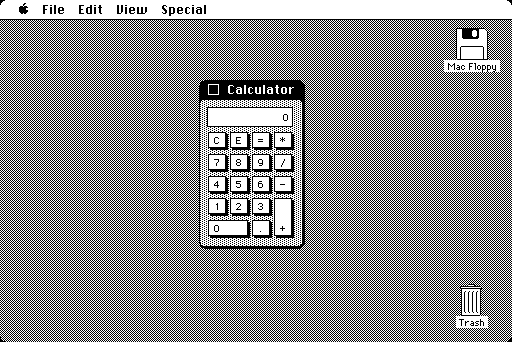
The Calculator as delivered with the first version of the Mac OS.
Andy Hertzfeld maintains that, “When I implemented the calculator UI (Donn Denman did the math semantics) for real a few months later, I used Steve’s design, and it remained the standard calculator on the Macintosh for many years, all the way up through OS 9.”
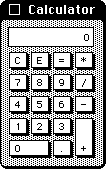
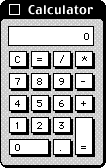
Mac OS 1 and OS 9 calculators.
Well, not exactly. I run Classic Mode on one of my G4 Power Macs, and when I launch the Calculator, it looks a bit different. See if you can spot the differences, other than the OS 9 version being grayscale and the header font going from Chicago to Charcoal.
Why the differences? Because the original Macintosh keyboard didn’t have a numeric keypad, there was no need for the Calculator’s layout to match it. When the Mac Plus was introduced in 1986, it had a numeric keypad on its keyboard, and the Calculator was modified to match its layout.
Remarkably, the overall layout is identical, it’s just some of the keys that have been moved. And, yes, its still looked like the one Steve Jobs had cobbled together with the Calculator Construction Set during the Mac’s development.
A Better Calculator
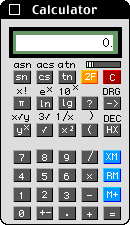
Calculator II
Even though the standard Calculator desk accessory was fine for basic math and came free with the Mac, lots of others popped up over the years, and there were other construction sets for customizing your own calculator as well.
A favorite at the publishing house where I worked was Calculator II (download), a freeware app by Joe Cicinelli that improved upon Apple’s design by adding memory and quite a few additional functions, along with using color.
Cicinelli notes:
“It improves on Apple’s original calculator by adding trigonometric functions, functions for base 10 and natural logorithms (sic) and their inverses, hex-to-decimal and decimal-to-hex conversion, [and] a memory function for storing values across uses of the program….”
20 years later, I’m still using this calculator. It’s exactly what I need a calculator to be.
Other Directions
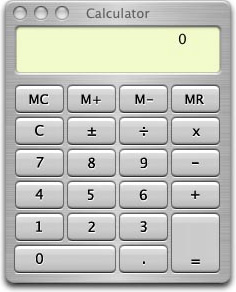
Not content to leave well enough alone, Apple completely redesigned the Calculator for Mac OS X, giving it a 3D look, brushed metal finish, and even a colored background behind the display. It does look more like a modern calculator, and it finally gains memory keys, but at the cost of a lot more display space – about 3.5x as many pixels.
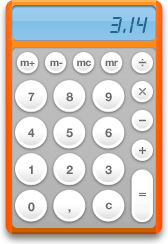 To add insult to injury, Apple “improved” on the calculator once again when it introduced widgets with Mac OS X 10.4 Tiger. Instead of rectangular buttons that are easier to mouse and click, since there is far less non-button space, the calculator widget introduced round keys. Sure, it looks cooler, but at what cost?
And what’s up with the orange? It adds absolutely nothing to the calculator, other than making it more visually interesting.
I deliberately disable widgets on all of my Macs. I have never found one that was worth using, and I didn’t even know how unnecessarily huge the OS X Calculator was until I found it while writing this article.
For the times I need to use a calculator, I simply go back to Calculator II on my aging Power Mac G4. It gets the job done without wasting screen space.
Note: This article was originally published in 2012, when I still used a Power Mac G4 with OS X 10.4 Tiger and Classic Mode. Although I still have that setup, I rarely use it these days.
Keywords: #calculator #maccalculator #deskaccessory
Short link: http://goo.gl/TdW0Y7
searchword: maccalculator
