
When Apple introduced the Early 2011 MacBook Pro models with Thunderbolt, something clicked in the back of my mind. With Thunderbolt, Apple has delivered on a promise made when the original Macintosh was introduced in 1984 – and then some.
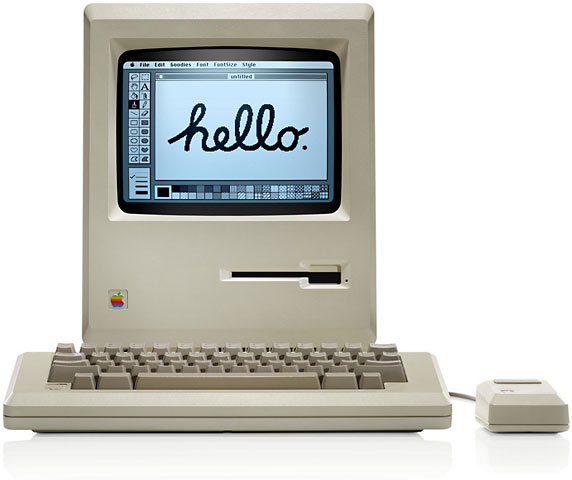 Steve Jobs ended up taking over the Macintosh project, and two of his design goals where a quiet computer and a closed box. In theory, every Macintosh would have the same configuration – exactly the way it left Apple’s factory.
Jobs must have realized that hardware geeks would find ways to hack the Mac to increase memory, add hard drives, and so on. It’s what hardware geeks do.
The High Speed Serial Bus
The early Mac had no expansion slots, which was the normal way of adding features to the Apple II family and the IBM PC and its clones. Instead, Apple developed a high speed RS-422 serial bus that could support “virtual slots”. Every Mac from 1984 until 1998 had two high speed serial ports. In 1998, the iMac abandoned Apple’s serial ports for the then-new USB 1.1 serial port.

Granted, the high speed serial port was not the Mac’s only port. It had a port for the mouse, for the keyboard, for the floppy, and for sound output, but only the high speed serial port was intended as a general purpose expansion bus. The ports were marked with icons for a printer and a modem.
By the standards of 1984, Apple’s 230.4 Kbps serial ports were very fast indeed, and if that wasn’t enough speed, Apple made provision for clocking them at up to 1 Mbps using an external clock. Also, RS-422 was flexible enough that it could be used to create a computer network. (RS-422 was also faster and useful over longer distances than the more common RS-232 serial standard.) And unlike USB, the original Macintosh serial port did not supply power to peripherals.
The one small drawback to Apple’s implementation is that it used a single serial chip to control both ports, so using one port at high speed could limit throughput on the other port, something covered in depth in Macintosh Serial Throughput.

When Apple introduced the Mac Plus in 1986, it switched from the original 9-pin serial port to a round DIN-8 connector (above). This was only a change in connection – electronically the two ports are identical.
Although Apple increased throughput for its serial ports with the Mac IIfx in 1990 and again with the GeoPort, introduced with the Centris 660av and Quadra 840av in 1993, the Mac’s RS-422 serial ports were used almost exclusively for printers, modems, and LocalTalk networks. Not much was done with the idea of “virtual slots” that could expand the Mac’s capabilities in the same way an add-in card would expand a PC.
USB
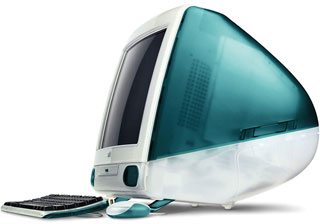 Apple abandoned its proprietary serial ports in favor of USB when it introduced the first iMac in 1998. The iMac embraced the USB 1.1 standard even before it was finalized, and that helped convince peripheral makers that it was time to adopt the new technology (USB 1.0 went back to 1996).
USB has been used for a lot more things than RS-422 ever was. Without the Mac’s traditional ADB port, the iMac used a USB mouse and a USB keyboard. And without the Mac’s traditional SCSI port, USB was the only way to add a hard drive, optical drive, tape drive, printer, scanner, etc. to the iMac.
There have even been a few monitors that use USB.
That was a big change from the more limited uses of Apple’s earlier serial bus, but USB didn’t support simple machine-to-machine networking, something that previous Macs could do using an ImageWriter II printer cable. For that kind of connection, iMac users would need an ethernet crossover cable.
USB 2.0 was released in 2000 and provides 40 times the bandwidth of USB 1.1, but Apple didn’t adopt it until it introduced the Power Mac G5 in 2003. That’s because Apple saw USB 2.0 as a rival to its own technology….
FireWire
While the PC industry was busy creating USB, Apple had been developing its own high speed serial interface, FireWire. Officially known as IEEE-1394 1995, FireWire 400 had been finalized in 1995 and supported transfer rates of 98.3, 196.6, and 393.2 Mbps (nominally 100, 200, and 400 Mbps) in one direction at a time.
Apple intended that FireWire would replace parallel interfaces – SCSI in particular – and because of this (SCSI is far more intelligent than traditional serial, parallel, or USB port), the FireWire command set is much more extensive than USB’s. Unlike USB, FireWire allows for peer-to-peer communication between peripherals (so one hard drive can send data directly to another) or computers (Macs can network with each other over FireWire). This also allows FireWire to be used for Target Disk Mode, something SCSI had long supported.
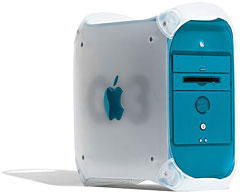 FireWire first came to the Mac in early 1999 with the Blue & White Power Mac G3. Unfortunately, the FireWire ports on this model and the Yikes Power Mac G4 do not support booting from a FireWire hard drive or using Target Disk Mode. (USB ports were also not bootable on these models or other early USB Macs.)
Apple expanded FireWire to support 800 Mbps throughput in 2002 and introduced it to the Mac with the January 2003 Power Mac G4 – also, coincidentally, the first Mac unable to boot the Classic Mac OS. FireWire 800 remains a feature of most Macs to this day, as does USB 2.0, which is also not supported by the Classic Mac OS.
Thunderbolt
With Thunderbolt, Intel’s new 10 Gbps interface introduced on the Early 2011 MacBook Pros, Apple has come full circle and may finally deliver on the high speed serial bus promise of the original Macintosh – but thousands of times faster!
Unlike RS-422, USB, and FireWire, Thunderbolt is designed as a full-fledged expansion bus, not simply a data interface. Thunderbolt can support monitors, hard drives, networking, USB 3 and FireWire adapters, and Target Disk Mode. It will be possible to add an external video card thanks to Thunderbolt’s extreme bandwidth and intelligent design.
Thunderbolt also provides more power than USB, enough to drive an external 3.5″ drive, and it uses the Mini DisplayPort connector that Apple adopted a while back, so the new MacBook Pros gained Thunderbolt without adding another port.
In the end, Thunderbolt should significantly reduce the number of ports on most Macs. I’m sure we’ll still see one or two USB 2.0 ports for keyboards, mice, modems, flash drives, card readers, printers, scanners, and the like, but FireWire’s days are numbered – a Thunderbolt adapter will make it unnecessary to build FireWire it into any future generation of Macs. Built-in ethernet could vanish, especially on notebooks, displaced by Thunderbolt ethernet adapters and WiFi. We’re unlikely to ever see built-in USB 3.0 on Macs, since a Thunderbolt adapter will make it easy to add if and when you need it.
Thunderbolt also incorporates PCI Express, which means that anything that can be put on a PCIe expansion card could also be built into a Thunderbolt device.
Thunderbolt is the port of the future, and only Macs have it at present. Expect it on all 2011 models, and at some future date, most Macs will probably have two Thunderbolt ports.
Keywords: #thunderbolt #firewire
Short link: http://goo.gl/uDFpJZ
