
2011 – I finally did it. I bought my first Intel-based Mac two weeks ago, and I’ve been making the transition from being PowerPC only.
I’d been debating between getting a Late 2006 20″ 2.16 GHz Core 2 Duo iMac – the white model with a 1680 x 1050 display that supports up to 4 GB of memory and runs Mac OS X versions as far back as 10.4.7 Tiger – or an Early 2009 or Late 2009 Mac mini, which would give me Nvidia GeForce 9400M graphics, room for 8 GB of RAM, and the ability to run OS X 10.5.6 Leopard.
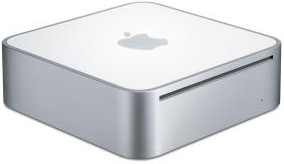 We’ve been setting aside money for a while, and I found an irresistible system on our local Craigslist: a stock 2.0 GHz 2007 Mac mini with Apple’s aluminum extended USB keyboard, a Bluetooth Mighty Mouse, an external USB hard drive, a speaker system, and the clincher – a 23″ Apple Cinema HD Display along with Apple’s ADC-to-DVI adapter that lets you use this ADC monitor with a DVI Mac. This was the first Mac mini to use a Core 2 Duo processor, so it supports 64-bit operation and can run OS X 10.7 Lion.
Even before I saw it, I knew the Mini would need a couple upgrades: more RAM and a faster, larger hard drive. They’re planned for the future when finances permit. Soon, I hope, as with the stock 1 GB of RAM and 5400 rpm hard drive, this machine is kind of poky.
I’ve been quite busy at my third-shift job the past few weeks, but I found the time to set up the system and begin migrating things from my Digital Audio Power Mac G4 (upgraded with a dual 1.6 GHz card) running Leopard. It’s been a real learning experience – especially how slow a minimum spec Intel Mac from a few years ago is with OS X 10.6 Snow Leopard, which is the installed OS. (I also have the Tiger installer and have cloned Leopard from my Digital Audio Power Mac, so I’ll eventually have three OS options – and I’ll leave space for OS X 10.7 Lion when I have a big enough internal hard drive.) [March 2016 update: I never did put Tiger on the Mac mini, and I’m still using the Mini five years after buying it – although it now has an SSD installed!]
The Early Mac Mini
Here’s the lowdown on the early Intel Mac minis: They use Intel GMA 950 graphics, which ties up 64-80 MB of your system memory, and they have relatively pedestrian laptop hard drives. In this case, a 5400 rpm 120 GB Hitachi Travelstar 5K160 with an 8 MB buffer.
Well, maybe it’s not that bad a drive, but I’m used to running my G4 Power Macs (and my eMacs before them) with 7200 rpm drives, and those older Macs seem a lot perkier than the Mac mini does running from its internal drive.
The early Mac mini uses the original 1.5 Gbps SATA bus, which has nearly twice the bandwidth of the UltraATA/100 bus in my newest Power Mac, so the bus shouldn’t be a bottleneck. My guess is that what’s making it feel slow is a combination of two factors:
- With just 1 GB of RAM, the Mini needs to make extensive use of virtual memory to swap data between system memory and the hard drive.
- A 5400 rpm hard drive can’t transfer data as quickly as a 7200 rpm drive, whether that’s booting the OS, loading apps, saving files, or swapping data for virtual memory.
It is possible that some of the utilities and/or iAntiVirus are behind the problem – something else I’ll need to investigate. I have disabled iAntiVirus as a login item. Checking its log, it never seems to find anything, which you’d expect on the Mac.
Making It Even Slower
My upgrade plan includes bumping RAM to 3 GB, the maximum for this model, which should significantly reduce swap usage, and installing a fast, higher capacity hard drive. I’m currently leaning toward the Western Digital Scorpio Black, which is rated as the fastest conventional 2.5″ hard drive available. I’ll probably get the 500 GB version, but I’ll do more research on heat before making that decision.
Starting My Migration
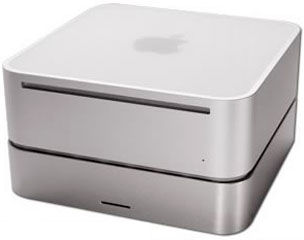 Until then, I’m running the Mac mini from an external hard drive. I installed an old 250 GB Maxtor 6 drive in a NewerTech miniStack enclosure, which is designed to perfectly match the look of the Mac mini. This is a 7200 rpm drive with an 8 MB buffer.
I divided the drive into separate Leopard and Snow Leopard partitions, then used SuperDuper to clone the internal hard drive to the Snow Leopard partition and then cloned the USB 2.0 drive to the Leopard partition. This was done while booted into OS X 10.6.7 from the internal hard drive. I was surprised to find that cloning the internal hard drive was a longer, slower process. Whether that was due to the hardware itself or the fact that I was cloning an active drive I can’t say.
FireWire 400: The Best Option for Now
In the best of all possible worlds, every Intel Mac mini would have shipped with eSATA (external SATA), which supports the same 1.5 Gbps bandwidth as the internal drive bus. FireWire 800 would have been a great second choice after eSATA, since it provides a bit over half SATA’s bandwidth. However, FireWire 400 is the fastest bus the Mac mini offers, so that’s what I’m using. It has about half the bandwidth of the UltraATA/100 in my Power Macs, but about 50% more than USB 2.0 at its best.
Another plus with the miniStack enclosure is that it gives me two additional FireWire ports and three more powered USB 2.0 ports. The latter is a real plus, since the Mac mini has only four USB ports – the external USB drive, the keyboard, and wireless dongle for my Logitech M705 mouse tie up three of them. If or when I need more ports, they’ll be there thanks to the miniStack.
Until I can afford a fast internal drive, I’ll be working from an external 7200 rpm drive. Despite the slower bus, the Mini definitely feels faster and performs more smoothly with the faster drive. I can get by using the partitioned 250 GB Maxtor for now (and a 250 GB Hitachi Deskstar in another miniStack for backup). I can only imagine how much better things will become with a 7200 rpm internal drive on the Mini’s fast (relative to FireWire and ATA/100) SATA bus.
Drive Discoveries
The previous owner left quite a few useful programs on the Mini that I hadn’t used until now. In particular, there’s DiskWarrior 4, which has rescued a couple drives that have been sitting on the shelf for years.
I’ve had real problems with 250 GB Maxtor and Deskstar drives, but I needed a 7200 rpm drive with enough space for Leopard and Snow Leopard partitions, along with all my apps. The first time I tried cloning the Mini’s Snow Leopard drive and the Power Mac’s Leopard drive to the partitioned Deskstar, the old problem showed up while cloning the second partition. This drive has always had partitions go bad. Whether I partition for the old Apple File System or the new GUID, whether I create two partitions or more, within days or even hours at least one partition becomes corrupt.
Since I had DiskWarrior 4 available, I used it on the freshly partitioned Deskstar. I was shocked that it found problems to fix. What’s wrong with Apple’s Disk Utility that a freshly formatted drive has problems? Anyhow, I let DW4 fix the problems and write new directories to each partition. However, the corruption problems with the Deskstar keep coming back after a few hours of uptime. I suspect it’s a heat-related problem.
The Maxtor was having similar partition problems, but since its treatment with DiskWarrior 4 (which found the same kind of problem as it did on the Deskstar), it’s had no problems in a week of use.
DiskWarrior has helped me resurrect a drive I had long ago given up for lost. If you’re having hard drive problems and Disk Utility isn’t helping, DiskWarrior should be the next tool in your utility arsenal. It’s been saving my butt since version 2!
Cooling the Mini
Buying secondhand, you sometimes get software surprises. The previous owner has several utilities installed, including smcFanControl, which measures CPU temperature and controls the maximum speed of the cooling fan so you can get the cooling you need without running the fan at full speed, which isn’t exactly quiet. It was turned down quite a bit, and I’ve found it maintains a nice consistent temperature at 4800 rpm (maximum is 5500 rpm).
Running the Mac mini on its side can also help, as it improves airflow and increases the surface area exposed to air, which should reduce heat buildup.
Also, the Mac mini seems to run even cooler when I’m not using the internal hard drive, which is only a temporary situation.
Regrets?
Do I have any regrets? I had expected a higher resolution display. After all, 23″ is bigger than 20″. I certainly didn’t expect lower resolution – but it’s not that much lower. I can live with that.
As much as I’ve read maligning the Intel GMA 950 graphics, it’s fine for everything I do.
So far my only frustration with the gear I bought is that Apple’s aluminum USB keyboard is only recognized* in Snow Leopard. If I boot into Leopard, the keyboard isn’t recognized at all. Good thing I have lots of keyboards that do are recognized in Leopard (and every previous version of OS X, not to mention OS 9 for some of them). I’m still using the Macally iKeySlim that I reviewed last November.
When I moved the Mac mini to its permanent location, I connected it to my higher resolution 20″ Cinema Display, attached the 23″ to my Mirrored Drive Door Power Mac, and moved my 1280 x 1024 Dell LCD to my server, which is now the dual 1.6 GHz upgraded Digital Audio Power Mac. I plan to connect a big hard drive to the server and use it for Time Machine backups. (When I get my next Intel Mac – probably several years from now – I plan to use this Mac mini as my server.)
When I get the memory to upgrade the Mini, I plan to benchmark it under OS X 10.4, 10.5, and 10.6 with several different memory configurations. It’s something I’ve always wanted to do with one of my Power Macs as well, but as they’re production machines, I avoid taking them out of service.
One Problem
The only glitch I’ve run into with my setup is with teleport, a great donationware app that lets one mouse and keyboard control multiple Macs. I’ve been using teleport 1.0.1 on my Tiger Mac and 1.0.2 on my Leopard Macs since I started using Leopard, and it never let me down on my Power Macs.
It worked as always for the first two days after I put the Mini into production use, but the third day it began to do the weirdest thing – the Tiger slave machine no longer recognized the modifier keys (shift, control, command, and option) when I was running Snow Leopard on the Mac mini. The server, which is running Leopard, has no such problem, and if I boot the Mini into Leopard, the Tiger machine sees the modifier keys.
I can still drag and drop files between Macs and share the clipboard, but no shift key, option key, or command key makes teleport far less useful than it has been. Maybe version 1.1, in beta, will fix this. Until then, I’m using separate mice and keyboards on my production Macs.
Looking Ahead
If anything, the Mac mini makes me more excited about the Thunderbolt future. What if, instead of having to choose a slow (compared to SATA) external FireWire drive or an even slower USB 2.0 drive, I could connect to a 10 Mbps bus? That’s over six times as fast as this Mini’s built-in SATA! Thunderbolt is going to make the future very interesting, and it could let Apple reduce the number of ports on the Mini in a year or two when there are lots of Thunderbolt peripherals available.
* Clarification: I’m not saying that the keyboard doesn’t work, only that it it is not recognized in the Keyboard & Mouse system preference when you click Change Keyboard Type…. The aluminum USB Apple keyboard works just fine with Leopard – and even with Tiger (10.4.10 and 10.4.11) if you install Keyboard Software Update 1.2.
Keywords: #macmini #osxsnowleopard #intelmacmini
Short link: http://goo.gl/Df2faK
searchword: goingintel
