
We take the Low End part of our name seriously at Low End Mac. Until six weeks ago, my newest Mac was a refurbished 2004 1.25 GHz eMac – and that’s not even a production machine. I picked up a secondhand dual 1 GHz Power Mac G4 to replace the eMac as my production machine about six years ago. Introduced in August 2002, it was nearly two years older than the eMac, which I keep as a spare. (When you depend on computers for a living, always have a spare you can fall back on in a pinch.)
When NetNewsWire stopped working with NewsGator’s servers, I had to switch to a newer version of NetNewsWire that syncs with Google Reader – and that meant I needed a Mac running OS X 10.5 Leopard. (I also need an OS X 10.4 Tiger Mac so I can Classic Mode for Claris Home Page.) I shared my need with others and received some donations and some awesome deals that let me put together a new production Mac. My Leopard Mac was a Digital Audio Power Mac (introduced in January 2001) with a dual 1.6 GHz G4 upgrade and 1.25 GB of memory.
And my server was a dual 500 MHz Mystic Power Mac with 1.5 GB of memory, a 250 GB external FireWire drive (the internal bus tops out at 128 GB), and Leopard.
I used a wonderful program called Teleport so I could control all three Macs from a single mouse and keyboard.
Entering the Intel Era
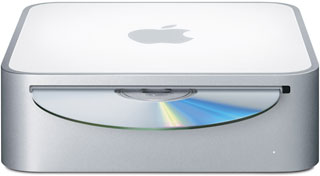 In late March, I picked up a secondhand 2007 Mac mini, the Core 2 Duo model with 1 GB of memory, a SuperDrive, and a 120 GB 5400 rpm hard drive. It replaced my Digital Audio Power Mac and has OS X 10.6 Snow Leopard installed (currently running from a 7200 rpm external FireWire drive).
For the most part, the transition was trouble free. With just 1 GB of RAM and a pedestrian hard drive, it’s no speed demon, but the external drive helps there, and I hope to upgrade memory and install a fast internal hard drive in May. Best of all, I can now try Intel-only software like Google’s Chrome browser.
My biggest problem was with Teleport, which started acting up about two days after I set up the Mac mini as a production machine. All of a sudden, the client Mac running Tiger no longer responded to the Shift, Command, Option, and Control keys on the Mini’s keyboard. Not good at all, and for a while I used Teleport to drag files and copy clipboards between machines, but I used a separate mouse and keyboard on the Tiger machine.
Yesterday I switched to using my server with Leopard as the Teleport host, and now I can move between my three Macs and their three versions of OS X without the modifier key problem. Life is good, my workflow has improved, and all that remained was to move the monitors around. Teleport client displays need to be next to the host display (virtually), so last night I moved the server’s display to the center position and the Mini’s display to the rightmost spot.
My Workstation
After I had it up and running, I decided that it was about time I shared my office setup with Low End Mac readers. It is a bit unconventional and very low-end.
When I used two displays or even three moderately sized ones, it was possible to work on a regular desktop, but bigger displays were really pushing things. I’d also read that working while standing can help with posture and burn a few extra calories, so I decided to set up a desk for that.
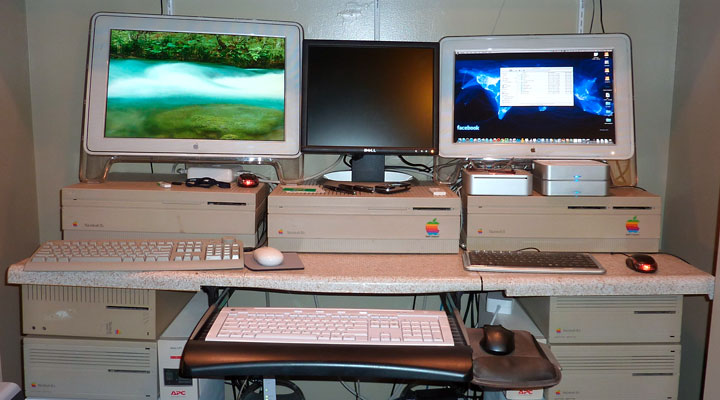
My workstation has two G4 Power Macs, a Mac mini, and three displays, plus keyboards and mice on a 60″ countertop.
My desktop is the same 60″ piece of countertop I’d used as a regular desk along with two old 2-drawer file cabinets a friend had given us. The only expense here was some spray paint for the ugly beige file cabinets and some contact paper to cover the ugly countertop.
For sitting, a 30″ high desktop is just about ideal, but for standing I needed an indeterminate amount of additional height. I did some estimates and concluded that the keyboard should be about 38″ from the floor (I’m six feet tall – you’ll have to adjust based on your height and preferences.)
The keyboard drawer is below the countertop, so I needed to add about 10″ of height between the file cabinets and the countertop. I ended up using some old Mac IIcx, IIci, and Quadra 700 cases to gain the height I needed. I’ve been working at this height for months now, and it’s just right for me.
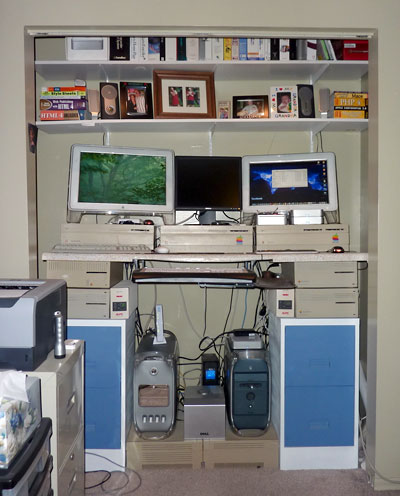
3 working Macs and 3 monitors in my closet workstation.
The desk is set up in the closet in my office, which was meant to be a bedroom. I’ve removed the bi-fold doors, put up some shelves for books, software, photos, and speakers, and now I have more floor space than ever before in my office.
I quickly discovered that having my monitors on the countertop – 41″ above the floor – wasn’t very comfortable. Better ergonomics dictate that the top of the monitor be at about eye level, which meant raising the displays about six inches. I dug out a Mac II, IIx, and IIfx from my storage room, and they did the job, raising the monitors to just the right height.
I did run into a problem. Two of my Macs, the Power Macs, were on the floor, and some of the USB cables didn’t quite reach their USB ports. Solution: Two more Mac II cases to raise the Power Macs 6″ higher. I also have a UPS and subwoofer sitting on these Mac IIs. I have a pair of APC Back-UPS power supplies on the file cabinets next to the IIci cases, and I have a pair of APC surge strips mounted to the bottom of the countertop to provide the outlets I need for three Macs, several external drives, two sets of speakers (one for the Mini, one for the Tiger Power Mac), monitors, a U-verse modem/router, and so on.
For lighting, I picked up the NON spotlight set from Ikea and mounted both lights to a 48″ long 1-by-4, which I mounted to the inside of the front wall of the closet. The two 10W halogen bulbs provide plenty of light, and the frosted cover makes for very even lighting. Best of all, it draws a minimal amount of electricity while providing better lighting than a 25W incandescent bulb or a pair of 40W equivalent CFLs would.
All told, I may have $50 to $60 invested in my workstation: paint, contact paper, shelving and brackets, and lighting. I have a very functional workstation and now know exactly what heights my keyboard and displays should be when I can afford something a bit nicer and more permanent someday.
I also have a nice stool that would have looked right at home in a malt shop – shiny chrome with a red cushion on top. I picked it up for $20 from a local consignment shop. Sometimes it is nice to sit down to work.
If you’re trying to come up with a more workable desk, think outside the box. What will fit your workflow and the number of computers you work with? Does a sitting or standing desk make more sense? And what kind of things can you use to create a test setup to make sure that what you think will work for you will actually work?
That’s what got me to this point. It’s not pretty, but it’s eminently functional.
Update, January 2016: Almost five years later, things have changed a bit. I’m still using that 2.0 GHz 2007 Mac mini, now with 3 GB of memory, a 256 GB SSD, and OS X Snow Leopard as my main production machine. My secondary is a 2.3 GHz Power Mac G5 Dual with 3 GB of RAM and separate partitions for Leopard, Tiger, and Tiger Server, although I hardly ever use anything but Leopard on it.
I’ve retired the Mirrored Drive Door Power Mac G4 from active duty. My monitors are now Dell 2007FP displays with 1600 x 1200 resolution. They now sit on a shelf about 12″ higher than my desktop, which is now a 30″ x 60″ desktop from Ikea.
I’ve replaced the two Ikea NON lamps with an Ikea LEDBERG kit, which is about 30″ of LED lighting. I also picked up a low coffee table from Ikea that holds the MDD Power Mac G4, the Power Mac G5 Dual, and three more Power Mac G5 machines I’m working on and hope to sell.
I should raise the desktop height a bit. Best ergonomic practice is for your elbows to be at the same height as the keytops on your keyboard. I’ve got a couple inches to go, but the Ikea table legs are only so long….
All in all, this has been an very good solution for me.
Keywords: #workstation #computerdesk
Short link: http://goo.gl/KoOelJ
searchwords: computerdesk, workstation

Great looking setup! Good use of those big old Macs too! Any photos of your new setup?