Mac Musings
The Enduring Value of Macs
Daniel Knight - 2009.11.25 -
Follow Low End Mac's blogs: LEMblog and Low End Mac Services.
We live in a consumer society. For the most part, things are not built to last and last. In Europe, there are town halls and castles and churches nearly a thousand years old. Here in America, we no longer seem to create buildings to last more than a few generations.
Yes, things wear out over time, but in our capitalist desire to maximize profits, too many products are built down to a price rather than up to a quality. And it shows in our buying habits - witness how many Americans will spend hours on Thanksgiving Day poring over ads and then showing up at stores at 4, 5, or 6 a.m. to start buying from whoever offers the lowest price on what they want.
Apple Is Different
Apple breaks that mold to some extent. While its products are not designed to last forever, they are built up to a quality. Macs don't really compete with commodity PCs, where it doesn't matter whether the nameplate says Dell, HP, Acer, or Bob's Homebuilt PC. In the PC world, everyone can use the same CPUs, the same memory chips, the same video cards, the same hard drives, the same optical drives, the same USB controllers, the same SATA chips, and so on. To a great extent, they can even use the same motherboard, power supply, and case.
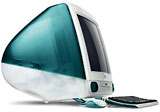 Not
so Apple. While many of the authorized
Mac clones did use commodity cases, that was the only time in
Macintosh history that you could buy a Mac that looked almost exactly
like a PC. Apple has always designed unique products that the rest of
the industry either ignored or emulated. How few all-in-one PCs have
there been since the
original Macintosh? And how many companies added swoopy colored
plastics after the iMac
launch?
Not
so Apple. While many of the authorized
Mac clones did use commodity cases, that was the only time in
Macintosh history that you could buy a Mac that looked almost exactly
like a PC. Apple has always designed unique products that the rest of
the industry either ignored or emulated. How few all-in-one PCs have
there been since the
original Macintosh? And how many companies added swoopy colored
plastics after the iMac
launch?
At the end of the day, Apple is a consumer company. It has a brilliant strategy of creating branded products with extra value that enable it to sell at higher prices and higher profit margins than its competitors because, quite frankly, we believe they are worth it. Still, to generate profits, Apple has to design products that you'll eventually replace - whether that's a Mac, an iPhone, or an iPod.
The key to consumer strategy is to create a dissatisfaction among users of older products. How Mac owners gripe when the new version of the Mac OS - whether that was System 7.0 or OS X 10.6 - no longer supports their beloved computer. As if there's a good business reason for Apple to keep supporting increasingly dated hardware!
Apple has the numbers. It knows its development costs, its potential sales, and the demands of each new version of the Mac OS.
Apple does the math. Apple knows when it's time to drop support for pre-FireWire G3 Macs, sub-867 MHz G4 Macs, and the entire realm of PowerPC Macs.
Apple continues to add power sapping features to Mac OS X, and it's not above asking its partners, such as Microsoft, to develop products that will force Mac users to migrate to newer hardware to use the latest version of Office - or whatever the app. (Likewise, Microsoft's feature bloat in Office is its way of getting people to upgrade from previous versions.)
Low End Mac Is Different
The reality is that those old computers running old software on old operating systems are no less capable than the day they came off the assembly line. In many cases, those old Macs have become more capable both through hardware upgrades (RAM, hard drives, video cards, etc.) and software upgrades (newer versions of the Mac OS and Mac apps).
Yes, it's a sad day when your Mac can no longer run the latest version of your favorite app, but the reality is that thanks to upgrades it can be a far more capable machine than it was when Apple first produced it. You can be the beneficiary of every newer version of the Mac OS that your hardware supports, and every Mac ever built has been supported for several years of Mac OS upgrades.
At Low End Mac, we recognize the enduring quality and usability of older Macs. I'm typing these words on a long-discontinued Logitech keyboard, using a long-discontinued Logitech mouse, running a long-discontinued Mac (dual 1 GHz Power Mac G4 from 2002) and a long-discontinued operating system (Mac OS X 10.4, first released in April 2005). I still use Claris Home Page 3.0 (1996) to write, edit, and upload articles. I have Microsoft Office 2004, which is more than enough to open the Word articles and Excel spreadsheets some people send me. I prefer AppleWorks 6 (from 2000, and descended from ClarisWorks 1.0, which I ran on my Mac Plus in 1991) for my word processing and spreadsheet needs.
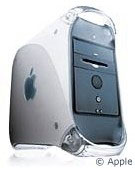 My other production machine
is a Digital Audio Power
Mac G4 (2001) with a dual 1.6 GHz G4 CPU
upgrade. It's running Mac
OS X 10.5, and my primary reason for migrating to "Leopard"
from "Tiger" was a single app - NetNewsWire
switched to using Google Reader to manage RSS, and the version that
supports Google Reader isn't compatible with OS X 10.4. I depend
on NetNewsWire to track new content on dozens of websites.
My other production machine
is a Digital Audio Power
Mac G4 (2001) with a dual 1.6 GHz G4 CPU
upgrade. It's running Mac
OS X 10.5, and my primary reason for migrating to "Leopard"
from "Tiger" was a single app - NetNewsWire
switched to using Google Reader to manage RSS, and the version that
supports Google Reader isn't compatible with OS X 10.4. I depend
on NetNewsWire to track new content on dozens of websites.
I use Teleport to tie the two machines together. Teleport lets you use one mouse and keyboard to control two or more Macs, and by holding down the Ctrl key, I can move the cursor from one Mac's display to the other. The Leopard machine is my primary, as Teleport won't let me control an OS X 10.5 machine from one running 10.4. It also has my lone LCD monitor, a wonderful 1280 x 1024 Dell display with a 4-port USB 2.0 hub. It's my primary machine for working on the Web, doing email, and working in KompoZer.
The Tiger machine has a cheap old Samsung monitor that tops out at 1280 x 960 with a 60 Hz refresh. This CRT display is adequate, but not as crisp as the Dell LCD. With file sharing enabled, the Leopard machine can work with files on the Tiger Mac.
Both of these Macs have been upgraded with USB 2.0 cards, additional RAM (2 GB in the Mirrored Drive Doors and 1.25 GB in the Digital Audio, which tops out at 1.5 GB), higher capacity 7200 rpm hard drives, and 16x Pioneer DVD±RW drives. Both can run the latest version of Safari (which I rarely use), Firefox, Camino, and Opera.
With the exception of NetNewsWire, Mac OS X 10.4 did everything I need a computer to do. I haven't yet begun using any "new" Leopard features, although I am experimenting with Spaces. For my purposes, I could get by with my 2002 Power Mac and 2005 operating system if I were willing to switch RSS readers.
Getting the Most from Your Mac
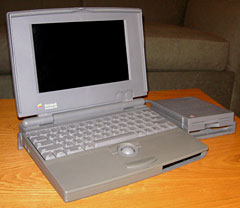 There's
something of an anti-consumption backlash in the way we think at Low
End Mac. Our writers rarely buy brand new Macs, and when we do, we
expect them to last for years before being relegated to backup or field
duty. We love our old PowerBooks and iBooks (PowerBook 100, 1400, WallStreet, Pismo, and Clamshell iBooks among them). We love
our old G3 iMacs, G4 eMacs, and G3 and G4 PowerMacs. Most of
us are very productive using Mac OS X 10.4 and/or 10.5. Few of us
use Intel-based Macs, and even fewer are running Mac OS X 10.6 "Snow
Leopard".
There's
something of an anti-consumption backlash in the way we think at Low
End Mac. Our writers rarely buy brand new Macs, and when we do, we
expect them to last for years before being relegated to backup or field
duty. We love our old PowerBooks and iBooks (PowerBook 100, 1400, WallStreet, Pismo, and Clamshell iBooks among them). We love
our old G3 iMacs, G4 eMacs, and G3 and G4 PowerMacs. Most of
us are very productive using Mac OS X 10.4 and/or 10.5. Few of us
use Intel-based Macs, and even fewer are running Mac OS X 10.6 "Snow
Leopard".
We are productive with older Macs, older operating systems, and older software - and we know that you can be productive as well. Most of us have upgraded our Macs with more RAM and larger, faster hard drives. We know that newer, more powerful Macs could rip our CDs faster in iTunes or process video with more alacrity, but we're pretty content with what we have.
Part of the reason Macs are worth more than commodity PCs is that they continue to just work. Pop in commodity RAM or a commodity hard drive/optical drive as necessary, and those old Macs become more capable at very little cost. Upgrade your OS and apps only when necessary to minimize your investment in productivity. Use freeware and included apps when possible. Keep it cheap.
Living the Low End way is a lifestyle. Whether you keep using your old Mac as long as practical because of your budget or because your philosophically opposed to unnecessary consumption, you're on the Low End Mac page. And best of all, if you're a true Low End user, when it does come time to get a newer Mac, you may well choose a discontinued Mac that's still several steps ahead of your older one - and then you'll repurpose the old one as a home server, a family Web and email machine, an iTunes player, or a first computer for a grandparent who has never taken to these newfangled PCs.
Like everything, Macs do wear out, although they tend to do so more slowly than PCs and remain useful a lot longer. We love the value of Macs, old and new, and we hope we're not just preaching to the choir when we say that older Macs are worth it. We hope new Mac users will hear the good news as well - every Mac has a whole lot of life in it, so use what you have for as long as it makes sense.
Macs are worth it. Definitely something to be thankful for!
Join us on Facebook, follow us on Twitter or Google+, or subscribe to our RSS news feed
Dan Knight has been using Macs since 1986, sold Macs for several years, supported them for many more years, and has been publishing Low End Mac since April 1997. If you find Dan's articles helpful, please consider making a donation to his tip jar.
Links for the Day
- Mac of the Day: PowerBook 500 Series, introduced 1994.05.16. 'Blackbird' includes a 25 to 33 MHz 68040 along with smart batteries and grayscale or color displays.
- Support Low End Mac