Mac Musings
The June 2009 13" MacBook Pro Value Equation
Daniel Knight - 2009.06.11 -
Apple overhauled its entire notebook line this week, with the exception of the MacBook White, which was just updated in May. From the 13" side of things, the biggest change is that the 13" Unibody MacBook has gained FireWire and an SD Card slot while adding "Pro" to its name.
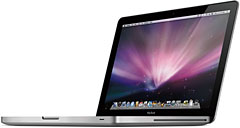 The
13" MacBook
Pro has the same unibody form factor as the Unibody MacBook that it
replaces, but with some significant improvements. It is available in
2.26 GHz and 2.53 GHz versions, is Apple's first 13" notebook with
FireWire 800, and gains an SD Card slot, allowing it to use the most
popular solid state memory found in digicams and camcorders.
The
13" MacBook
Pro has the same unibody form factor as the Unibody MacBook that it
replaces, but with some significant improvements. It is available in
2.26 GHz and 2.53 GHz versions, is Apple's first 13" notebook with
FireWire 800, and gains an SD Card slot, allowing it to use the most
popular solid state memory found in digicams and camcorders.
The smallest MacBook Pro retains the glossy 13.3" 1280 x 800 display of the MacBook and surrenders its swappable battery for one that lasts up to 7 hours - up from 4.5 hours in the regular MacBook.
Best of all, the 13" MacBook Pro is US$100 less expensive than the 13" Unibody MacBook it replaces. This is in stark contrast to what I said when Apple introduced the Unibody MacBook last October:
Apple really surprised me with the "Unibody" MacBook - not because it's aluminum, but because the two new models seem to offer less for your dollar than the models they replace. Part of that is because it's not really possible to quantify the difference in the video realm. What is a 5x as fast GPU worth?
The entry-level 13" MacBook Pro runs at 2.26 GHz, making it 6% faster than the MacBook White. At the new $1,199 price point, the question is whether it's worth the extra $200. You have the same RAM and drive configuration, while you gain an aluminum case, a faster version of FireWire, an SD Card slot, and the ability to reach 8 GB of RAM. For a slightly smaller, lighter model with vastly better battery life, I'd say the smallest MacBook Pro has proved its value relative to the MacBook White.
The top-end MacBook runs at 2.53 GHz and has the same RAM and drive configuration as the 2.4 GHz Unibody MacBook it replaces. It has the same benefits over the Unibody MacBook - and the Unibody MacBooks don't have FireWire at all. But is it worth $300 more than the 2.26 GHz 13" MBP?
The Value Equation
You do gain 12% more processing power, and the 250 GB hard drive is a much better option in a media-rich age. You also get twice as much RAM - 4 GB instead of 2 GB. Overall, I give the 2.26 GHz model the edge for value, but the 2.53 GHz model is very close in overall value.
We updated our 13" MacBook and MacBook Pro price tracker this morning. Here are the best deals on new and refurbished Unibody MacBooks and the new 13" MBP (close-out prices on the Unibody aren't good enough to take sales away from the MBP):
- refurb 2.0 GHz Unibody, $949
- refurb 2.4 GHz Unibody, $1,099
- new 2.26 GHz MBP, $1,119
- new 2.53 GHz MBP, $1,399
If you don't need FireWire, the refurbished 2.0 GHz Unibody is the low price leader - plenty of power for most users most of the time, good battery life, and the same form factor as the 13" MacBook Pro. However, for just 18% more money, you gain 13% more processing power, FireWire 800, and the ability to use SD Cards without buying a card reader. Additionally, should you need more than 6 GB of RAM, the MBP goes to 8 GB.
The refurb 2.4 GHz Unibody offers 6% more CPU speed for less than 2% more money - and it has a 250 GB hard drive. Again, if you don't need FireWire or more than 6 GB of RAM, it can be an excellent value. Still, for a lot of Mac users, FireWire is definitely worth having, the SD Card reader is a nice plus, and that 7 hour battery in the MacBook Pro is a real bonus.
The overall value champion: The 2.26 GHz 13" MacBook Pro by a slim margin over the 2.53 GHz model. Refurb prices are competitive if you only consider basic features like CPU speed, RAM, and hard drive size, but the improved battery life and inclusion of FireWire give the "Pro" model the edge for most users.
Join us on Facebook, follow us on Twitter or Google+, or subscribe to our RSS news feed
Dan Knight has been using Macs since 1986, sold Macs for several years, supported them for many more years, and has been publishing Low End Mac since April 1997. If you find Dan's articles helpful, please consider making a donation to his tip jar.
Links for the Day
- Mac of the Day: PowerBook 500 Series, introduced 1994.05.16. 'Blackbird' includes a 25 to 33 MHz 68040 along with smart batteries and grayscale or color displays.
- Support Low End Mac