
2009 – Others have published their thoughts on the Best Mac Ever, the 10 Best Macs, and the 25 Best Macs, but I’m taking a different approach. I want to identify the 25 most important Macs ever, clones included. (In some cases, I’ll lump together two or more models that were introduced simultaneously.)
I’ve been using personal computers since 1979 and have been a Mac user since 1986. I hope that informs my comments, although I’m sure I’ve left somebody’s favorite off my list. Enjoy the trip down memory lane!
.
The Original Macintosh (1984)
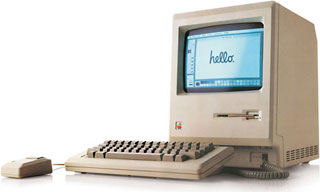
The most significant Mac ever has to be the first one, the ancestor of all the others. The Macintosh 128K, as it came to be called after the Mac 512K was introduced, matters most because it broke the mold for personal computers. It had no expansion slots, no room for a hard drive, no RAM expansion, no color display, no 5.25″ floppy drive, and no command line.
What it had was a crisp 9″ black & white bitmapped display that let you see what your document was going to look like on the printed page (WYSIWYG), a mouse to move your cursor around the screen, a 3.5″ 400K floppy drive, and just barely enough RAM to be useful. (In fact, Steve Jobs had to use a Mac upgraded to 512K to demonstrate what the Mac was capable of.)
.
Mac Plus (1986)
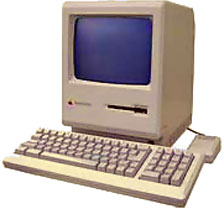 Until 1986, the Mac had very limited expandability. All of that changed when the Macintosh turned two and the Mac Plus was introduced. For the first time a Mac was designed with memory expansion in mind – it shipped with an impressive 1 MB and could be upgraded to a mind-boggling (for 1986) 4 MB – and the SCSI bus on the back made it easy to add a fast hard drive.
The Mac Plus remained in Apple’s product line longer than any other Mac at 4 years and 10 months. I have a real soft spot for the Plus, as it was the first Mac I ever used and a few years later became the first Mac I ever owned. It was a real workhorse, and it officially became a low-end Mac when the Macintosh SE was introduced in 1987.
.
Mac II (1987)
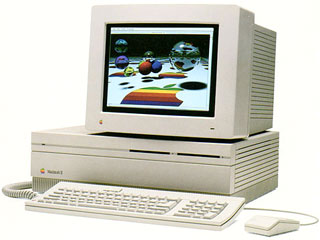 The Mac Plus introduced some expandability to the original all-in-one Macintosh design; the Mac II blew away the Mac’s other limitations. It had room for two internal floppy drives, one 5.25″ or two 3.5″ hard drives, six NuBus expansion cards, and 128 MB of memory. The 16 MHz 68020 CPU was far more powerful than the 8 MHz 68000 used in earlier Macs, and the icing on the cake was support for color – up to 256 colors from a 16 million color palette.
The compact Macs had been good enough to start the desktop publishing revolution, but with its larger displays, awesome power, and ability to support more than one monitor, the Mac II became the designer’s dream machine. It’s biggest drawbacks were that the battery was soldered to the motherboard, and RAM took a different turn than Apple expected, resulting in very expensive RAM beyond 8 MB.
.
Mac IIci (1989)
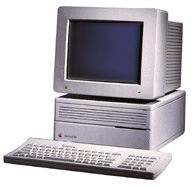
The Mac IIci was the perfect desktop Mac – enough expansion slots, onboard color support (yes, it used “vampire” video), and plenty of power. The IIci was the first Mac faster than 16 MHz – it clocked in at 25 MHz, and with a level 2 (L2) cache card, it could easily provide twice the power of 16 MHz Macs. The built-in video was decent, and you could add a NuBus video card if you wanted or needed something better. Three NuBus slots meant lots of expansion options, and the processor direct slot (PDS) made it easy to plug in a still faster 68030 chip, a 68040, or even a 100 MHz PowerPC 601.
If Apple were ever to release a midrange modular desktop Mac, it should look to the IIci for inspiration.
.
Mac IIfx (1990)
Apple took the Mac to the next level with the Mac IIfx, which jumped the Mac’s top CPU speed from 25 MHz to 40 MHz. Everything about the IIfx was optimized for speed – it uses special memory that could overlap read and write operations, it has two 6502 CPUs (the same chip used in the Apple II computers) to handle I/O, and it has 32 KB of L2 cache. The IIfx has twice the processing power of a cacheless IIci.
To top it off, Apple introduced the 8•24GC, its first accelerated video card. Of course, all of this came at a price – the IIfx would set you back well over $10,000 by the time you added a keyboard, video card, and monitor.
.
Mac LC (1990)
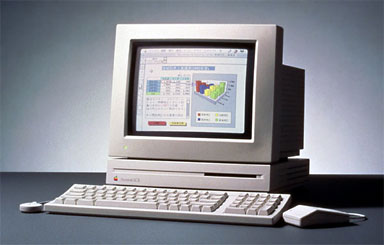
Later the same year, Apple introduced a trio of more affordable Macs. The entry-level Classic was your basic 8 MHz compact Mac, no more powerful than the Mac Plus. The Mac IIsi was nearly as powerful as the IIci, but with only one expansion slot (with a PDS-to-NuBus adapter, it could support a single NuBus card) and a more accessible price.
And then there was the Macintosh LC, the first low cost color Mac. It was less than 3″ high, ran the same 16 MHz 68020 CPU as the Mac II, and made it possible to buy a color Mac with keyboard and monitor for $3,000 for the first time ever. It even had its own processor direct slot; the LC PDS would live on for years.
Where the Classic was simply underpowered and the IIsi was simply underclocked (it could have run at 25 MHz, but by running it at 20 MHz it wouldn’t take as many sales from the IIci), the LC was deliberately crippled. Apple arbitrarily decided that it would support no more than 10 MB of RAM and, to keep costs down, put two SIMMs on a 16-bit memory bus while the CPU has a 32-bit bus.
This crippled architecture would also be used in the LC II, Classic II, and Color Classic.
.
The First PowerBooks (1991)
The Mac Portable (1989) had been impressive in many ways, but its roughly 16 lb. weight kept it from being very popular. (The $6,500 price tag didn’t help either.) Apple went back to the drawing board and came up with a new design for notebook computers – the keyboard would be close to the display, and a trackball and button would sit in front of it. This design went on to dominate the notebook computer industry, although nowadays we usually have a trackpad instead of a trackball.
 There were three PowerBooks in the first generation. The PowerBook 100 was developed with Sony and essentially reduced the size and weight of the Mac Portable. The PB 100 was one-third as heavy and had an 8.5″ x 11″ footprint. It had an external floppy drive – shades of the MacBook Air with its external SuperDrive!
The PowerBook 140 had a 16 MHz 68030 CPU, a 1-bit passive-matrix display, and two hours of battery life, and the PowerBook 170 stood at the top of the line with a 25 MHz CPU and an active-matrix display. Both weighed 6.8 lb. and had 9.3″ x 11.25″ footprints.
The PowerBook name would live on into 2006, when Apple retired it with the introduction of the MacBook Pro line.
.
AV Quadras (1993)
 Apple rolled out two Macs with special AV circuitry in July 1993. The Quadra 840av was the top-end workhorse with its 40 MHz 48040 CPU and 67 MHz digital signal processor (DSP). The more affordable 660av was smaller, ran a 25 MHz 68040, and had a 55 MHz DSP.
The AV Quadras could receive live video, overlay text or graphics, and output the results in real time. They became indispensable in the broadcast industry, providing usability years after most contemporary computers had been retired.
.
The First Power Macs (1994)
In early 1994, Apple managed its first transition from one CPU family to another. Apple began to phase out Motorola 680×0 CPUs and started using the PowerPC 601 in its place. Just as with the 2006 transition to Intel, compatibility with existing software was paramount, and Apple did a bang-up job with its 680×0 emulator. Most programs run just fine on the Power Mac 6100, 7100, and 8100.
These were excellent bridge machines, taking proven designs from Quadra family and retaining the familiar NuBus expansion slots while paving the road ahead with their PowerPC chips. With this under its belt, it should be no surprise that 12 years later the transition from PowerPC to Intel was also relatively painless – at least for those using only Mac OS X apps.
.
PowerBook 500 Series (1994)
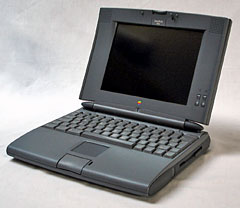 Many longtime Mac users consider the PowerBook 500 Series (five different models) to be the best 680×0 notebooks Apple ever built. Unlike the later PowerBook 190, ethernet and a modem were built in rather than extra cost options. The keyboard was excellent, and this was the first notebook with a trackpad instead of a trackball. This was also the first PowerBook with a 640 x 480 display (earlier models were 640 x 400) and PC Card expansion slots – and the first notebook with stereo speakers and “intelligent” batteries.
The 500 Series has an expansion bay, can hold two batteries, and automatically goes to sleep when you shut the lid. Except for the PowerBook 550c, which was available only in Japan, these used low power 25 MHz or 33 MHz 68LC040 CPUs. There was even a PowerPC upgrade available.
.
Performa/LC/Quadra 630 (1994)
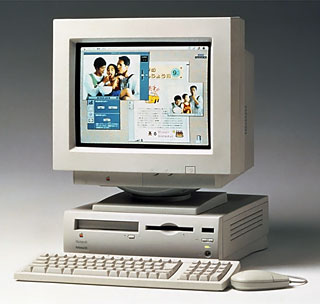 There were three versions of this computer. The LC 630 and Performa 630 Series are powered by a 33 MHz 68LC040 CPU, while the Quadra 630 has a full-fledge 68040. These were the first desktop Macs to use IDE hard drives, and the compact design included space for an optional SCSI CD-ROM drive. Memory could officially be expanded to 68 MB, although later users sometimes managed to break that barrier with the right modules.
The 630 had an LC PDS, a comm slot for a modem or ethernet card, and a video slot for either Apple’s Video System Card or TV/Video System card. Later on, Apple made the Power Mac PDS card, and the 630 was also offered with a built-in DOS card. This was probably the most flexible consumer Mac ever made.
.
Power Mac 7500/8500/9500 with CPU Daughtercards (1995)
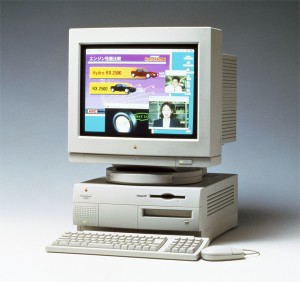 After the “bridge” computers of the first Power Mac generation, Apple abandoned NuBus and embraced PCI expansion slots. Three of the new PCI Power Macs had their CPUs on removable cards, so it was easy to make them more powerful by plugging in a daughter card with a faster CPU.
The Power Mac 7500 was the traditional desktop design, the 8500 was a minitower, and the 9500 was a 6-slot tower. Thanks to their daughter card slots, these could later be upgraded with G3 and G4 CPUs. That kept them viable for year to come, much as the Mac IIci had done in 1989.
.
DayStar Genesis MP (1995)
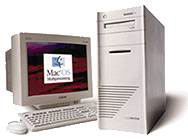
The only Macintosh clone on our list is the DayStar Genesis MP, which was introduced in October 1995 with four 132 MHz PowerPC 604 CPUs. At the time, Apple’s fastest model was a Power Mac 9500 with a single 604 CPU. It was DayStar that introduced multiple processors to the Mac, and Apple actually licensed the technology for use in later Macs.
Perhaps most significant is that the Mac OS itself had no support for multiple processors, so only programs specifically written to take advantage of them would benefit. Of course, that included Photoshop, so the DayStars quickly became favorites of high-end digital photographers.
.
20th Anniversary Mac (1997)
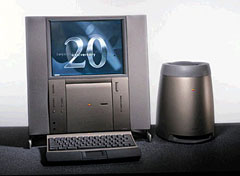
The Mac mini wasn’t the first desktop Mac built around notebook components, and the iMac G5 wasn’t the first Mac to put the computer behind a flat panel display. In both cases, it was the 20th Anniversary Mac (TAM for short) that pioneered these ideas.
TAM had stereo speakers plus a subwoofer, an 800 x 600 12″ LCD, a keyboard with a trackpad, and didn’t come in any shade of beige. The limited-edition TAM showed what Apple could do if cost was no object (it retailed for $7,500) and appearance was. The computer made a brief appearance in one of the Batman movies, and even today it looks quite modern.
.
PowerBook 2400c (1997)
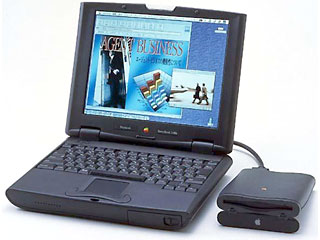 The PowerBook 2400c is important not for its features, but for its story. It was designed for the Japan market, and Apple teamed up with IBM to create it. Size is a big factor in Japan – small size, that is, and the 2400c had the smallest footprint of any PowerBook to date at 8.5″ x 10.5″ (the first footprint smaller than the PB 100). At just 2 kg (4.4 lb.) it could be considered a precursor to ultralight notebooks.
.
Power Mac G3 and Kanga PowerBook G3 (1997)
In November 1997, Apple unveiled new Power Mac and PowerBook models with the new PowerPC G3 CPU. The G3 had been optimized to run existing software, and it showed – a 266 MHz G3 gave the 350 MHz 604e a run for its money.
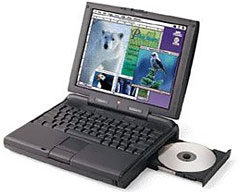 The Kanga PowerBook G3 was based on the PowerBook 3400c, but with a 250 MHz G3 on a 50 MHz system bus instead of the 3400’s 180-240 MHz 603e CPU on a 40 MHz bus. It was billed as the world’s most powerful notebook.
It was joined by the Power Mac G3, the original beige model, in 233 MHz and 266 MHz speeds and in either a traditional desktop enclosure or as a minitower. Later versions would hit 366 MHz, and this was the world’s most powerful desktop computer.
The Power Mac G3 was the first Power Mac to use an IDE drive instead of a SCSI drive, a switch Apple had made in its consumer line three years earlier. This is the oldest Mac officially supported by any version of Mac OS X.
.
WallStreet PowerBook G3 (1998)
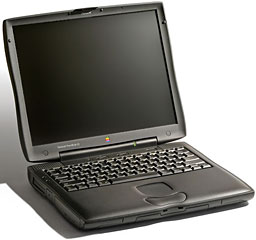 Of four different G3 PowerBook families – Kanga, WallStreet, Lombard, and Pismo – I’m naming the WallStreet as the most significant. It introduced a new, somewhat curvaceous design with two drive bays and two PC Card slots, and it had lots of raw power. It was big and heavy but worth the weight.
The later Lombard was slimmer and added USB, which replaced ADB, and the final G3 PowerBook, Pismo, replaced SCSI with FireWire. Both are excellent computers, better than WallStreet in some ways, but they are outworkings of the WallStreet legacy.
.
The Original iMac (1998)
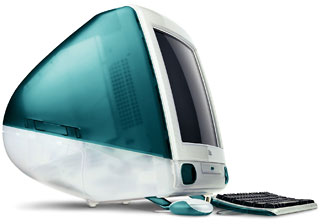
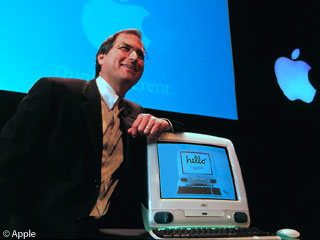 With the original iMac, the world sat up and took notice of Apple. It looked different. It was different – the all-in-one design, the Bondi blue color, the lack of an internal floppy drive and legacy ports.
 Steve Jobs, the master of hype, announced the iMac in May with a mid-August ship date, and it became the hot topic of conversation all over the Web. Several iMac-specific websites popped up within days, and the anticipation was so great the many Apple dealers had midnight hours on the day the iMac went on sale.
The original iMac had most of the power of the 233 MHz Power Mac G3 combined with a 15″ multiscan display and an absolute minimum of wires – AC, keyboard, mouse, modem, ethernet. The iMac helped turn Apple around and went on to become the best selling computer model in the US for several months.
.
The Original Clamshell iBook (1999)
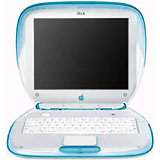
Less than a year after the iMac went on sale, Apple unveiled the iBook, it’s notebook for the home and education markets. It looked unlike any notebook computer on the market, and some went so far as to say it looked like a toy. It was solidly built, and its 300 MHz G3 gave it a good deal of power. It was also the first notebook designed for an internal WiFi card – Apple called it AirPort.
.
The Cube (2000)

The Power Mac G4 Cube was one of the most beautiful computers ever produced, but in the minds of many it put style ahead of substance. It had plenty of power, limited expansion, and was in some ways the anti-iMac – where the iMac reduced wires and desktop clutter, the Cube had an external power supply and external speakers, and the keyboard cable had to run out the back of its transparent enclosure and around to the front. The Cube itself was elegant, but a Cube system less so.
The Mac press didn’t understand the Cube’s price point – it cost more than the entry-level Power Mac G4 yet had far less expandability. You could upgrade RAM, replace the AGP video card, and that was about it. In terms of value, the Cube just didn’t cut it.
Perhaps if Apple had given it a different name that didn’t put it head-to-head with the “regular” Power Mac G4….
.
Mystic Dual Processor Power Mac G4 (2000)
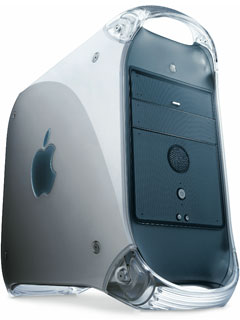 During the G3 era, Apple no longer made multiprocessor Macs. That became a possibility with the G4, and when Motorola was unable to produce faster chips in quantity, Apple went with Plan B – Two Brains Are Better than One. True, but the Classic Mac OS didn’t know how to use a second CPU, so until Mac OS X arrived, the second processor spent most of its time idle.
The Mystic Power Mac G4 put Apple back on the multiprocessor trail, and by the end of 2006 every Mac made had at least two cores. (It was also the first Mac with gigabit ethernet.)
.
PowerBook G4 (2001)
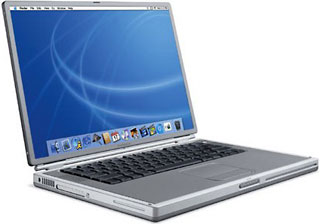 Apple has had some archetypal designs, and the Titanium PowerBook G4 was one of them. It introduced two concepts: thin and wide. The entire computer was just 1″ thin, and the display had a 3:2 aspect ratio vs. the 4:3 typical of notebook computers. It set the stage for today’s thin and widescreen MacBook and MacBook Pro models.
The 400 MHz version was my first notebook computer, and it served me well for nearly five years – along with regular RAM, hard drive upgrades, and a new battery about three years in.
.
The Dual USB iBook (2001)
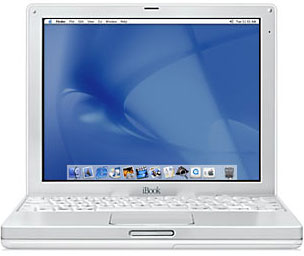 2001 was a good year for archetypal designs, and the 12″ Dual USB iBook G3 (nicknamed the iceBook) is a case in point. It was elegantly simple, plain white, fairly light (just under 5 lb.), and relatively small. The design made it to 900 MHz, then became the iBook G4, which topped out at 1.33 GHz.
This design was also the foundation for the 12″ PowerBook G4, which was even smaller and lighter, as it was clad in aluminum. Because of its small footprint, it remains a favorite in the Intel Age, since no current Mac notebook is as easy to tote.
.
Mac mini (2005)
For years the Mac Web had clamored for a modular desktop Mac, something more like an iMac in its simplicity and less like a big, expensive Power Mac. We’d hoped for 2-3 expansion slots and an affordable price. We got the Mac mini, which was positively tiny and downright affordable at just $499 for the entry-level model.
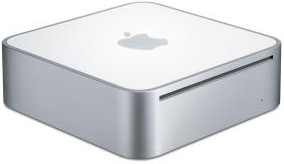
We also got laptop components in a desktop case, absolutely no expansion slots, and a case that was a challenge to open. Laptop components meant small size, less heat, more costly components, and slower, smaller hard drives. Of course, you could address the last with a fast (not cheap) 7200 rpm notebook drive or an external (much more affordable) 3.5″ FireWire hard drive. And the Mac mini did have plenty of ports.
The Mac mini is enough computer for a lot of people, and it rapidly found its way into family rooms, where it became part of the media center hooked up to the television. Although it has fallen far behind the rest of the Mac desktop line in terms of specs, it provides sufficient power for most users most of the time – and the Intel Core 2 Duo version is a huge jump in power for those living with G4 Macs.
.
MacBook (2006)
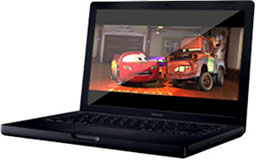 The 15″ and 17″ MacBook Pros simply continued to use the design of the 15″ and 17″ aluminum PowerBooks, but Apple had something else up its sleeve for its consumer notebook. There had long been rumors of a widescreen iBook, and that’s pretty much what the MacBook was – a 13.3″ widebody version of the 12″ white iBook, although you could also get the MacBook in black.
The 1280 x 800 display is a nice step up from the 1024 x 768 of the 12″ PowerBook and iBook – and from the 1152 x 768 of early titanium PowerBooks. The 5.2 lb. weight is comfortable, and the chiclet-style keyboard has garnered great praise after much initial apprehension. There were a few teething pains with the first version, but the design has proved itself – and is only made better in the October 2008 Unibody incarnation.
.
The iPhone and iPod touch (2007)
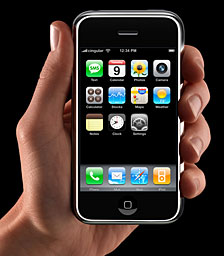 The smallest Macs ever grew in Apple’s iPod division. The iPhone and iPod touch run a version of OS X (which Apple carefully never calls Mac OS X), and with the advent of Apple’s App Store they have become a whole new computing platform in their own right.
The iPhone platform rethinks everything for a small touchscreen – a visual keyboard where the key you’re pressing expands, scrolling around web pages, synching with your Mac, connecting to the Internet, etc. It’s not really a Mac, but it is what the Mac would be if it had to fit in you pocket and not have a keyboard.
It’s been quite a ride. I wonder what the next 25 year hold. What do you think? And what five devices should we add for the Mac’s 30th anniversary in January 2014? Please add your comments!
Short link: http://goo.gl/XoyKYn
searchword: significantmacs

Nice list, but I’m not sure about the 630. Slow IDE hard drive and no standard slots.