2 Useful Online Genealogy Resources
Dan Knight - 2008.04.02 - Tip Jar
Low End Mac Reader Specials
Memory To Go Special: MacPro 8 Core Memory 4GB kit $154 / 2GB kit $94, New 2008 iMac 2GB $46. MacBook Pro / MacMini / iMac Intel Core2 DUO 2GB $44 / 1GB $23--Free shipping available.
Download Typestyler, still the Ultimate Styling Tool for Internet, Print and Video Graphics. Works great in Classic with a Native OS X Version on the way. Free Tryout: www.typestyler.com
LA Computer Company: Specials on AppleCare, iMac's, Apple Batteries and Apple A/C Adapters. Also Great prices on Used Apple Computers. Call 1-800-941-7654 Click Here.
OWC: Top Quality Memory for Faster Mac Performance 1GB/2GB/4GB Kits from $23.99/$47.99/$94.99 Expert Support, Free Installation Videos & Guides, Lifetime Advance Replacement Warranty - www.MacSales.com
Mac users can finally play Party Poker for Mac. Not only that, they can also learn how to play PokerStars for Mac.
Laptop Hardware Provided by TechRestore - Overnight Mac & iPod Repairs.
Compare products like desktop computers, laptops, and LCD TVs side by side! All the information and reviews to make the best purchasing decision for a new cell phone GPS products or MP3 players. The Ciao network makes searching products easy for you.
MacBook/MacBook Pro / MacMini / iMac Intel Core2 DUO DDR2 667Mhz 4GB Kit $80, 3GB Kit $60, 2GB Kit $40, 1GB $20 - Click to Maximize your Macs...
We've all got ancestors, although many of us would be hard pressed to name any of our great-great grandparents.
I've been dabbling in genealogy on and off for about 20 years, first using Q&A on DOS, later playing with FileMaker Pro on the Mac, and eventually investing in some Family Tree software that's been unused for maybe a decade. This past week I've found two excellent websites that have helped me a lot.
Everyone's Related

The first site is
Geni, which uses the catch phrase
"everyone's related". I suppose if we could find records going back to
10,000 BC that might be the case, but it is true that everyone has a
family tree - and that's what Geni helps you track.
Not only that, but Geni makes it easy to keep in touch with relatives with email, and they in turn can invite their relatives. And all of these relatives can add photos, information, and relatives to an ever-expanding family tree. Every person on the tree has a profile, which can be filled with all sorts of information: date and place of baptism, schools attended, employers, and so on.
At the same time, Geni protects your privacy - only those in your family tree can log into it and see your profile. And the folks behind Geni know about privacy, as they come from a wide range of companies including PayPal, eBay, and Yahoo.
I've been using Geni for less than a week, and it's addictive. I started out with my immediate family, added ancestors I knew about, put in the start for my wife and her family, and then began to Google to expand the family tree.
That was good timing, as the sister of my ex-wife's grandmother passed away on Easter, and her obituary was still available. (For genealogical research, it's a shame that obituaries aren't kept up perpetually.) This let me add a bit to that part of the family tree, as well as cut-and-paste the obituary to her profile.
Google can be a great tool for finding relatives, assuming they don't have popular names - in which case it can be very difficult. The more unusual the name, the better.
Dutch Roots

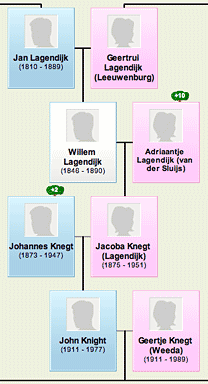
Part of my family tree, greatly reduced (click for larger, still
unreadable version).

While
exploring Google's discoveries, I came across a genealogy website in
the Netherlands just chock full of names, many of them ancestors I'd
been unaware of. (My parents and grandparents emigrated from the
Netherlands circa 1950.) Until then, the oldest ancestors I knew of
were Jan Harm Nijenhuis and his wife, Gezina van der Veen, both born
circa 1805. I had six generations of ancestors, and these
great-great-great grandparents were the only ones I knew of in that
generation.
Thanks to Genealogie, I now have over 20 generations in my family tree, with several names going from the 13th and 14th centuries. It's been fascinating crawling up and down the branches of the family tree, adding new names, dates, and places. If you have Dutch roots, especially from the province of South Holland, this is an amazing resource.
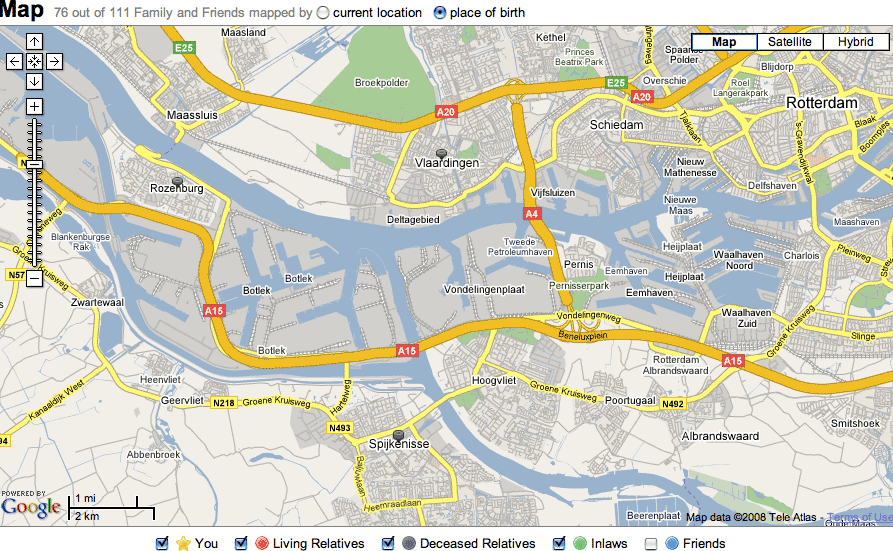
Not only that, but it's well designed and pretty responsive. It is in Dutch, but I'm learning the important words, and in addition to having a wealth of names, dates, and places, many profiles also include Google maps showing where an individual lived. (In my case, most of them lived in Hoogvliet, Poortugaal, Rhoon, Vlaardingen, Pernis, Charlois, Spijkenisse, IJsselmonde, and other communities near the Nieuwe Maas river east of Rotterdam.)
My family tree now incluldes over 400 direct ancestors, the majoriy of them in this area.
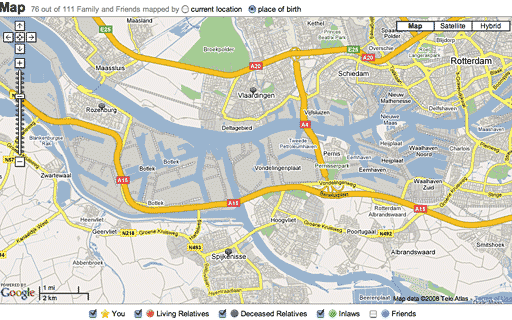
Map showing communities some of my ancestors live in (click for larger
version).
It's been a lot of fun, and I'm trying to limit the amount of time I spend copying names into Geni. As I said, it's very addictive, and it's fascinating watching the tree grow - as well as discovering closed loops (Geni calls them cycles) where two lines merge back to a single family.
Geni is pretty polished, but it's not finished yet. The only significant drawback is that the site is Flash-based, and it's pretty slow even on my 1 GHz dual processor G4. In fact, Flash is so much faster on Intel-based Macs that Geni could help me justify finally making the switch.
You'll also want a big screen. I'm using a 19" 1280 x 1024 display, and I wish it was bigger - especially wider. You may find the 1280 x 800 display on a MacBook adequate, but the 1440 x 900 screen found in the 15" MacBook Pro and 17" iMacs will make you much happier. Better yet the higher resolution screens found on the 17" MacBook Pro and the 20" iMac.
Despite poky speed on older computers, Geni is good enough for
getting started, sharing your tree, and watching it grow. Have fun
discovering your roots.
Dan Knight has been using Macs since 1986, sold Macs for several years, supported them for many more years, and has been publishing Low End Mac since April 1997. If you find Dan's articles helpful, please consider making a donation to his tip jar.
Recent Mac Musings
- Looking for a Content Management System That's as Easy as Mac, 08.29. Low End Mac needs to move to a content management system, but the few we've tried just don't cut it for people used to the simple elegance of the Mac.
- MacDrought: 4 Months with No New Macs, 08.27. The most recent Mac update was over four months ago, and the Mac mini has been unchanged for over a year.
- The iMac Legacy: After the G3, 08.15. The G3 iMac influenced the whole industry, but Apple continued to move forward with innovative designs using G4, G5, and Intel processors.
- The iMac Legacy: The G3 Era, 08.15. 10 years ago today, the original iMac went on sale. One of the most popular lines of computers ever, the G3 iMac would be Apple staples for nearly five years.
- More in the Mac Musings index.
Links for the Day
- Mac of the Day: PowerBook 170, Oct. 1991 - At 25 MHz, the PB 170 was at the top of the original PowerBook line.
- List of the Day: The iPhone List Low End Mac's forum for discussing and supporting Apple's iPhone.
- August 30 in LEM history: 99: The truth about USB speed - 00: Could Eazel kill the Mac? - Mac OS 8.1 on a IIci and LC III - 01: Beyond MHz and GHz - Getting a handle on email - Thanks for the IBM PC, Dad - Apple's anniversaries - 02: Mac OS X v10.2 - iBook video out - 04: Things that freak out my students - 06: Nvu and SeaMonkey can't replace Home Page - 07: DVD-RAM support
Recent Content on Low End Mac
- First 3 Million Mac Quarter, Skinny on Mac mini Pricing, Mac-like gOS, and More, Mac News Review, 08.29. More plan to buy Apple products than ever before, complete reset can fix MobileMac synch problems, Apple boosting computer and smartphone share, and more.
- New 'Books Likely in September, 17" PowerBook Display Fault Site, SSD Security, and More, The 'Book Review, 08.29. Also 6 ways to speed up your MacBook, next generation MacBook Air CPU, MacBook Air Update, LapStrap carrying solution, rise and fall of ultraportables, bargains from $220 to $2,699, and more.
- iPhone 3G Reception 'Completely Normal', AT&T International Data Plans for iPhone, and More, iNews Review, 08.29. Also longer life for iPod earbuds, an alternative to MobileMe, new cases and apps for iPhone, AppStoreGems website launched, and more.
- Best Power Mac G4 Deals, Low End Mac Deals, 08.29. Used 450 MHz AGP, $75; 500, $99; 800 QS, $199; 1.25 GHz MDD, $375; 450 MHz dual, $179; 867 dual, $300; 1 GHz dual, $395; 1.42 dual, $575.
- Best iBook G3 Deals, Low End Mac Deals, 08.29. Used 300 MHz clamshell, $150; 500 CD, $150; 800, $200; 600 CD-RW, $240; 900 Combo, $300; 14" 600, $360; 900, $400.
- Best iPod nano Deals, Low End Mac Deals, 08.29. Used 2 GB iPod nano, $89; refurb 3G 4 GB, $99; new, $140; refurb 8 GB, $149; new, $179.
- 10 Mac Browsers Compared, Simon Royal, Mac Spectrum, 08.28. A look at Internet Explorer, Radon, Opera, Safari, Shiira, iCab, Firefox, Netscape Navigator, Flock, and Camino running in Leopard.
- Clone and Boot: Another Advantage of the Mac OS, Kev Kitchens, Kitchens Sync, 08.28. Unlike Windows, Apple makes it possible to clone a bootable drive (Classic Mac OS or OS X) and use it with another supported Mac.
- Best MacBook Deals, Low End Mac Deals, 08.28. Used 1.83 GHz, $799; 2.0 black, $875; refurb 2.1 GHz, $899; 2.4, $1,099; black, $1,299; new 2.1, $1,019 after rebate; 22, $1,094; 2.4, $1,219 a/r; black, $1,394 a/r.
- Best iMac G5 Deals, Low End Mac Deals, 08.28. Used 17" 1.6 GHz Combo, $499; 1.8 SuperDrive, $530; 2.0, $600; 1.9 iSight, $625; 20" 1.8 GHz, $580; 2.0, $650; 2.1 iSight, $700.
- Best classic Mac OS Deals, Low End Mac Deals, 08.28. System 6, $10; 7.1, $12; 7.5.1, $4; Mac OS 7.6, $13; 8.0, $13; 8.1, $48; 8.5, $25; 8.6, $20; 9.0, $20; 9.2.2, $20; more.
- CrossOver Strikes Out, Frank Fox, Stop the Noiz, 08.27. Running Windows apps on a Mac without paying for Windows is great in theory, but actually getting Windows software working is another story.
- Resurrecting a Dead Pismo, Spotlight Search Tip, and EasyFind a Good File Finder, Charles W. Moore, Miscellaneous Ramblings, 08.27. Lots of tips on bringing a comatose Pismo back to life, a Spotlight file name search tip, and EasyFind as an alternative to Spotlight.
- Best Intel iMac Deals, Low End Mac Deals, 08.27. Used 17" 1.83 GHz, $625; 20", $599; 2.16, $749; 24", $950; refurb 20" 2.4, $999; 2.66, $1,299; 24" 2.4, $1,299; 2.8, $1,549; new 3.06, $2,094 after rebate; more.
- Best 15" PowerBook G4 Deals, Low End Mac Deals, 08.27. Used 1.25 GHz Combo, $600; SuperDrive, $650; 1.33 Combo, $640; 1.5, $680; SD, $725; 1.67, $730; hi-res, $800.
- Best Time Capsule and AirPort Deals, Low End Mac Deals, 08.27. 500 GB Time Capsule, $294; 1 TB, $468; AirPort Extreme Card, $39; 802.11n Base Station, $166; 802.11g AirPort Express, $60; 802.11n, $98.
- More links in our archive.
About LEM | Support | Usage | Privacy | Contacts