Mac Musings
iCab 4: Try It, You Might Like It
Daniel Knight - 2008.01.28, revised
I've been using iCab 4 for three weeks now, and I have to say that I like it.
iCab History
iCab was born as CAB, a browser for the Atari ST, itself a moderately successful alternative to the Mac (much more successful in Europe than in the States). CAB was developed by Alexander Clauss, and the first version was released sometime in 1995, according to Clauss.
Clauss decided to port CAB to the Macintosh and released the first version of iCab in early 1999. Version 2 debuted in April 2000, and iCab 3.0 came on the scene in June 2005.
iCab 4
The biggest difference between iCab 4 and all earlier versions of this browser is that iCab 4 no longer uses the rendering engine that Clauss developed and has been improving for over a decade (first on the Atari ST). As Clauss explains it, this is because "Apple dropped support for some important features like the Java embedding API on Intel Macs, so the only official way to embed Java applets was to use WebKit in Carbon applications (iCab 3 is a Carbon application)."
Another issue is that web developers do a very poor job of holding to standards, so there's a lot of work involved in making sure a browser handles improper HTML decently. As they tend to only test their sites in Internet Explorer, Firefox, and Safari, using Clauss' rendering engine meant a lot more troubleshooting than one man should have to do.
So iCab 4 uses Apple's WebKit, which came to the Mac with Safari 2 (and retroactively to version 1.3.2, the last version to run on OS X 10.3). This means that iCab will be able to render any page that Safari does. (Safari 1.3.2 came with Mac OS X 10.3.9, and as that's the oldest version of the Mac OS with WebKit support, it's the oldest version of OS X that can work with iCab 4.)
I asked Clauss, "Does iCab 4 do anything different 'under the hood' than Safari? Where are we likely to see rendering differences, if anywhere?"
He responded: "In general there're not much differences in Safari and iCab 4. But iCab adds some features which are not in Safari, like support for standard links (the <link> tag), the accesskey attribute, and some other details, which can change the rendering. Also the filter settings, the preferences do allow much more control over the rendering than Safari." And iCab will still frown when it encounters nonstandard HTML.
After a little testing, I made iCab 4 my default browser almost 4 weeks ago. I've visited dozens and dozens of websites (most Mac-related or general interest), and I've only had problems with two.
- I can't use the new version of Yahoo Mail. iCab only works with the Classic version.
- Some of the options are missing in Google Gmail, such as "select all".
I have to admit that I haven't made iCab my only browser. I haven't tried it with my bank. I also use Safari, Firefox, and Camino daily (Camino has been my primary browser for quite a while).
Further, I haven't tweaked iCab to make it pretend to be a different browser. I want the world to know that I'm visiting with iCab, not one of the Big Three (Internet Explorer, Firefox/Camino and the other Mozillas, and Safari/KHTML).
iCab is a great little browser. Version 2.9.9 runs on ancient Macs, 3.0.5 has very good support of Cascading Style Sheets, and 4.0 brings it another step forward, although only with recent versions of Mac OS X. Despite running on more hardware than any other browser, the number of visitors to lowendmac.com using iCab trails OmniWeb, which is quite a ways behind Opera, which accounts for about 2% of our visits. Talk about rooting for the underdog!
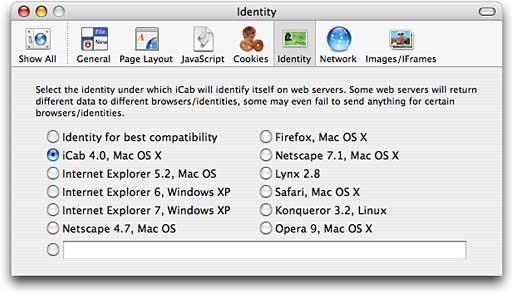
Anyhow, this isn't a review of iCab. It's a suggestion that you give it a try, as I hope you'll do with Camino, Opera, and the other alternatives to Safari on the Mac platform. It's a nice browser, and by fiddling with its Identity (in Preferences), you can probably make it compatible with websites that don't officially support obscure browsers but insist that you use Internet Explorer, Safari, or one of the Mozillas.
The only drawback to iCab is that it keeps reminding you that it's not a free application. If you do decide to use it regularly, please support its continued development by registering your copy.
Try it, you might like it.