Mac Musings
Restoring a Blue and White G3 and a 'Mystic' Power Mac G4
Daniel Knight - 2008.01.30
I've been working to get a couple of old Power Macs working over the past 5-6 weeks, and I've been frustrated more than once.
The two models are a Power Mac G4/450 dual and a Blue & White Power Mac G3/350. The problems have been all over the map - memory, hard drives, keyboards, mice, and operating systems. I'll cover them in no particular order.
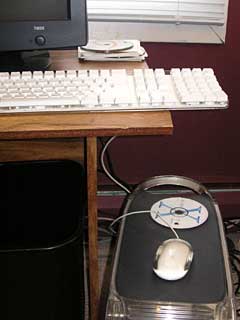
Short USB cables are a bother.
Keyboards and Mice
Apple did a great job designing the enclosures for these computers. The "drawbridge" access to their interiors is brilliant, but there's a problem when you put them on the floor - which is the norm for tower computers. The problem? The USB cables on Apple's mice and keyboards are too short. You need to use a hub, third-party keyboard and mouse, or get a USB extender (which shipped with these computers originally, but I acquired them used).
Or do what I've resorted to: using the mouse on top of the computer and having the keyboard hang partially off the edge of the desk so the cables can reach the Power Mac's USB ports.
Another problem is that the black Apple Pro Keyboard has a built-in USB hub that Mac OS 9.x doesn't recognize and won't support. Weird, since earlier Apple USB keyboards had hubs that worked just fine.
When I tried to use one of those earlier USB keyboards, I discovered that the cable on one is bad, and the other one doesn't respond when you press the A key. Sigh.
Installing Mac OS 9.2.2
I have a Mac OS 9.0 install CD, as well as OS 9.1 and 9.2.1 update CDs. Problem is, the Power Mac G4 refused to let me install 9.0, even though the computer officially supports Mac OS 8.6 and later. Without a 9.1 or 9.2 installer, I was stuck. (I had a stripped down version of 9.2.2 on both of these Power Macs, but it was missing a lot of components. I was doing a fresh install to get them on my hard drives.)
I finally gave up on the G4 and moved to the older, slower Blue & White G3, which I'd never been able to get working reliably in Mac OS X 10.3 or later. I have three partitions on the hard drive: one with a stripped version of 9.2.2, one with 10.3, and an empty "work" partition. My solution was to install Mac OS 9.0 on the second partition, after erasing it and wiping off OS X. It booted just fine, but for some reason it wouldn't let me run the 9.1 update.
Tip: Open the Speech Control Panel, select Spoken Alerts, and turn them off (they're on by default). There's something a bit spooky about having your Mac speak to you when you didn't explicitly enable that feature.
I then ran the available updates, used DiskCopy to make a Read-only (but not compressed) disk image of the updated 9.0 installation on the third partition, and then found the 9.0.4 update on Apple's website. Neither Internet Explorer 4.5 nor Netscape 4.6 worked well with apple.com, so I ended up downloading iCab 3.0.3 for the Classic Mac OS. That let me download the 9.0.4 update, which ran just fine.
Tip: If you're making clean versions of the Mac OS so you can archive them, rename the partition for whatever version of the Mac OS you've installed. When you create the disk image, it will be given the name of your partition by default, making it easy to determine which version of the Mac OS is on that disk image.
After rebooting and running Software Update, I made another disk image and then inserted the 9.1 update CD. This time it ran without a hitch. And after rebooting and installing updates, I made yet another disk image.
Finally, I ran the 9.2.1 update (which requires 9.1), used Software Update to get to 9.2.2 and apply any other updates, and made my fourth disk image. Now I have disk images of Mac OS 9.0, 9.0.4, 9.1, and 9.2.2 just in case I ever need them.
Tip: Turn off Virtual Memory (VM) before making a disk image. In my case, with 384 MB of RAM installed, it reduced the size of disk images by 385 MB.
For the record, these disk image files are 210.3 MB, 221.6 MB, 233.8 MB, and 249.3 MB, respectively, for a full installation of Mac OS 9.0, 9.0.4, 9.1, and 9.2.2 plus iCab 3.0.3, the only additional software I installed before making these disk images. With virtual memory turned off and the default disk cache (8160 KB or 8 MB), Mac OS 9.0 uses 43.7 MB of RAM at startup, 9.0.4 uses 45.6 MB, 9.1 uses 49.1 MB, and 9.2.2 uses 49.2 MB. (With VM on, these numbers drop 12-14 MB, and by reducing the disk cache, you could run Mac OS 9 on a 32 MB Mac, but that's cutting things mighty close. And you'll definitely want a drive larger than 250 MB.)
Tip: If you have a CD-RW drive, Combo drive, or SuperDrive, you should be able to use Disk Burner in Mac OS 9.1 and later to create a bootable CD using these steps:
- Launch Disk Burner.
- Double-click the disk image for the OS you want to install.
- Open the mounted disk image, select everything (Cmd-A), and drag it to the CD icon on the desktop. You can also drag other files to the CD at this time.
- Once everything is copied over, drag the CD icon to the Trash, and tell Disk Burner to burn the CD. (It's not intuitive, but that's how Disk Burner works.)
Now I finally have a CD that should boot the Power Mac G3 into Mac OS 9.2.2 - but it doesn't work for the G4. The only way I've been able to get a bootable version of Mac OS 9.x on the Mystic G4 so far has been to use the Mac OS 9.1 installer that came with my PowerBook G4, and if I update that to 9.2.1, it no longer boots the G4 Power Mac. Weird. I guess it's time to buy a full-fledged Mac OS 9.2.2 install CD.
RAM Issues
Both of these computers have been very troublesome, especially with OS X, so they've been set aside for quite a while. After a lot of trial and error, I've determined that my problems stemmed from mixed memory modules - different brands, different speeds, different capacities, different types of RAM (222 and 322, whatever those numbers mean), and even some error correcting (ECC) RAM in the G4. No wonder these machines were flaking out!
I has all four memory banks filled in both Macs. The Blue & White G3 is down to 384 MB at present - one 256 MB DIMM (type 222) and two 64 MB ones (one 322, one unmarked). They're all the same type, and Mac OS 9.2.2, 10.0, 10.1, 10.2.8, 10.3.9, and 10.4.11 have all been running reliably for hours.
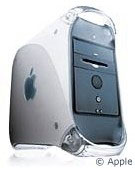 The Mystic has
three 256 MB modules for a total of 768 MB. It has run Mac OS 9.1,
10.2.8, 10.3.9, and 10.4.11 very reliably and even been used to test a
1.8 GHz NewerTech upgrade.
The Mystic has
three 256 MB modules for a total of 768 MB. It has run Mac OS 9.1,
10.2.8, 10.3.9, and 10.4.11 very reliably and even been used to test a
1.8 GHz NewerTech upgrade.
One of the bugaboos about Mac OS X is that it's far pickier about RAM than the Classic Mac OS ever was. I can't fathom why this should be, but it is. Back in the early days of OS X, this was a real nightmare for some users who had replaced their original RAM with higher capacity, lower cost third-party RAM - and then discovered after successfully installing OS X that their Mac wouldn't boot into OS X.
At this point, I think I'm going to warn people of the dangers of randomly mixing memory in Macs that are going to be running Mac OS X - and even the Classic Mac OS, after these headaches. Both Power Macs have been running with barely a problem since removing the unmatched memory. (Sometimes they hang in sleep mode in OS 9, but that's about the only problem.)
Tip: When upgrading memory in an older Mac, seriously consider replacing all of the installed RAM with new RAM - and be sure to buy identical modules to avoid problems due to speed differences and other ratings. (Apple recommends 322 memory.)
Installing Mac OS X
I started by installing Mac OS X 10.0.3 "Cheetah" on the Blue & White G3 and running Software Update twice to get up-to-date with 10.0.4 and a few other things. Almost everything worked perfectly (the only glitch: it wouldn't recognize my black Apple Pro USB Keyboard when it was connected to a hub, so I had to stretch its short cable to the back of the computer on the floor), and I had hoped to clone my 10.0.4 installation to an external FireWire drive, but nether Carbon Copy Cloner nor SuperDuper works with 10.0.4 - CCC 2.3 requires Mac OS X 10.2 or later, and SuperDuper calls for 10.3.9 or later. (I haven't been able to locate earlier versions that might work with 10.0.x or 10.1.x.)
Not that there's really a lot of sense keeping 10.0.4 installed, as there's very little software that works with it. Even the the erstwhile iCab 3.0.3, which can run under Mac OS 8.5, requires 10.1 "Puma" or later in its OS X version. So I upgrading to 10.1, and after that I ran my OS X 10.2 "Jaguar" update. After updating that to 10.2.8, I cloned it to a second internal hard drive using CCC.
Once that was done, I moved on to 10.3 "Panther" and 10.4 "Tiger", each installed on a separate partition and also cloned to a partition on the second hard drive. At that point it was time to get back to work on the Power Mac G4/450 dual - and all I had to do was transplant one of the hard drives. I've been able to run Mac OS X 10.2.8, 10.3.9, and 10.4.11 comfortably (albeit slowly, compared to my workhorse 1 GHz dual Power Mac G4).
I've also got Jaguar, Panther, and Tiger cloned to an external FireWire drive, so I can work with clean copies of them to run tests on my Mirrored Drive Doors Power Mac G4.
It's been a real learning experience. I rediscovered how much I hate the mushy feel of Apple's white keyboard, what a nuisance short USB cables are, and that Mac OS 9.2.2 that runs perfectly on a Blue & White G3 may work just fine in Classic Mode on my Mystic G4, but for some reason it can't boot it.
My goal in this project has been achieved. I now have both machines running reliably, and they're going to become testbeds for CPU upgrades, video cards, and other add-ons, as well as different hard drives and different versions of the Mac OS, classic and X.
Next project: Digging out the Beige G3 and getting it up and running again.
Join us on Facebook, follow us on Twitter or Google+, or subscribe to our RSS news feed
Dan Knight has been using Macs since 1986, sold Macs for several years, supported them for many more years, and has been publishing Low End Mac since April 1997. If you find Dan's articles helpful, please consider making a donation to his tip jar.
Links for the Day
- Mac of the Day: PowerBook 500 Series, introduced 1994.05.16. 'Blackbird' includes a 25 to 33 MHz 68040 along with smart batteries and grayscale or color displays.
- Support Low End Mac