
Kudos to Apple for some real changes in the iPod line. It’s been a year since Apple overhauled the entire iPod range with the 3G iPod nano, the iPod touch, and the new name for the “classic” iPod – the iPod classic.
Yesterday saw the introduction of a new form factor for the iPod nano, a slightly smaller iPod touch, simplification of the iPod classic, and new colors for the iPod shuffle and nano. And lets not forget new capacities, new prices, and one cool new feature.
Shake It Up, Baby
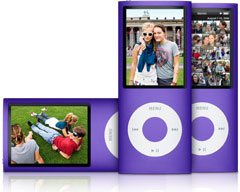
The new feature, which is found on both the 2G iPod touch and the 4G iPod nano, is an accelerometer. Now you can shuffle your tunes by shaking your iPod. Practical? Maybe. Cool? Definitely!
Don’t expect to find this in the iPod classic – not ever. After all, there’s a hard drive in there, and you don’t want to risk damaging it. As for the iPod shuffle, it’s always in shuffle mode, so there’d be no point adding an accelerometer to it.
Also new is the Genius feature, which is supposed to choose songs based on the track you’re listening to, creating a Genius playlist. Time will tell how well this one works for different types of music.
The New nano
The biggest changes come to the iPod nano, which has gone from the squat 3G design back to a taller, slimmer form factor like the first two generations. Taking a page from the iPod touch and iPhone, its screen is taller than it is wide, and whatever is on the screen rotates when you turn the iPod nano sideways.
The screen itself is the same one found in the 3G nano, so you gain nothing in viewable area, but you do have room for more menu items in its default configuration.
 But there’s more to the new design than a vertical display – the 4G iPod nano is curved, and the aluminum and glass design pays homage to the iMac. On top of that, you now have 9 different color choices: silver, dark gray, purple, blue, green, yellow, orange, pink, and red, which remains exclusive to Apple stores, both online and retail.
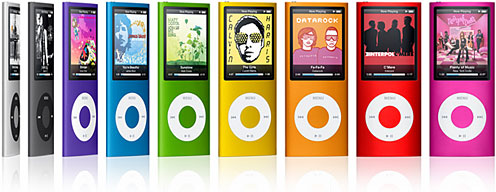
The battery is rated at 24 hours for music, 4 hours for video.
Price: $149 with 8 GB of storage, $199 with 16 GB.
Value: The 3G iPod nano is being cleared out at $129 for 4 GB, $149 for 8 GB. The 4 GB model is overpriced considering the $20 difference in price. Comparing the 3G and 4G models at 8 GB, it comes down to a matter of personal preference: Do you want a slimmer iPod that you’ll want to rotate for videos or a wider, shorter one that doesn’t need to be rotated (or even support rotation)?
We don’t see the shake-to-shuffle feature as useful enough to give an advantage to the 4G nano.
Comparing the 16 GB nano at $199 with the 8 GB touch (discussed below) at $229, it comes down to how important WiFi and apps are vs. small size and a 2″ display. Geeks that we are, we’d probably pick the lower capacity iPod touch over the high-end nano.
The New touch
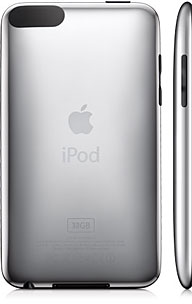 The 2G iPod touch is slimmer (one-third of an inch) and more rounded than its predecessor, and it has impressive battery life: 36 hours for music, and 4 hours for video. It’s also the first iPod ever with a built-in speaker, although we suspect sound quality won’t be the best.
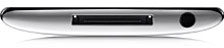 In addition to the “shake to shuffle” accelerometer, another new feature is dedicated volume controls on the left side. My guess is that Apple did this so you can lock out the scroll wheel yet still be able to adjust volume. It also has the Genius feature.
The iPhone 2.1 operating system is standard, so you’ll have WiFi access to the Internet and the ability to buy apps from the iTunes App Store.
The 2G iPod touch ships in 8 GB, 16 GB, and 32 GB capacities at retail prices of $229, $299, and $399 respectively. That compares very well with what you’d pay for an 8 GB or 16 GB iPhone when you factor in the expense of AT&T phone and data service.
Value: The 8 GB 1G iPod touch is being closed out at $199, 16 GB at $269, and 32 GB at $369. Add $10 for the iPhone 2.1 firmware update (available Friday), and you’re only saving $10 to $20. Unless we see better close-out prices than these, we give the edge to the slightly more expensive 2G iPod touch models with their dedicated volume control and accelerometer. We can’t get excited about the built-in speaker, as it’s probably of mediocre quality.
The New classic
The new 120 GB iPod classic looks like the old one, but inside it has 50% more capacity than last year’s entry-level iPod classic. The 160 GB iPod classic has been discontinued, and we suspect that we won’t ever see a higher capacity hard drive-based iPod, as flash memory is becoming very competitive. Our guess is that the classic iPod form factor will have a 128 GB solid state drive by the end of 2009.
New features: As far as we can tell, just the Genius feature. There’s not even a built-in speaker like the iPod touch gained.
Like the iPod touch, it promises 36 hours of music or 6 hours of video before exhausting the battery.
Price: $249, with the 80 GB model being cleared out at $199 and the 160 GB iPod classic at $299.
Value: It seems likely that the Genius feature will come to the 2007 models with a software update. This is the time to pick up a 160 GB iPod classic if you need the capacity. If not, the 80 GB and 120 GB iPods are also good values.
The 2008 shuffle
We won’t call the 2008 shuffle new, because it’s exactly the same as the 3G shuffle, which was identical to the 2G shuffle except for its color palette and the later introduction of 2 GB capacity. The 4G iPod shuffle distinguishes itself with four new colors – blue, green, pink, and red (again an Apple exclusive color) – in addition to good old silver.
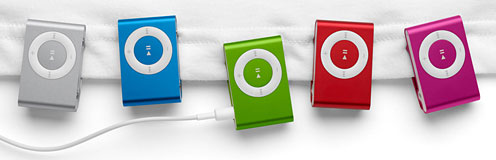
No change in price or capacity: $49 with 1 GB of storage, $69 with 2 GB. And no change in value, as the discontinued models are selling for exactly the same price.
Conclusion
We see the iPod classic as the end of the iPod’s hard drive legacy. It provides lots of capacity and a decent screen size at a good price. You can buy a close-out 80 GB iPod classic for the same price as a 16 GB iPod nano – five times as much capacity for the same amount of money. For carrying a lot of videos, a lot of photos, a huge music library, or backing up a lot of your computer data, the iPod classic is the value champion.
The iPod touch is the ultimate iPod in terms of features. In addition to being a great video iPod, in many ways it’s a pocketable Macintosh, as it runs a lightweight version of OS X and has WiFi access to the Internet. We’re big fans, and we suspect the 16 GB model will be the best seller. (Too bad there’s not a 120 GB hard drive version.)
In terms of a compact personal iPod, the iPod nano offers the same feature set as the iPod classic (plus a few more features) in a small, lightweight, colorful package. The broad color selection is a nice plus. Given $229, we’d pick the 8 GB iPod touch or a close-out 80 GB iPod classic ahead of the iPod nano, but that’s due to our personal biases.
The 4G iPod nano is going to be hot, and we’d guess the 8 GB and 16 GB models will probably sell at about the same pace. Apple’s biggest problem may be the color spectrum – as Apple learned with the first multicolored range of iMacs, some colors are just more popular than others. Picking the right color is going to be a challenge for some.
And then there’s the iPod shuffle. Same old same old, with different colors. If it’s what you want, you can now choose between the 2007 and 2008 palettes.
keywords: #valueequation #ipodvalueequation #2gipodtouch #4gipodnano #ipodclassic #4gipodshuffle
