
Ever since Apple released the first MacBook one year ago, the company has sold the MacBook with matched pairs of memory, recommended that users only upgrade with matched pairs, and stated that the MacBook has a 2 GB memory ceiling.
Other World Computing, a longtime supporter of Macs and a company that likes to push the envelope, decided to test that with both an original MacBook and the later Core 2 version by installing matched pairs and unmatched sets of RAM and running several benchmark tests.
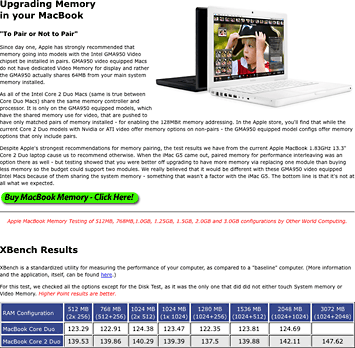
They tested the original MacBook in seven configurations and the Core 2 version in eight (the earlier Core Duo model doesn’t support more than 2 GB). This included testing at 512 MB, 1 GB, and 2 GB with matched pairs – and at 768 MB, 1 GB, 1.25 GB, 1.5 GB, 2 GB, and 3 GB with unmatched RAM.
That’s a total of 15 configurations tested with six different benchmarks. It’s a lot of data to digest, and OWC reports raw benchmark numbers. We’re going to translate that to percentage improvements.
XBench: A Draw
Regardless of the configuration, XBench results for the original MacBook were within 1% of the base 512 MB score. The highest score, achieved with a pair of 1 GB modules, was an imperceptible 1.6% better than the lowest score, which came from mixing a 256 MB module and a 1 GB one.
We see a broader range of results with the newer Core 2 MacBook. Here the 2 GB results are 3.3% better than the 1.25 GB results. However, the 3 GB results are even better – 3.9% better than 2 GB, 5.2% better than 1 GB (matched), and 5.8% better than 512 MB (matched).
Comparing the 1 GB matched and unmatched scores, there’s only 0.6% difference between them. Again, the lowest score is achieved with the 1.25 GB configuration. It seems that the greater the difference in capacity between two unmatched modules, the greater the performance hit.
In this case, except for the 1.25 GB configuration, more RAM yields more performance whether RAM is matched or not.
Cinebench: Matched RAM Wins
Cinebench tests 3D modeling, and in this case the best results were achieved with matched pairs of memory in both the Core Duo MacBook and the later Core 2 model. In fact, you had to put 1.5 GB in the original MacBook to match the base 512 MB matched score – and that was well behind the 1 GB matched score.
The best point of comparison is at 1 GB, where the Core Duo MacBook scored 9.1% higher with a matched pair, and the Core 2 model has an 8.8% better score. The highest score was achieved with 2 GB of RAM, and the 3 GB configuration in the Core 2 MacBook was 4.6% below that. Even the match 1 GB configuration scored higher.
For this kind of work, matched pairs are a real benefit.
Photoshop: More RAM Wins Big
The Photoshop benchmark uses the older Photoshop CS, so it uses the Rosetta translation program to convert PowerPC code into something the MacBook’s Intel CPU understands. Rosetta is very memory hungry.
As with XBench, the trend is that more RAM means a better score. Going from 512 MB to 768 MB cut 45% from the benchmark score with the original MacBook – and just over 50% with the Core 2 MacBook! Differences between 1 GB matched and unmatched scores are negligible (under 2%), and the best results trim an impressive 50% from the 512 MB benchmark score with 2 GB of RAM in the Core Duo model, while 3 GB of RAM in the Core 2 MacBook reduced the score by 54.5%.
After Effects: More RAM Wins
Adobe After Effect also runs under Rosetta, and the maximum RAM configuration provides the best result for both MacBooks. The year old MacBook sees a 9.6% improvement vs. 512 MB, while the November MacBook is 9% faster with 3 GB.
Results are less predictable with After Effects than with the other programs, so we can’t generalize about unmatched pairs being better or worse than matched pairs of RAM. We’ll call this one a draw.
‘Stress Test’: A Draw
This benchmark runs the iTunes visualizer while concurrently running the Photoshop benchmark. This taxes the CPU, memory, and video card. Again, there’s a huge performance improvement (43% on the Core Duo and the Core 2) simply by moving from 512 MB matched to 768 MB unmatched. Curiously, the best Core Duo result is achieved at 1.5 GB unmatched, while the best Core 2 results is at 2 GB matched.
Looking at the 1 GB results, matched memory is 3.3% faster in the original MacBook, 1.4% faster with the Core Duo model. Overall, we’ll call this a draw.
Halo: Matched RAM Wins
This is the one gamers will be most interested in, and the tests are run with the Intel-native version of Halo. We can expect to see the greatest difference here, as the GPU is the part of the MacBook that benefits most from matched RAM.
Most importantly, these frame rates are going to be considered unacceptable by most gamers, as they range from 12.4 to 14.3 frames per second. On the Core Duo MacBook, the 2 GB score is just 2.1% better than the 512 MB score, and on the Core 2 version, the frame rate is barely 3% higher.
Results with unmatched memory are worse across the board than comparable amounts of matched RAM. At the 1 GB level, the Core Duo MacBook has a 4.2% higher frame rate with matched RAM, and the newer Core 2 model sees an even more impressive 6.1% difference.
For gaming, matched pairs will provide the best performance.
Final Results
Hats off to OWC for doing all of this work and publishing the full results on their website. It really helps us understand where more RAM is more important than matched modules – and vice versa.
Of the six benchmarks, After Effects and Stress Test are a draw. Of the remaining four, more RAM is more important than matched RAM in XBench and Photoshop. Matched RAM only seems to make a significant difference for Cinebench and gaming – and if that’s what you want to do, the MacBook simply isn’t the ideal platform.
We have to agree with OWC when they conclude, “More memory is overall better than having less memory that is interleaved. There is a huge benefit to upgrading even just to 768 MB (replacing a one of the 256 MB with a 512 MB) from a factory 512 MB config.”
These benchmarks should apply equally to Core Duo and Core 2 Duo iMacs and Mac minis with Intel GMA 950 graphics.
Thankfully Apple finally recognized that 512 MB of RAM really is inadequate today, and the latest version of the MacBook ships with 1 GB of RAM (two matched 512 MB modules).
Whatever you current configuration, don’t be afraid to mix rather than match RAM modules when upgrading your Mac. Outside of gaming, more RAM will give you better performance whether it’s matched or not.
Short link: http://goo.gl/xNSzgP
searchword: unmatchedram
