
Apple did it again. Like clockwork, they upgraded the MacBook six months after its last update. The Mid 2007 models are a bit faster, have larger hard drives, include 802.11n wireless, and the top models use a faster SuperDrive. Prices remain the same.
The base model runs at 2.0 GHz and has a 4 MB shared cache, up from 1.83 GHz and 2 MB on last year’s model. The hard drive is 80 GB vs. 60 GB in the Late 2006 version. It should benchmark as well as the earlier 2.0 GHz MacBooks.
The 2.16 GHz models has 120 and 160 GB hard drives, 40 GB larger than before, and use an 8x SuperDrive vs. 6x in the prior model. Expect about 8% higher benchmark scores than last year’s 2.0 GHz MacBooks.
Everything else is familiar – the same sharp, glossy display; the same odd looking but well received keyboard; the same widescreen form factor.
There’s really no compelling reason to upgrade from the earlier Core 2 MacBooks. An 8% speed gain is nearly imperceptible, a slightly faster SuperDrive isn’t going to save much time at all, and adding a bigger hard drive to your current MacBook is a lot cheaper than selling your MacBook and buying a new one. Even 802.11n WiFi isn’t compelling, mostly because there’s very little support for it at present. (In six months, that may be a different story.)
New vs. Discontinued
The Late 2006 MacBooks were dropped to $999 (1.83 GHz, 512/60/Combo), $1,199 (2.0 GHz white), and $1,399 (2.0 GHz black), as seen in our MacBook price tracker.
For $100 more at the entry level, you get twice the RAM (worth $50), 20 GB additional drive space (harder to quantify, maybe worth $25), and an almost unnoticeable 8% speed bump (8% of $1,099 is $88). Add a bit more performance due to the larger cache in the new MacBook. In terms of value, the new 2.0 GHz MacBook wins unless the 1.83 GHz Core 2 model sells for at least $150 less.
The 2.16 GHz white MacBook sells for $100 more than the 2.0 GHz model it replaces. It gains 40 GB of drive space and an 8x vs. 6x SuperDrive. 8% more speed equates to $108, the extra drive space may be worth $50, and the faster SuperDrive probably isn’t going to matter to most buyers. At $150 difference, we tip the hat to the new model, which also includes 802.11n WiFi.
Comparing the new 2.0 GHz MacBook to the old 2.0 GHz Core 2 model, the new one is a hands down winner unless you want a SuperDrive. The same amount of RAM, the same sized cache, the same sized hard drive, and faster WiFi (but no SuperDrive) at $100 less. But if you want a SuperDrive, the older model is definitely a good buy.
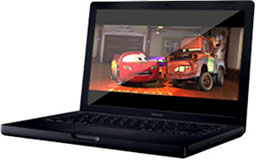 At the top of the MacBook line is the black MacBook, which has the same gains as the white one. There is definitely a “black tax”, but it is gorgeous. For $100 more money, you get 1/3 more drive space, a 1/3 faster SuperDrive, faster and farther reaching WiFi, and the same 8% speed bump as the others. For 6.7% more money, the new 2.16 GHz model is a hands-down winner.
New vs. Refurbished
The best value comes from refurbished units of last year’s model. When we checked refurb prices on May 4, the 1.83 GHz Core 2 sold for $949, the 2.0 GHz white for $1,099, and the black was unavailable. It was $1,299 the last time Apple offered it refurbished.
We’ll have to see how things settle down, but Apple briefly listed the refurbished 2.0 GHz white MacBook to $999. Spec for spec, it’s a good comparison with the new $1,099 2.0 GHz entry-level MacBook. The old model has a SuperDrive (nice) and 802.11g WiFi, while the new one has a Combo drive and 802.11n wireless. Personally, I’d lean toward the discontinued refurb MacBook for its SuperDrive and give up the slightly improved speed and the greater range of 802.11n.
I’m guessing 1.83 GHz refurbs will sell for $849, which would make them a better value than the new 2.0 GHz entry-level MacBook. And the black MacBook will probably go for $1,199 refurbished, making it a steal compared to the new model. Of course, these are only guesses as to how Apple will price them, but based on past experience, they should be in the ballpark.
Keywords: #macbook #macbookvalue
searchword: #2007macbookvalue
