Mac Musings
Less than Intelligent Design in Electronics and Computing
Daniel Knight - 2007.05.03
One thing that has always set Apple products apart from the bulk of the personal computer and electronics industry is intelligent design. Someone takes the time to put all the pieces together in just the right way that everything works as it should.
Alas, this is a lesson lost on a lot of companies - and, once in a while, on Apple itself.
The iLive iPod Boombox
You'd think that a "boom box" designed specifically for Apple's iPod, one of the most intelligently designed consumer electronics products ever, would inspire its designers to raise the bar of product design.
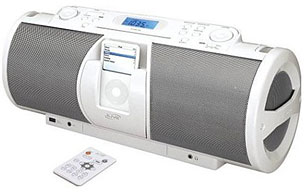
In the case of the iLive IBCD3816DT Portable 2.1-Channel CD Boombox with iPod Docking Station, you'd probably be very disappointed.
I bought one of these last year for $80, thinking it would be the perfect addition to my massage room. Plug in my 60 GB iPod photo, choose the "relax" playlist, and have soothing background music. It would also be a convenient way to charge my iPod without connecting it to my Mac. And with a set of D cells, it should make a decent boombox as well.
Well, I was right about all of that - mostly. The iPod slides into its bay nicely, and the iLive boombox sounds pretty nice. It looks great, as you'd expect from something designed for the iPod. There's even a remote control.
But there are a lot of stupid design choices. For instance, there's no handle. Instead, you have a shoulder strap. That would be nice in addition to a handle, but with no handle at all, it's a pain moving the iLive boombox from place to place.
Another annoyance is that every time you turn it on, it comes on at its default volume level. It doesn't remember whether you had it boomingly loud or relaxingly quiet, not even if you have batteries installed.
Worse yet, if you like to listen to the radio, every time you unplug the iLive boombox, it resets itself to the lowest FM radio frequency. It doesn't remember what station you were listening to.
Do I consider it a good investment? Well, it does what I bought it to do. It plays music from the iPod. And it sounds pretty good considering the price. And it looks good as well.
But would I recommend one? Not so likely. Although it looks and sounds good, although it works very nicely with the iPod, the "reset the volume when you turn it off and reset the radio when you unplug it even if batteries are installed" behavior are things I would warn a prospective buyer about. Consider this column that warning.
VCRs & DVD Recorders
Ever set up your VCR or DVD recorder so you wouldn't miss an episode of a favorite program - only to come home and discover that it hadn't recorded it because you forgot to turn off the device?
That's a design flaw we've lived with for 20 years now, and it still drives me crazy. It even made the leap from VCRs to DVD recorders, including my Pioneer combo VCR/DVD recorder (picked up at a very reasonable price on Woot last year).
If I want my computer to do something, I leave it on. When I wanted to record a radio show to my cassette deck in the old days, I had to leave it turned on (and connected to an external timer). If I want my Palm to give me an alarm about an event, it does so whether it's on or off. If I have my mobile phone give me an alarm, it does so even if it's asleep.
So why is it that VCRs and some (perhaps most or even all) DVD recorders have to be turned off to record something you've programmed them to do? It's remarkably stupid behavior, and I'm sure that by now someone must have figured out that there's no sense to it at all.
Apple
I'm sure that Apple would never make those kind of mistakes. The closest they come is giving you no control over the startup volume of your Mac.
No, Apple's mistakes are more subtle, and they're usually the result of function taking a back seat to form.
Mighty Mouse
Take the Mighty Mouse as a prime example. In a world of two-button mice with scroll wheels, it looks like a no button mouse with an itty-bitty trackball. Plug it into your Mac, and it behaves like a one-button mouse with a scroll ball. It's actually quite clever.
But Apple dropped the ball in two ways. First off, the Mighty Mouse is designed to function as a multi-button mouse, but there's no indication whatsoever that there is a right click area or sections on the sides that can act as buttons. It looks like it has no buttons. How is a new Mac buyer supposed to know that these extra button functions exist when there is no visual or tactile indication of them?
To make matters worse, while Apple has thrown a lot of clever technology into the Mighty Mouse, they don't seem to want users to get to it by accident. The default setting on the Mac's mouse driver is to treat the Mighty Mouse as a one-button mouse with a scroll ball. That means no user is going to figure out that it can function as a multi-button mouse by playing around with it. Unless they know they can change its functionality in System Preferences, its going to be a one-button mouse as far as they're concerned.
I wonder how many Mac buyers have gone out and bought a third-party mouse because they didn't realize that the Mighty Mouse that came with their Mac already gave them the functionality they wanted.
That's what happens when function follows form.
Mac mini and iPod
If you've ever replaced the battery in an iPod or gotten inside a Mac mini (or one of the many zero footprint drives that match the mini's design), you know that these devices were not designed for easy access.
I can't think of a single consumer electronics device other than the iPod that makes it so hard to get to the battery that a lot of people think the battery cannot be replaced. I'm sure this helps drive the sale of new iPods as old batteries lose capacity, but it's environmentally unsound. A "greener" Apple should have realized that by now.
 And when the Mac mini
started shipping, there was no obvious way to get inside. Several
sites posted the "putty knife" solution, which involved slipping a
putty knife between the mini's plastic lid and sides. Not
intuitive, and a lot of Mac mini owners have got to believe that
they can't upgrade the RAM or hard drive themselves.
And when the Mac mini
started shipping, there was no obvious way to get inside. Several
sites posted the "putty knife" solution, which involved slipping a
putty knife between the mini's plastic lid and sides. Not
intuitive, and a lot of Mac mini owners have got to believe that
they can't upgrade the RAM or hard drive themselves.
Not to say that Apple hasn't built computers that were a bear to get into in the past, but with a few tools and a little persistence, it's possible to get inside an iMac or eMac to swap out the hard drive or optical drive - or upgrade RAM in the old tray-loading iMacs.
The design of the mini is compromised in other ways. Because Steve Jobs wanted the smallest possible device, the mini uses more expensive, lower capacity 2.5" notebook hard drives instead of the less costly, higher capacity 3.5" drives that might have made the mini a half-inch bigger.
The mini's size also limits the amount of space available for memory. A 7" square mini standing 2-1/2" tall would have room for a 3.5" hard drive and more RAM sockets, and it would probably sell for less, but then it wouldn't be the smallest possible desktop computer with an optical drive.
Other Apple Faux Pas
Still, overall Apple has designed hardware and operating systems that are pretty easy to figure out while avoiding stupid design choices. The only mistakes seem to come when function takes a back seat to form, as in designing the Apple III without a cooling fan (because Steve Jobs hates them) and then having chips come loose on the motherboard because of the heat.
Another one was designing the Quicksilver Power Mac G4, followed by all later G4 and G5 Power Macs and every slot-loading Mac, with no visible eject button. I don't know how many Mac newbies that must have confused before Apple decided to finally put an eject button on the keyboard. Sure, Mac users know we can drag a CD or DVD to the Trash and have it ejected, but that's not intuitive behavior a switcher is likely to discover alone.
Still, it's a short list. We just need to remind His Jobsness now and then that while form is important, it has to follow function, not lead.
At least I don't have to turn off my Mac to have it download a podcast or reset its volume every time I reset it or shut it down.