Mac Musings
Nvu and SeaMonkey Can Supplement, but Not Replace, Claris Home Page
Daniel Knight - 2006.08.30
As I've been doing since I created the first Low End Mac pages in 1997, I'm writing this article in Claris Home Page. It's a great WYSIWYG editor for Web pages that's as fast and easy to use as a word processor, has a trainable spell checker, and includes some basic site management tools.
Like Low End Mac, Home Page 3.0 goes back to 1997, when it was the best low-end WYSIWYG editor on the market for either Mac or Windows. Today it still seems to be the best one available for the Mac, although you need to use the classic Mac OS to run it.
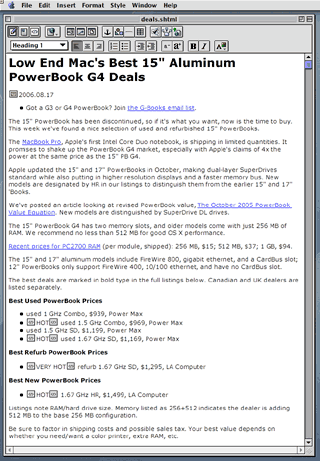
Claris Home Page 3.0
Unfortunately, Home Page predates HTML 4.0, let alone the XHTML we use nowadays. There's no support for applying CSS styles, and it tends to modify some types of code. Still, it produces code that displays well and consistently from one browser to another.
Another frustration is that Classic apps don't respond to the scroll wheel for moving up and down the document. I miss that, and both Nvu and SeaMonkey (discussed below) support scrolling.
Nvu
I've been looking for an OS X compatible replacement, since Home Page is the only Classic program I depend on. (Photoshop 5.5 is a preference; I find it a lot faster than Photoshop Elements 3.0.) Until a couple weeks ago, Nvu (pronounced en-view) was the closest thing I'd found to a replacement for Home Page.
 Nvu is based on the
Composer part of Mozilla, and although it's called a 1.0 release,
it's very much beta quality software. When it works, it works
nicely, but it has a tendency to quit without warning. And there
hasn't been any development since 2005.
Nvu is based on the
Composer part of Mozilla, and although it's called a 1.0 release,
it's very much beta quality software. When it works, it works
nicely, but it has a tendency to quit without warning. And there
hasn't been any development since 2005.
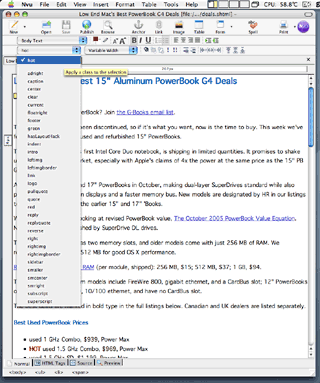
I've used Nvu to write a couple of articles, and it always felt like I was struggling with the software. For instance, if you just start typing, Nvu doesn't create paragraphs of text (marked with <p> and </p> in HTML). Instead it creates body text. And instead of starting and ending each paragraph with a marker, it instead inserts breaks (<br>).
This isn't unique to Nvu. A lot of programs do the same thing when you export text to HTML, but it breaks with the whole paradigm of the semantic Web. The basic idea of markup languages is that the markup tells you what kind of text you're dealing with. That means marking paragraphs, including where they start and end. (Home Page gets this right.)
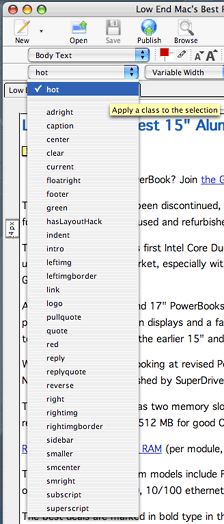 The things I
like best about Nvu are that it uses Low End Mac's CSS style sheet
and has a pulldown menu that lets you apply styles to text or
words. For instance, by applying "rightimg" to the image of
the menu, the graphic is placed on the right side of the page and
has a thin white border between it and the text.
The things I
like best about Nvu are that it uses Low End Mac's CSS style sheet
and has a pulldown menu that lets you apply styles to text or
words. For instance, by applying "rightimg" to the image of
the menu, the graphic is placed on the right side of the page and
has a thin white border between it and the text.
My current modus operandi is to do my editing in Home Page, then open the file in Nvu so I can apply styles to things like images and replies in mailbag columns.
Curiously, this is a feature that SeaMonkey, also based on Mozilla Composer, lacks.
Like Home Page, Nvu has a tendency to change the underlying HTML, which messes up a few things.
SeaMonkey
Although I'd heard of SeaMonkey and had published articles about it (see SeaMonkey Preview Internet Suite, 2005.11.07), it wasn't until B.J. Major, also a fan of Home Page, recommended it that I gave it a try.
SeaMonkey is newer than Nvu. Version 1.0.4 is current, and it's far more stable than Nvu. I haven't had it quit even once.
SeaMonkey Composer has some of the same quirks that Nvu does, but it doesn't seem to change imported HTML code to the same extent. However, without the ability to apply styles, there's no compelling reason to use SeaMonkey for writing or editing articles.
SeaMonkey Composer is pretty good. If you're writing and your current paragraph is styled as a paragraph, your next one will be also (set via a preference option). But you do have to set that first paragraph as a paragraph - and watch out for body text after creating a header or list.
Like Nvu, SeaMonkey displays pages using your CSS style sheet.
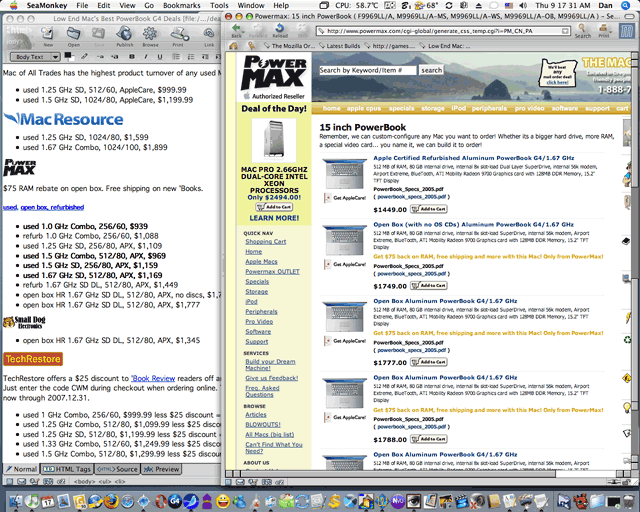
SeaMonkey lets you have a Composer window and Browser window open
side-by-side
Although I don't use it for writing, editing, or applying styles, I use SeaMonkey almost every day, because there's one project where it's a better tool than either Home Page or Nvu. That's our price trackers.
Before I started using SeaMonkey, I would open the tracker I was working on in both Camino and Home Page in slightly overlapping, mostly side-by-side windows. Click a link in Camino, check prices at Baucom or Power Max or whoever, click on the Home Page document, make changes, click back into Camino, and repeat many, many times.
With SeaMonkey, I can have the same HTML file open in both Composer, for editing, and Browser, for checking current prices. I still spend a fair bit of time switching windows, but it's all within the same program, which lets me work more efficiently.
Two More Tools
I have seven tools in my design arsenal: Home Page, Nvu, SeaMonkey, Photoshop 5.5, Photoshop Elements 3.0, TextWrangler 2.1.x, and the Tidy to XHTML service from the HTML Tidy project. Four of these programs are free, and two are obsolete. We take the low end seriously. :-)
Anyhow, once I've finished editing an article and applying styles, I open it in TextWrangler, search for and remove spurious breaks (<br /> in XHTML) that SeaMonkey loves to add, remove the x-claris tags that Home Page likes to add to image links, select all, and go to the Services menu, where I apply Tidy to XHTML.
Now the article is ready for publication, and I use Home Page to upload site changes to our server.
The Perfect Low-end HTML Editor
Each of these tools excels in some areas. Home Page is fast, so it's the best tool for writing and editing. Nvu lets me apply styles. SeaMonkey makes it easy to work on a page while viewing it in another window and following links. TextWrangler is the perfect text editor, and Tidy to XHTML does a wonderful job of fixing up the "not quite compliant with today's standards" HTML code that Home Page creates.
I'd love to see it all rolled into one. A decently fast WYSIWYG editor with a trainable spell checker. One that doesn't randomly toss in breaks. One that understands that paragraphs should always be marked (perhaps Nvu or SeaMonkey could add this as a preference). One that lets me view my work using my style sheet. One that lets me apply my styles from a menu. One that lets me have an open window for editing and another for browsing. One that can use the Tidy to XHTML service. One that handles site management.
And while I'm dreaming, how about making it Mac-specific, as the Camino team did with the same core Mozilla browser used to build Firefox. That way it looks and acts like a Mac program, not something adapted from the world of Windows and X-windows.
I'd love to replace Claris Home Page 3.0. It's nine years old and has been showing its age for years. But not one of the low-end solutions is a better tool for writing and editing. (Dreamweaver is supposed to be very good, but that's a $400 program!)
I bought a copy of iLife 06 in hopes iWeb would be that tool. After all, it came from the same company that gave us Home Page a decade ago. Alas, iWeb is anything but a tool for writing, editing, and creating simple pages. (The same goes for solutions like Freeway that won't open existing HTML files and do their best to keep you from the code that makes up the page.)
I love the low end, and I love free, but I'd gladly pay US$100 for a program that could replace Home Page, Nvu, SeaMonkey, TextWrangler, and Tidy to XHTML. Until then, I'll use the program that hasn't let me down in over nine years.